If your Canvas admin has enabled self enrollment for your institution, you can enable self enrollment in your course. Self-enrollment allows a student to sign up for a course using a secret URL or code. Self-enrollment can be enabled for a course whether or not the course is publicly visible.
Notes:
- If you cannot view the options for self enrollment, your admin has disabled this setting for your institution.
- Instructors are not notified when a student self-enrolls.
- The Course Home Page shows the Join this Course link only when you enable it, as it does not appear by default.
View the video transcript
00:07: How do I enable course self-enrollment with a join code or secret URL?
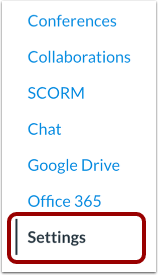
00:12: In Course Navigation, click the Settings link.
00:15: Click the Course Details tab.
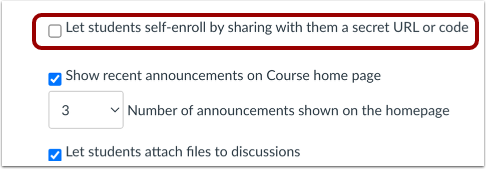
00:18: Click the Let students self-enroll by sharing with them a secret URL or code checkbox.
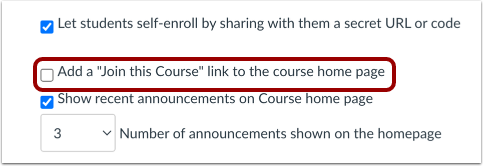
00:24: If you want to add an enrollment link to the Course Home Page, click the Add a "Join this Course" link to the course home page checkbox.
00:32: Click the Update Course Details button.
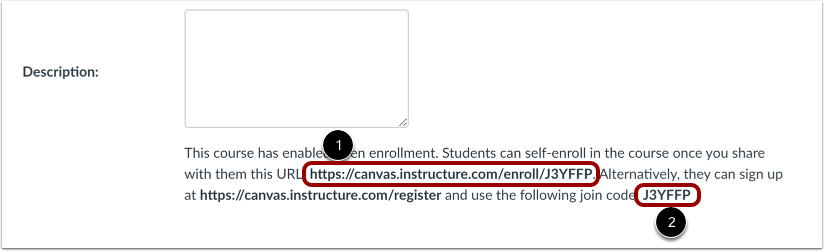
00:36: Copy and share the provided secret URL.
00:39: If your institution has enabled Canvas authentication, which allows students to sign up for a Canvas account, you can also view an alternative sign-up option that includes the account URL and join code.
00:52: This guide covered how to enable course self-enrollment with a join code or secret URL.
Open Settings
In Course Navigation, click the Settings link.
Open Course Details
Click the Course Details tab.
Enable Self-Enrollment
Click the Let students self-enroll by sharing with them a secret URL or code checkbox.
Add Join the Course Link
If you want to add an enrollment link to the Course Home Page, click the Add a "Join this Course" link to the course home page checkbox.
Update Course Details
Click the Update Course Details button.
View Self-Enrollment Details
Copy and share the provided secret URL [1].
If your institution has enabled Canvas authentication, which allows students to sign up for a Canvas account, you can also view an alternative sign-up option that includes the account URL and join code [2].