You can view student progress using the Learner Dashboard. Only active and completed student enrollments are included in the portfolio data. Deleted or inactive enrollments will not generate progress information.
Available data includes portfolio completion status, group statistics, and individual assignment progress. By default, the dashboard displays an interactive overview of all data, but you can also view detailed statistics for individual students.
View the video transcript
00:07: How do I view Learner Progress Data in Evaluation Portfolios as an instructor?
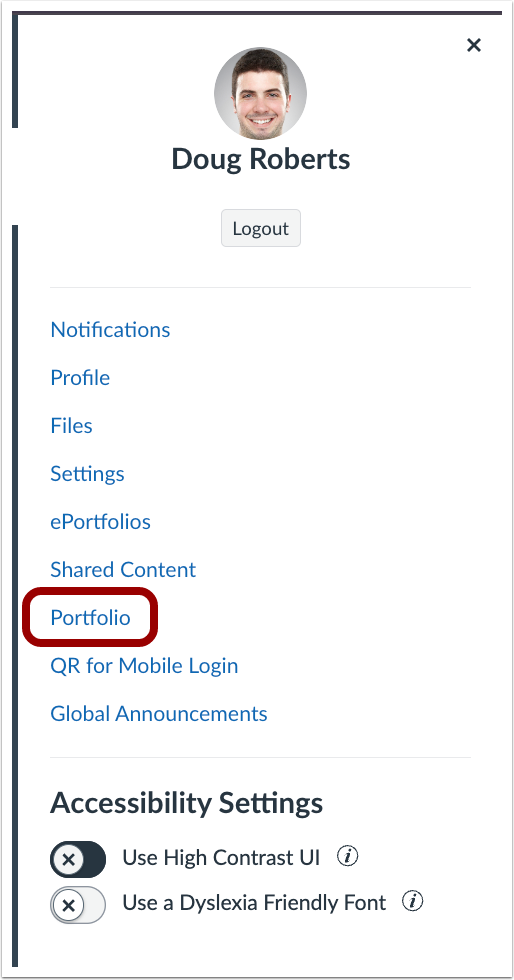
00:12: In the User Navigation menu, click the Portfolio link.
00:17: Select an Evaluation Portfolio.
00:20: From the Learner Dashboard, you can track student progress on their evaluation portfolios.
00:26: See how many students portfolios are Pending Review, In Progress, Completed, or Not Started.
00:34: For portfolios with many students, search by student name or filter by portfolio status.
00:40: Click a students name to see their portfolio progress, including how many items are pending review and the portfolio status of each student.
00:48: For individual students, you can view their overall portfolio progress, as well as the status of each assignment.
00:55: This guide covered how to view Learner Progress Data in Evaluation Portfolios as an instructor
Open Portfolio
In the User Navigation menu, click the Portfolio link.
Select Evaluation Portfolio
Select an Evaluation Portfolio.
View Learner Progress Data
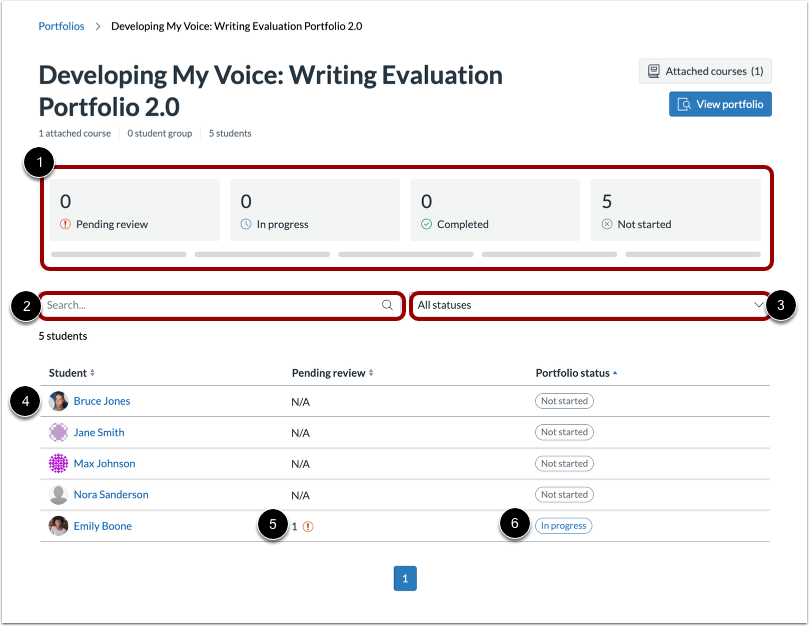
From the Learner Dashboard, you can track student progress on their evaluation portfolios.
- View group statistics: See how many students portfolios are Pending Review, In Progress, Completed, or Not Started [1].
- Search and filter: For portfolios with many students, search by student name [2] or filter by portfolio status [3].
- View individual statistics: Click a students name [4] to see their portfolio progress, including how many items are pending review [5] and the portfolio status of each student [6].
Note: On the learner dashboard, assignment progress may not update in real time due to a known limitation. However, instructors can view up-to-date assignment progress when looking at a specific students Portfolio.
View Individual Student Data
For individual students, you can view their overall portfolio progress [1], as well as the status of each assignment [2].