You can archive, unarchive, and restore grading schemes.
Notes:
- Archived grading schemes can still be used wherever they are currently in use, but they cannot be selected for new courses or assignments.
- An archived grading scheme cannot be leveraged in the future by a course or assignment unless the scheme is restored.
- You cannot archive the Default Canvas Grading Scheme.
- When copying or exporting a course, archived default grading schemes are not copied or exported.
View the video transcript
00:07: How do I archive a grading scheme in a course?
00:10: In Course Navigation, click the Settings link.
00:14: Click the Course Details tab.
00:17: If the checkbox has not been selected, click the Enable course grading scheme checkbox.
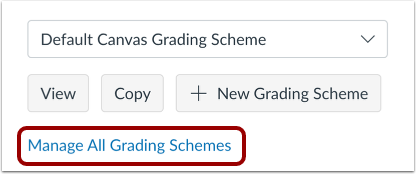
00:23: To manage the grading schemes, click the Manage All Grading Schemes link.
00:27: Click the Archive icon.
00:30: View the archived grading scheme. To unarchive the grading scheme, click the unarchive icon.
00:37: This guide covered how to archive a grading scheme in a course.
Open Settings
In Course Navigation, click the Settings link.
Open Course Details
Click the Course Details tab.
Enable Course Grading Scheme
If the checkbox has not been selected, click the Enable course grading scheme checkbox.
Manage All Grading Schemes
To manage the grading schemes, click the Manage All Grading Schemes link.
Archive Grading Scheme
Click the Archive icon.
View Archived Grading Scheme
View the archived grading scheme [1]. To unarchive the grading scheme, click the Unarchived icon [2].