00:07: How do I view a discussion thread as an instructor?
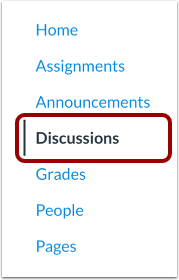
00:10: In Course Navigation, click the Discussions link.
00:14: Click the title of the discussion.
00:17: View the discussion topic.
00:20: When viewing inline discussion thread replies, you can collapse and expand
00:24: the discussion threads by clicking the Expand Threads and Collapse Threads buttons.
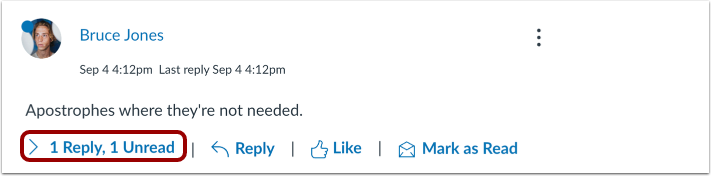
00:29: When a discussion thread replies collapsed, you can view the reply.
00:33: Indicators showing the number of unread and total replies.
00:37: To expand the discussion thread replies in line.
00:41: Click the number of replies link.
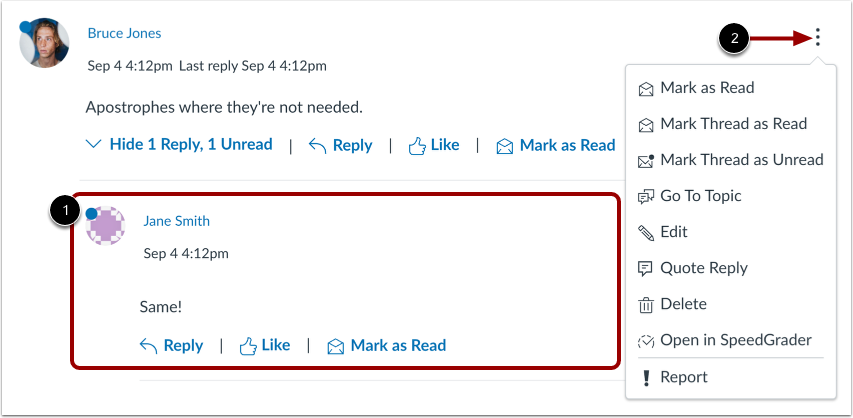
00:44: View the read and unread replies
00:47: To view threaded replies options, click the Options icon.
00:50: You can mark replies as read or unread, mark threaded
00:55: replies as read or unread, return to the topic,
00:57: edit the reply, reply by quoting the reply, delete
01:01: the reply, open the reply in SpeedGrader, or report the reply.
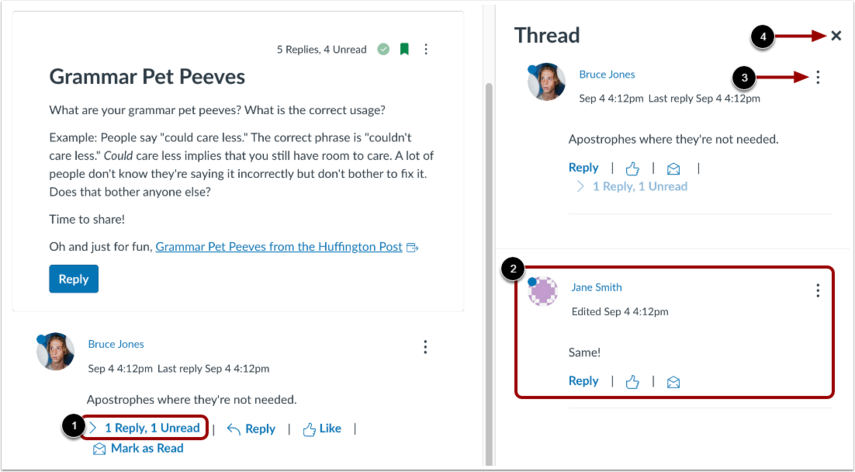
01:07: To view threaded replies in a split screen
01:09: sidebar, click the View Split Screen button.
01:13: When viewing split screen discussion, thread replies, you can collapse and
01:17: expand the discussion thread replies. Sidebar, when a discussion thread replies
01:22: collapsed, you can view the reply. Indicators showing the number of unread and total
01:26: replies. To expand the discussion thread replies.
01:30: Sidebar, click the number of replies link.
01:33: When viewing split screen discussion thread replies, you can collapse
01:37: and expand the discussion thread replies sidebar. When a
01:41: discussion thread reply is collapsed, you can view the reply indicators showing
01:45: the number of unread and total replies.
01:49: View the read and unread replies.
01:52: To view, threaded, replies options, click the options icon.
01:55: You can Mark replies as read or unread, Mark, threaded replies
02:00: as read or unread return to the topic. Edit the reply, delete the reply,
02:04: open the reply, and speed grader, or report the reply.
02:08: To collapse the discussion thread replies sidebar, click the Close icon.
02:14: This guide covered how to view a discussion thread as an instructor.