You can edit module items' names and indentation after they have been created.
View the video transcript
00:07: How do I edit module items?
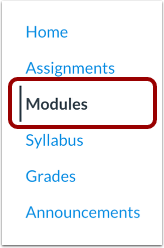
00:09: In Course Navigation, click the Modules link.
00:13: Click the Options icon and select the Edit link
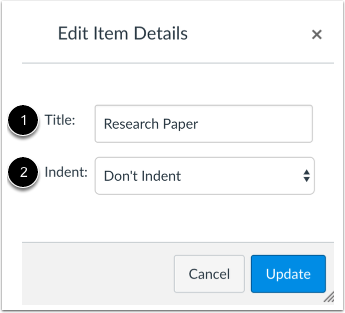
00:17: You can edit the item title by typing in the title field.
00:21: You can also edit the indentation level by selecting the indent drop-down
00:25: menu.
00:26: Click the Update button.
00:29: View the changes to the Module item.
00:32: This guide covered how to edit module items.
Open Modules
In Course Navigation, click the Modules link.
Edit Module Item
Click the Options icon [1] and select the Edit link [2].
Edit Item Details
You can edit the item title by typing in the title field [1]. You can also edit the indentation level by selecting the indent drop-down menu [2].
Note: Changes made to one item will be made to all iterations of the item.
Update Item
Click the Update button.
View Module Item
View the changes to the Module item.