You can easily move or copy individual questions from one question bank to another. Moving questions removes the question from the original question bank. Copying questions leaves a copy in the original question bank and adds a copy to the selected question bank.
You can also move multiple questions from one question bank to another. Copying questions is not available for multiple questions.
Note: You can only copy or move questions between question banks in the same course. However, you can import a question bank from one course to another.
Open Quizzes
In Course Navigation, click the Quizzes link.
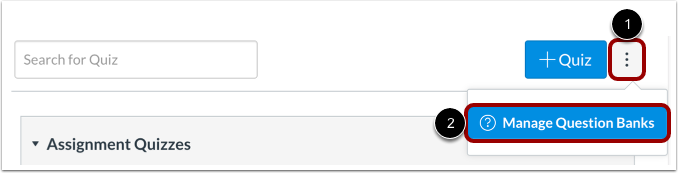
Manage Question Banks
Click the Settings icon [1] and click the Manage Question Banks link [2].
Open Question Bank
Click the title of the Question Bank.
Move/Copy Questions to Another Bank
Click the move/copy question to another bank link to move/copy the question to another question bank.
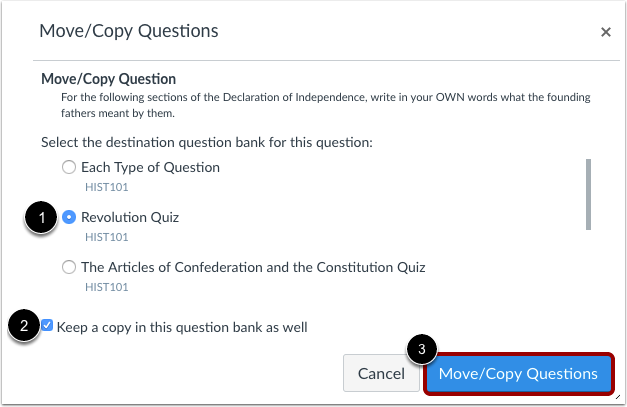
Select Question Bank
Click the title of the bank [1] where you would like to copy/move the questions. Click the Keep a copy in this question bank as well checkbox [2] if you only want to copy the question. Then click the Move/Copy Questions button [3] to copy the question.
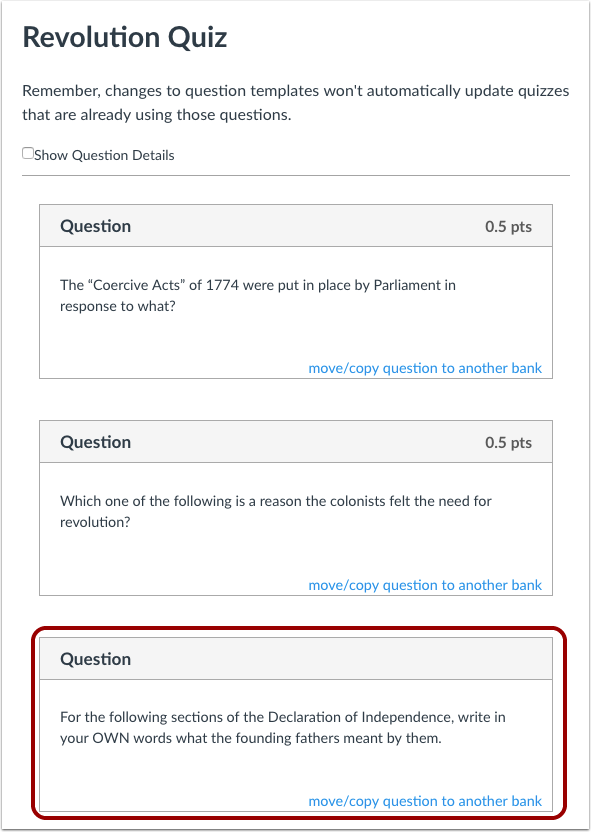
View Moved/Copied Question
View the moved/copied question in the new bank.
Note: Changes to questions won't automatically update quizzes that are already using those questions unless you remove the question and re-add it.