You can view the history of all Gradebook changes in your course using the Gradebook History page. Gradebook History is a read-only log that allows you to see who graded each artifact. Options are available to filter grading history by student, grader, artifact, and date.
For quizzes, you can view historical data for any regraded quizzes.
Notes:
- Gradebook history displays changes made within the last 365 days.
- Gradebook history will reflect any grade changes made to assignments with a manual posting policy, even if grades are not yet visible to students.
- If you have enabled the Final Grade Override feature option, you can filter by the Final Grade Overrides Only option.
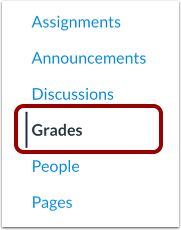
Open Grades
In Course Navigation, click the Grades link.
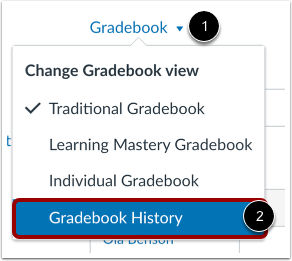
View Grading History
Click the Gradebook menu [1] and select the Gradebook History link [2].
View Gradebook History
The Gradebook History page displays recent grade changes in the course. Each grade change lists the date of the change [1], the student whose grade was changed [2], the grader who changed the grade [3], and the artifact where the grade was changed [4].
Additionally, you can view a summary of the grade before it was changed [5], after it was changed [6], and the current grade for the assignment [7].
Notes:
- If you are grading in a course where you can only interact with users in your same section, the Gradebook history page will only display results for users within your same section.
- For automatically graded quizzes, the Grader section displays Not Available instead of your name.
View Anonymous Assignments in Gradebook History
Any grade changes related to an anonymously graded assignment do not include student names in the search results [1].
If the anonymous grading option is removed from the assignment at a later time, the Gradebook History page displays an icon showing that the assignment was previously graded anonymously [2].
Note: Posting grades for an anonymous assignment will remove anonymity from the assignment.
View Filters
If you want to locate a specific grade change, you can filter grading history by student [1], grader [2], artifact [3], and start or end date [4].
Filter by Name
To filter grading history by student, grader, or artifact, start typing the name in the search filter[1]. Canvas will automatically populate matching names. Select the name from the results [2].
Filter by Date
If you also want to filter grading history by start or end date, click the date field [1] and then select a date from the calendar [2].
Filter by Final Grade Overrides Only
To filter the Gradebook History to display only final grade overrides, click the the Final Grade Overrides Only checkbox. The Final Grades Overrides checkbox only displays if you have enabled the Final Grade Override feature option.
By default, the filter displays both assignment grade changes and override grade changes. If you filter by final grade override, you cannot filter by any other filters.
Apply Filter
To apply your specified filters, click the Filter button.
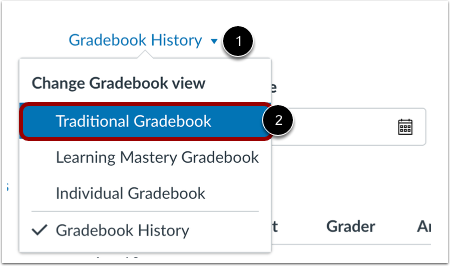
Return to Traditional Gradebook
To return to the gradebook, click the Gradebook History menu [1] and select the Traditional Gradebook link [2].