You can view and download reports for published courses as CSV files in Course Analytics. You can download reports for missing assignments, late assignments, excused assignments, class roster, and course activity. Reports can be filtered depending on the report type.
Data is refreshed in Course Analytics every 8 hours. However, when the Course Analytics feature option is first enabled, it may take up to 24 hours before the complete data set becomes available. Make sure to also check the time data was last updated in the course, as content may be outdated compared to recent course activity and student submissions.
Downloaded CSV files may show different timestamp formats depending on the user's time zone settings.
If a report appears incomplete or outdated, it may be due to the time of day the data was last refreshed.
Course Analytics report data begins on the date that Course Analytics was enabled in a published course. For example, if a course enabled Course Analytics on October 1 and downloaded a report on October 15, the report would only include data between October 1-15.
All reports reflect the state of data at the time of the last Course Analytics refresh. Data refreshes occur once every 24 hours, but may vary based on institutional configurations.
Course Activity report data includes only the past 30 days of activity and does not account for activity prior to that window.
The Class Roster report may include additional columns (such as section, SIS ID, or email address) based on your institution’s settings and permissions.
If no data appears in a report, verify the course has published content and student participation after Course Analytics was enabled.
Reports include only active and completed enrollments. Inactive, deleted, or dropped students are excluded from the reports.
Note: In order for Course Analytics to display in Canvas, third-party cookies may need to be enabled in your browser settings.
00:07: How do I view and download reports in new Analytics?
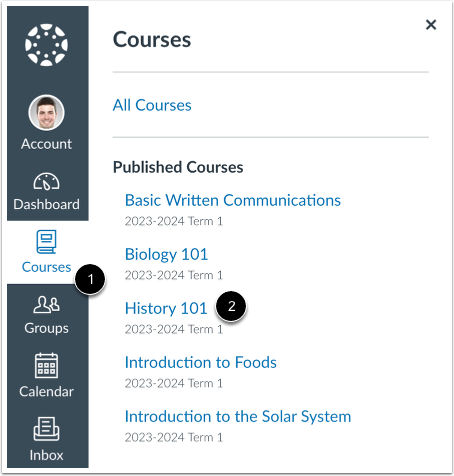
00:10: In global navigation, click the courses link.
00:14: Then click the name of the course.
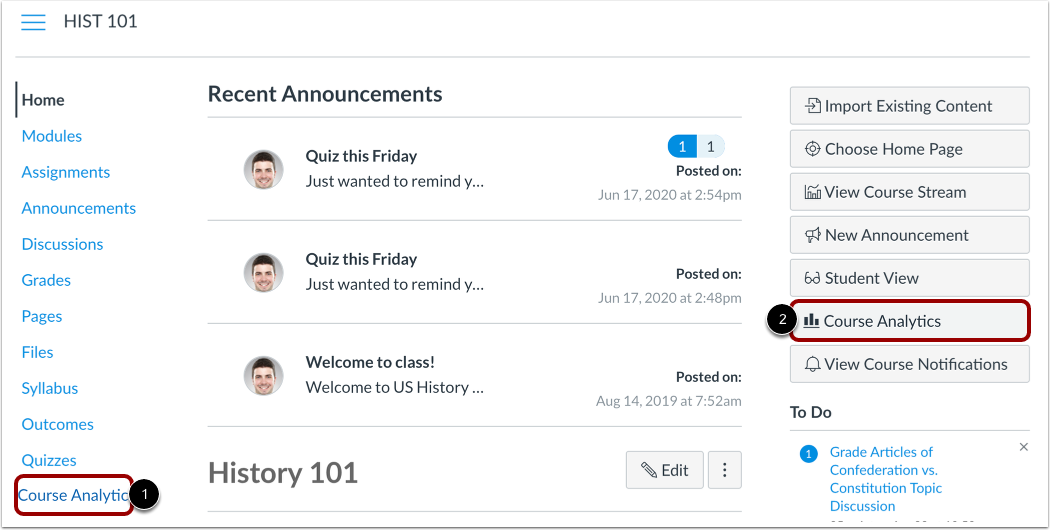
00:17: To open new analytics. Click the new analytics Link in course, navigation.
00:23: Or click the new analytics button in the course homepage.
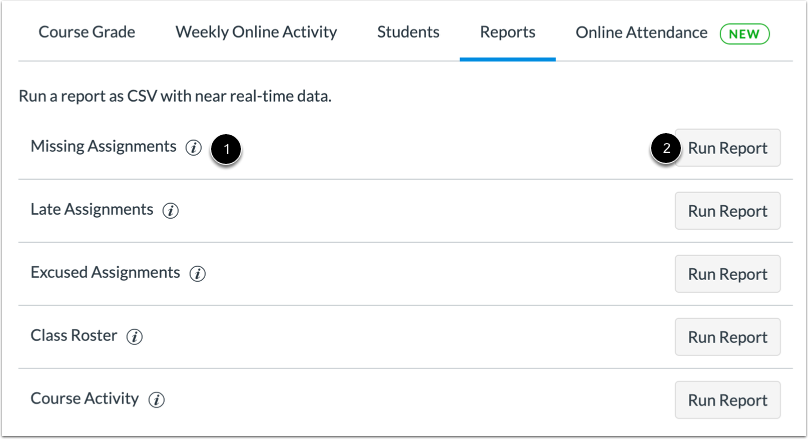
00:27: Click the reports tab view the new analytics reports.
00:30: The following reports are available.
00:34: Missing assignments a list of assignments that have not been submitted yet.
00:39: Late assignments, a list of assignments that have been submitted late.
00:45: Excused assignments. A list of assignments that are excused.
00:50: Class roster a list of students enrolled in the course or section with
00:54: student contact information such as email and sis ID.
00:59: Course, activity a list of daily user views and participations.
01:04: To view more information about the report, click the information icon.
01:10: To open and configure a report, click the Run report button for the corresponding
01:14: report.
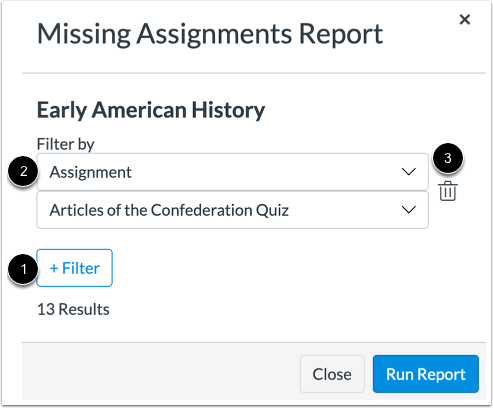
01:16: To add a filter for the report, click the add filter button.
01:21: Click the filter by drop-down menu and select filters for the report.
01:26: To remove a filter, click the delete button.
01:30: To run the report and download the CSV file.
01:32: Click the Run report button.
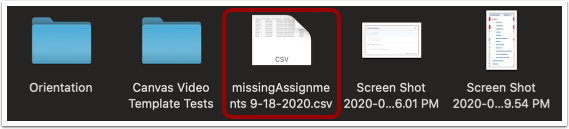
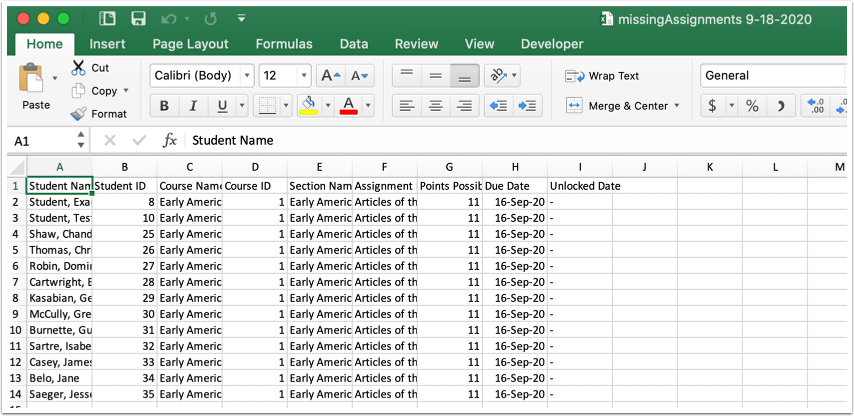
01:35: Locate the CSV file for the report to open and view the report.
01:40: View the report.
01:43: To view the online. Attendance report, click the online, attendance tab.
01:48: This guide covered how to view and download reports in new Analytics.
Open Course
In Global Navigation, click the Courses link [1], then click the name of the course [2].
Open Course Analytics
To open Course Analytics, click the Course Analytics link in Course Navigation [1] or click the Course Analytics button in the Course Home Page [2].
Note: If you cannot view the Course Analytics link, you may have to make the link visible via the Navigation tab in Course Settings.
Open Reports
Click the Reports tab.
View Reports
View the Course Analytics reports. The following reports are available:
- Missing Assignments [1]: a list of assignments that have not been submitted yet
- Late Assignments [2]: a list of assignments that have been submitted late
- Excused Assignments [3]: a list of assignments that are excused
- Class Roster [4]: a list of students enrolled in the course or section with student contact information such as email and SIS ID
- Course Activity [5]: a list of daily user views and participations
Note: The Course Activity Report only includes course activity data for the past 30 days.
Run Reports
To view more information about the report, click the Information icon [1].
To open and configure a report, click the Run Report button for the corresponding report [2].
Filter Report
To add a filter for the report, click the Add Filter button [1].
Click the Filter by drop-down menu and select filters for the report [2].
To remove a filter, click the Delete button [3].
Run Report
To run the report and download the CSV file, click the Run Report button.
Open Report
Locate the CSV file for the report to open and view the report.
View Report
View the report.
View Online Attendance Report
To view the Online Attendance report, click the Online Attendance tab.
Note: If the Online Attendance tab does not display in your course, it has not been enabled by your institution.