This guide applies only to institutions that have enabled the IgniteAI Generator for Rubrics feature. If your user interface differs from what is shown, the feature is not enabled at your institution.
As an instructor, the IgniteAI Generator for Rubrics allows you to generate editable rubrics with AI-suggested criteria, point values, and performance levels based on the assignment name and description.
The IgniteAI Generator for Rubrics works best with the following types of assignments:
- Essays or written responses
- Presentations
- Projects or group work
- Open-ended assignments
Notes:
- IgniteAI Generator for Rubrics is designed for open-ended assignments that require subjective grading and is not available for quizzes or auto-graded assignments.
- The AI rubric generator is currently available only in English.
- IgniteAI Generator for Rubrics only works in courses where the Enhanced Rubrics feature option is enabled.
- This guide applies to institutions that have opted in to the IgniteAI Generator for Rubrics feature preview. If your user interface appears differently, the feature has not been enabled at your institution. To learn more, ask questions, or provide feedback on the feature preview, navigate to the IgniteAI Generator for Rubrics feature user group.
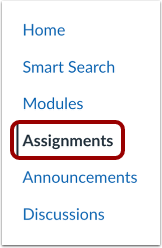
Open Assignments
In Course Navigation, click the Assignments link.
Open Assignment
Click the name of the assignment.
Create Rubric
In the Assignment details page, click the Create Rubric button.
Create Rubric
You can add or adjust certain information [1]. To generate criteria, click the Generate Criteria button [2].
View Criteria Builder Options
View the generated criteria. To regenerate the entire rubric, click the Regenerate button [1]. You can also edit, delete, or duplicate an individual criterion [2], regenerate a specific criterion [3], preview the rubric [4], add a new criterion [5], or create a criterion from an outcome [6].
To add the rubric to the assignment, click the Create Rubric button [7].