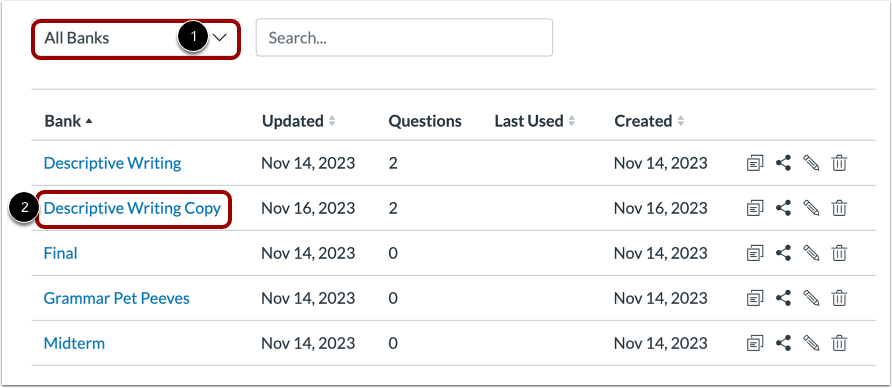
Duplicated Item banks can be edited without affecting the original content. When an Item Bank is duplicated, the word Copy is added to the end of the bank name.
00:07: How do I duplicate an Item Bank?
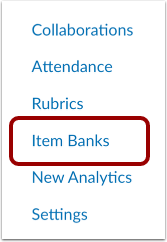
00:10: In Course Navigation, click the Item Banks link.
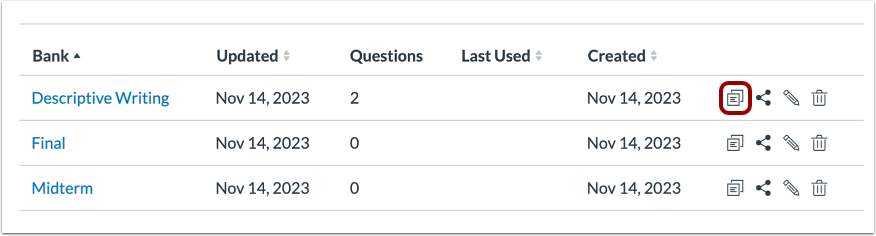
00:14: To duplicate an item bank, click the Duplicate icon.
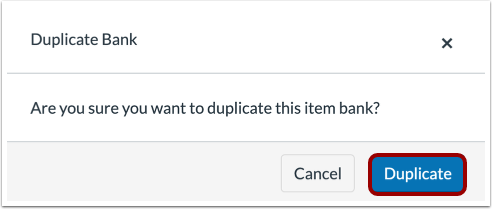
00:18: To confirm duplication, click the Duplicate button.
00:22: Duplicated item banks display in the Shared
00:25: with Me filter. Duplicated item banks include "Copy"
00:29: at the end of the bank name.
00:31: This guide covered how to duplicate an Item Bank.
Open Item Banks
In Course Navigation, click the Item Banks link.
Note: You can also access Item Banks from the New Quizzes Build page.
Duplicate Item Bank
To duplicate an item bank, click the Duplicate icon.
Confirm Duplication
To confirm duplication, click the Duplicate button.
View Duplicated Item Bank
Duplicated item banks display in the Shared with Me filter [1]. Duplicated item banks include "Copy" at the end of the bank name [2].