00:07: How do I export a New Quiz from a course?
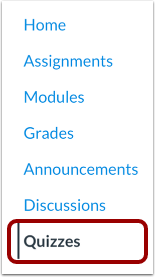
00:11: In Course Navigation, click the Quizzes link.
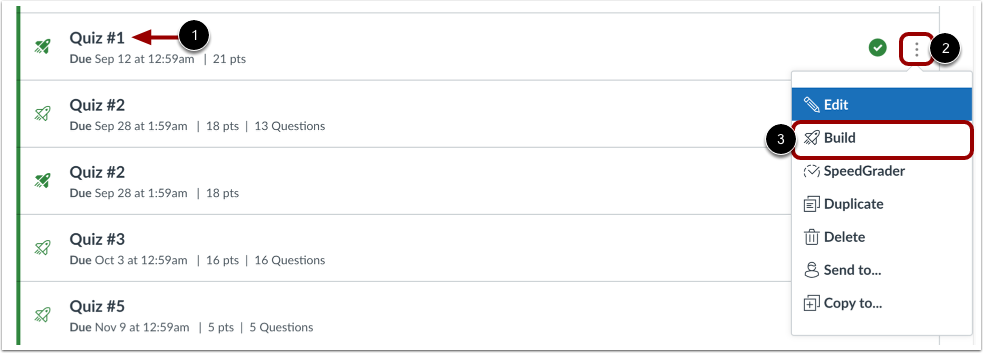
00:15: To export a quiz, find the quiz you want to open.
00:19: To open the Build page, click the Options icon and then click the Build
00:23: link.
00:25: Click the Exports tab.
00:27: Click the Create Export button.
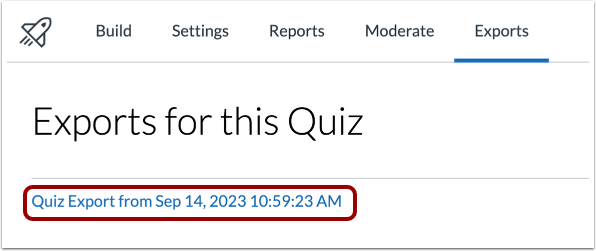
00:30: When the export is complete, click the Quiz Export link.
Open Quizzes
In Course Navigation, click the Quizzes link.
Note: You can also access quizzes from the Assignments page.
Open Build Page
To export a quiz, find the quiz you want to open [1].
To open the Build page, click the Options icon [2] and then click the Build link [3].
Open Exports
Click the Exports tab.
Create Export
Click the Create Export button.
View Quiz Export
When the export is complete, click the Quiz Export link.