You can show recent announcements as part of your Course Home Page. You can set the number of announcements that should be displayed.
The Course Home Page only displays text and links within announcements; any images or media will not be shown.
Note: Student app users cannot view announcements on the homepage. However, they can view announcements in the course's Announcements navigation.
View the video transcript
00:07: How do I show recent announcements in the Course Home Page?
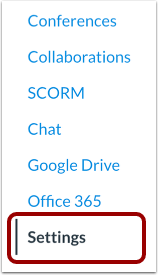
00:10: In Course Navigation, click the Settings link.
00:14: Click the Course Details tab.
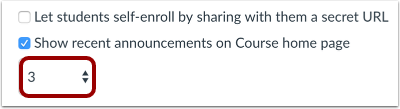
00:17: Select the Show recent announcements on Course home page checkbox.
00:22: In the Number of announcements menu, select the number of announcements to show on the home page. You can show up to the most recent 15 announcements.
00:31: Click the Update Course Details button.
00:34: This guide covered how to show recent announcements in the Course Home Page
Open Settings
In Course Navigation, click the Settings link.
Open Course Details
Click the Course Details tab.
Show Recent Announcements
Select the Show recent announcements on Course home page checkbox.
Select Number of Announcements
In the Number of announcements menu, select the number of announcements to show on the home page. You can show up to the most recent 15 announcements.
Update Course Details
Click the Update Course Details button.