Impact integrates fully with Studio. Users who have access to both Studio and Impact can access the Impact integration in Studio.
The Impact integration allows users to customize in-app messaging, measure Studio adoption, and support Studio users.
Notes:
- By default, the Studio Impact integration is enabled for accounts that have access to both Studio and Impact.
- You can view additional Studio resources such as campaigns and adoption reports in the Impact Dashboard.
Open Inline Editor
To open the Inline Editor in Studio, click the Inline Editor icon.
View Inline Editor Options
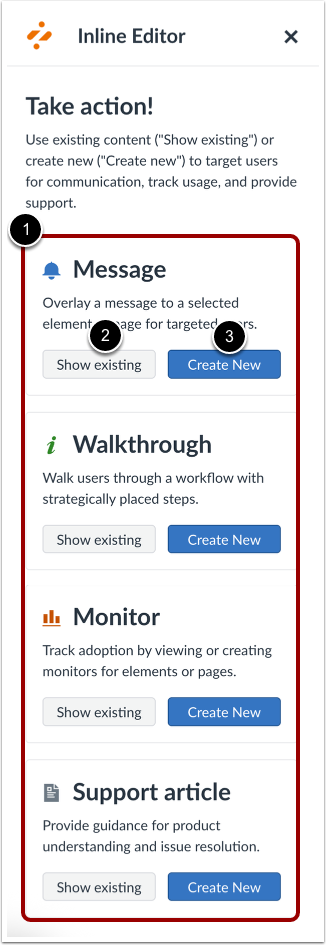
In the Inline Editor, you can view, edit, or create a message, walkthrough, monitor, or support article [1].
To view and/or edit an existing message, walkthrough, monitor, or support article, click the Show Existing button [2] in the corresponding section.
To create a new message, walkthrough, monitor, or support article, click the Create New button [3] in the corresponding section.
Note: You can select a Studio context using the Inline Editor. To select a Studio context displaying within Canvas, you must first select the Studio frame.
Open Support Center
To view the Support Center for Studio, click the Support button.
View Support Center
In the Support Center, suggested help articles and resources display for Studio.