As an admin, you can enable Open Registration for your entire account. Open registration allows instructors with the appropriate permissions to add users to a course, even if the users don't already have Canvas accounts. When an instructor adds a user to a course, the user is sent a course invitation. To join the course, the user must first register with Canvas and create a password. The user's account will then display in the account Users list.
Even with Open Registration disabled, admins with the Modify Login Details permission can always create accounts and add users to courses, even if they don't have Canvas accounts.
Once this feature is enabled, instructors can add users in the course People page.
00:07: How do I enable open registration in an account and allow instructors to add users
00:11: to a course without canvas accounts.
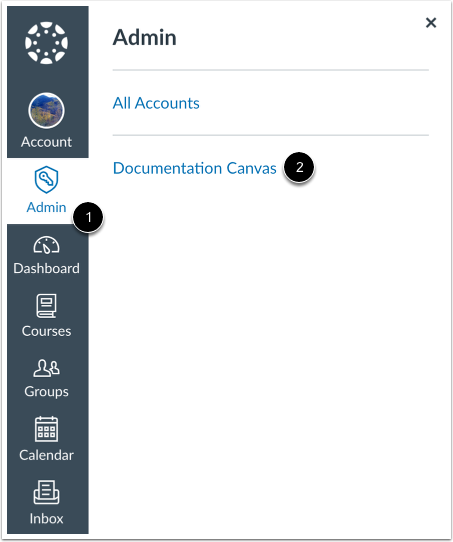
00:14: In global navigation click the admin link then click the name of
00:18: the account.
00:20: The settings portion of your account is only available to Canvas admins.
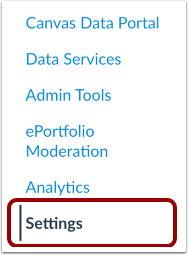
00:24: In account navigation click the settings link
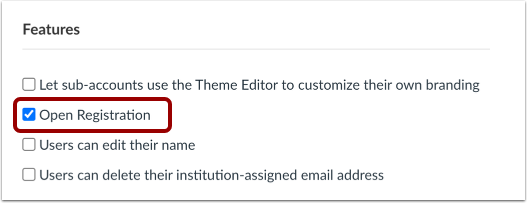
00:29: In the settings tab under the features. Heading click the open registration checkbox.
00:44: Click the update settings button.
00:49: This guide covered how to enable open registration in an account and allow instructors
00:53: to add users to a course without canvas accounts.
Open Account
Click the Admin link [1], then click the name of the account [2].
Open Settings
In Account Navigation, click the Settings link.
Change Open Registration
In the Settings tab under the Features heading, click the Open Registration checkbox.
Note: By default, this option is turned off.
Update Settings
Click the Update Settings button.