If you cannot find an outcome to use, you can create a new outcome for the account. Outcomes can be created from the account, sub-account, or course level.
Outcomes can be included in assignment rubrics as a way to assess mastery of outcomes aligned to specific assignments.
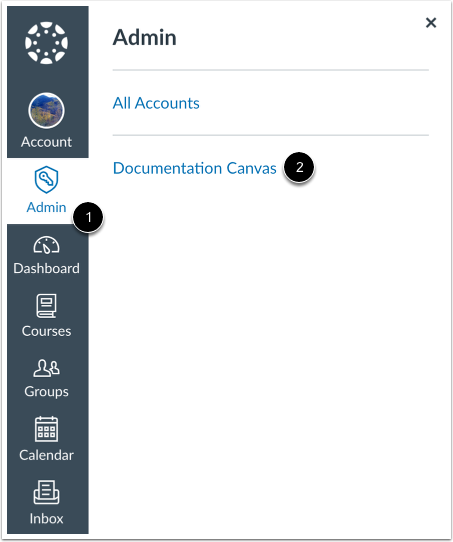
Open Account
In Global Navigation, click the Admin link [1], then click the name of the account [2].
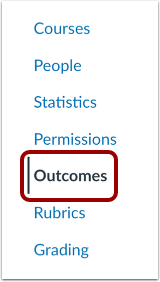
Open Outcomes
In Account Navigation, click the Outcomes link.
Create New Outcome
To create a new outcome, click the Create button.
Create Outcome
Enter the name or code for the outcome in the Name field [1].
To add a friendly name for the outcome, enter a name in the Friendly Name field [2].
Use the Rich Content Editor to add an outcome description in the Description field [3].
Modify Mastery Scale
You can make changes to outcome mastery scales in the Mastery tab.
Modify Mastery Calculation Method
You can make changes to calculation methods in the Calculation tab.
View Outcome
View your newly created outcome.