00:05: How do I configure Canvas authentication details for an account?
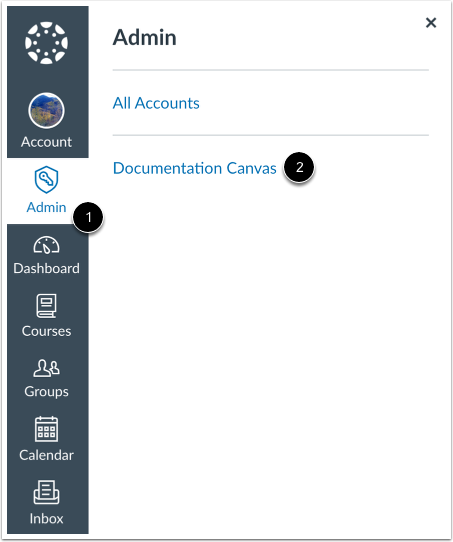
00:09: In Global Navigation, click the Admin link, then click the name of the account.
00:14: In Account Navigation,
00:15: click the Authentication link.
00:18: In Authentication Settings,
00:19: you can configure third-party authentication providers.
00:23: You can configure Single Sign On settings for your authentication provider.
00:28: By default, Self Registration is disabled. To allow self registration for
00:34: all users, click the All Account Types radio button. All accounts includes those
00:39: for students, instructors, and observers.
00:42: For students, self registration is used with self
00:46: enrollment. When users sign up as a student, a join code is required to
00:50: access the course. Self enrollment creates the join code, which instructors can give
00:54: to students to sign
00:55: up in the course. Learn more about self enrollment options in your account.
01:00: Instructors can sign up for a Canvas account through self
01:03: registration if your institution does not already create instructor accounts.
01:08: To limit self registration to observers (including parents), select the
01:13: Observer Accounts Only option.
01:15: To require users to complete a Captcha form before completing the registation
01:19: process,
01:20: click the Require Captcha for Self Registration checkbox.
01:25: To allow users to receive a one-time passcode via SMS,
01:28: click the Send one-time passcodes via SMS (US carriers only) checkbox.
01:35: To require all users to change their password on their next login, click the Force
01:40: Password
01:40: Reset button.
01:42: A warning message displays. To confirm the action, click the Force Password Reset
01:47: button.
01:49: To configure the Multi-Factor Authentication (MFA) settings, ensure that this feature
01:54: is first set to Required or Required for Admins within Account Settings.
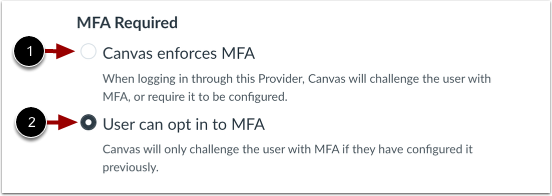
02:00: To require MFA, click the Canvas enforces MFA radio button.
02:07: To allow users to choose whether they want MFA, click the User can opt in to MFA
02:13: radio button.
02:15: Click the Save button.
02:18: This guide covered How do to configure Canvas authentication details for an
02:23: account.