If necessary, you may be able to escalate a case to the Canvas support team in the Field Admin Console. Cases related to Instructure-managed SIS issues can be escalated to the SIS support team.
Note: Before escalating a case, try troubleshooting the issue or searching for the answer yourself. Try using the community forums or Canvas Guides.
Open Case
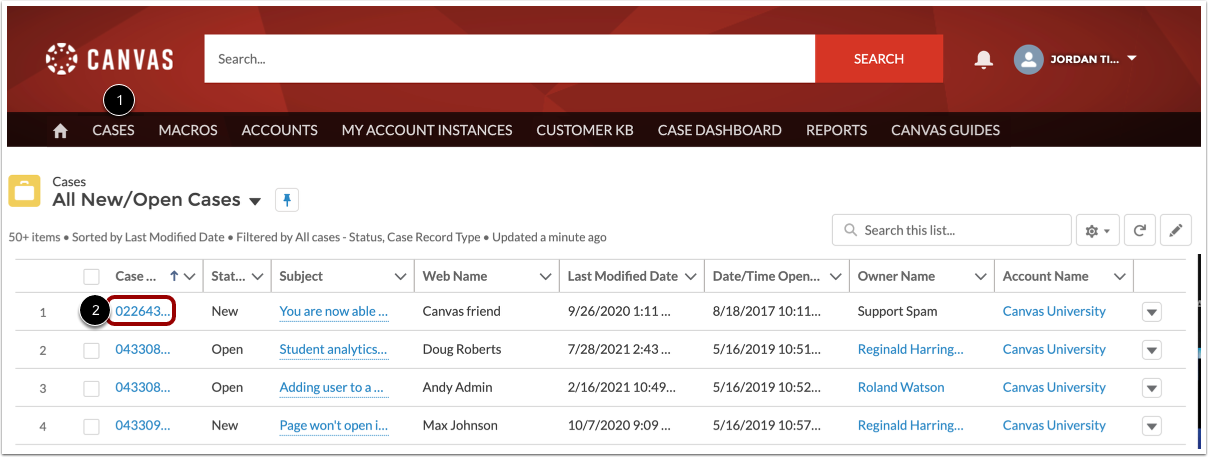
Click the Cases tab [1]. Then click the case number link for the case you want to escalate [2].
Open Escalate Tab
Click the Escalate tab.
Escalate Case
Click the Escalate button.
Select Queue
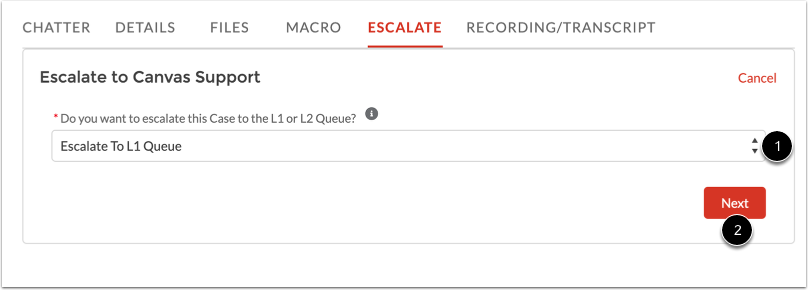
In the Do you want to escalate this case to the L1 or L2 Queue drop-down menu [1], select the L1 or L2 queue.
Then click the Next button [2].