If enabled by your institution, you can use Admin Analytics to view, filter, and download data about Canvas usage.
In the Overview Dashboard, you can view account courses by status, student and instructor engagement data, various data over a given time, and average course grades. You can also view course and student-specific data in the Course Dashboard and Student Dashboard respectively.
For more information, visit our about dashboard charts and statistics.
View the video transcript
00:07: How do I view the Admin Analytics Overview Dashboard?
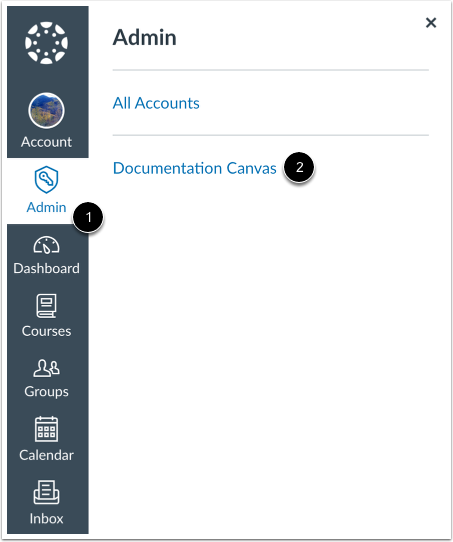
00:11: In Global Navigation, click the Admin link, then click the name of the account.
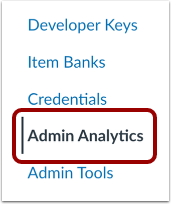
00:16: In Account Navigation, click the Admin Analytics link.
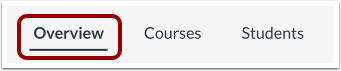
00:21: By default, the Overview Dashboard displays filters by active term.
00:26: In the Overview Dashboard, you can view the following charts: Courses by status;
00:32: Enrolled students with or without activity;
00:36: Teacher use of courses with activity;
00:40: Average course grades;
00:42: Interactions by Canvas feature;
00:45: And overall course interactions over time.
00:49: For more information, visit our guide on viewing and managing statistics and chart data.
00:55: This guide covered how to view the Admin Analytics Overview Dashboard.
Open Account
In Global Navigation, click the Admin link [1], then click the name of the account [2].
Open Admin Analytics
In Account Navigation, click the AdminAnalytics link.
Open Overview Dashboard
By default, the Overview Dashboard displays filters by active term.
View Overview Dashboard
In the Overview Dashboard, you can view the following charts:
- Courses by status [1]
- Enrolled students with or without activity [2]
- Teacher use of courses with activity [3]
- Average course grades [4]
- Interactions by Canvas feature [5]
- Overall course interactions over time [6]
For more information, visit our guide on viewing and managing statistics and chart data.
Note: All statistics and charts display data based on the selected filters.