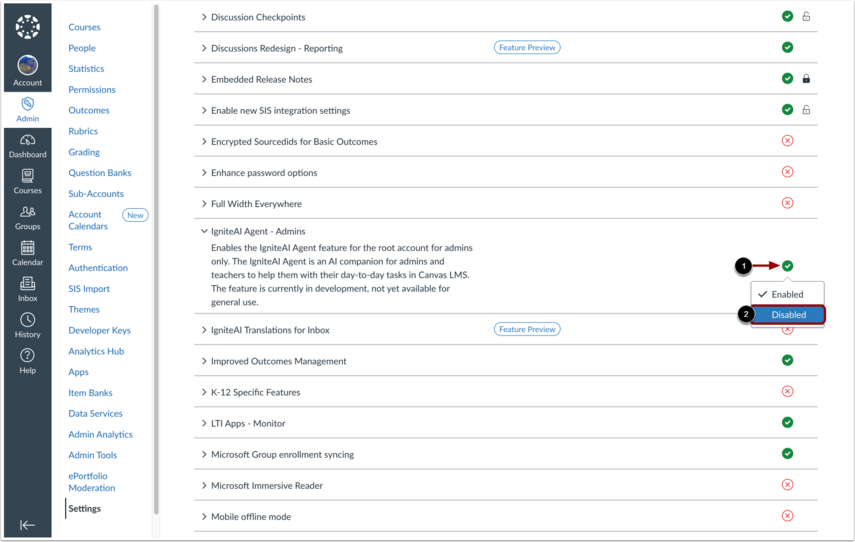
This guide applies to institutions that have opted in for IgniteAI related feature options. If your user interface displays differently, the feature has not been enabled at your institution.
IgniteAI is a suite of artificial intelligence (AI) features in Canvas designed to enhance the teaching and learning experience. This lesson provides an overview of the following AI tools available in Canvas:
- IgniteAI Agent
- IgniteAI Nutrition Facts
- IgniteAI Ask Your Data
- IgniteAI Generator for Rubrics
- IgniteAI Insights for Discussions
- IgniteAI Summaries for Discussions
- IgniteAI Search for Courses
- IgniteAI Suggestions for Quick Reassessments
- IgniteAI Standards Alignment for Quiz Conversions
- IgniteAI Study Tools
- IgniteAI Translations
- IgniteAI Question Authoring for Quizzes
View IgniteAI Agent
The IgniteAI Agent is an AI tool that answers your prompts and helps admins and instructors manage students, communications, discussions, assignments, quizzes, extensions, and grades in Canvas.
To learn how to get started with the agent, view our IgniteAI Agent community guides.
View IgniteAI Nutrition Facts
The IgniteAI Nutrition Facts displays the Model and Data, Privacy and Compliance, and Outputs. We never use your data to train models without your consent.
To learn more about how this feature provides a clear, standardized look at the capabilities, data practices, and limitations of the AI tools, view the IgniteAI Nutrition Facts community page.
View IgniteAI Ask Your Data
IgniteAI Ask Your Data is an AI-powered natural language query tool. As an administrator or educator, you can use Ask Your Data to ask questions about your Canvas learning data and generate data-informed insights without needing advanced technical or statistical skills.
To learn how to use the tool, please see the AI for Ask Your Data guide.
View IgniteAI Generator for Rubrics
The IgniteAI Generator for Rubrics allows instructors to generate editable rubrics with AI-suggested criteria, point values, and performance levels based on the assignment name and description.
To learn how to generate rubrics and discover which work best with these assignment types, view the IgniteAI Generator for Rubrics guide.
View IgniteAI Insights for Discussions
The IgniteAIInsights for Discussions tool [1] helps instructors quickly evaluate the relevance and quality of student replies [2]. You can view results exclusively within the Discussion Insights interface. However, if your institution enables the Platform Usability Updates for SpeedGrader feature option, you can also view these results in SpeedGrader.
To learn more about evaluating student participation, view the IgniteAI Insights for Discussions guide.
View IgniteAI Summaries for Discussions
IgniteAI Summaries for Discussions provides instructors with concise summaries of conversations. This feature allows you to quickly grasp the key points of a discussion without needing to read every reply.
To learn more about how this feature works, view the IgniteAI Summaries for Discussions Nutrition Facts page.
View IgniteAI Search for Courses
IgniteAI Search allows users to search Canvas course content by understanding the context of queries and finding relevant results based on that context.
To learn more about this feature, please see the IgniteAI Search for Courses guide.
View IgniteAI Suggestions for Quick Reassessments
IgniteAI Suggestions for Quick Reassessments allows instructors to generate new standards-aligned questions based on existing items to quickly create diverse, tailored assessments. This feature expands beyond current Mastery Item Bank content to enhance instructional flexibility and efficiency.
To learn more about generating standards-aligned questions, view the Intro on the Quick Reassess Feature and the Suggestions for Quick Reassessments Nutrition Facts page.
View IgniteAI Standards Alignment for Quiz Conversions
If your institution uses Canvas LMS, you can import a Canvas New Quiz or a Classic Quiz into a Mastery Tracker item-based assessment. Each New Quiz item converts to a comparable item type in Mastery Connect.
IgniteAI Study Tools allow students to generate personalized study materials such as summaries, quizzes, and flash cards directly from course files and pages.
To learn how to create study materials, view the IgniteAI Study Tools student guide.
View IgniteAI Translations
IgniteAI Translations allows you to translate discussion topics, peer replies, and announcements into their preferred language in real time.
This feature currently supports the following languages:
- Catalan
- Chinese (Simplified)
- Dutch
- English
- French
- German
- Portuguese (Brazil)
- Russian
- Spanish
- Swedish
If you are a student and you want to learn more, please see the following student guides:
If you are an instructor, please see the following instructor guides:
View IgniteAI Question Authoring for Quizzes
As an instructor, you can use the IgniteAI Question Authoring for Quizzes feature in New Quizzes to create questions based on course content.
To learn how to use this feature, view the IgniteAI Question Authoring for Quizzes guide.