You can view current and recent global announcements on the Global Announcements page. Global announcements are announcements created by an admin user at your institution and display on the Dashboard to all applicable user roles. The Global Announcements page displays global announcements that are currently active, announcements that you dismissed from the dashboard, and announcements from the past four months.
View the video transcript
00:07: How do I view the global announcements page as a student?
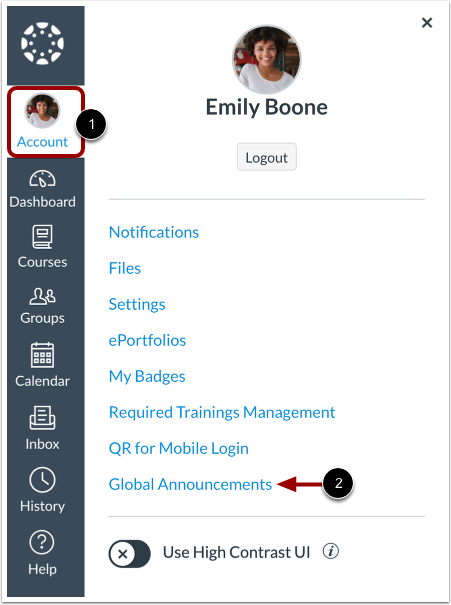
00:11: In the global navigation. Then you click the account link, then click the
00:15: global announcements link.
00:18: Have you currently active announcements click the current tab.
00:22: There are five announcement types for Global announcements.
00:26: A blue announcement with an eye icon indicates, an information announcement type,
00:30: a red announcement with an exclamation icon, indicates, an air announcement
00:35: type an orange, an element with an exclamation icon, indicates a warning
00:39: announcement type, a blue announcement.
00:41: With a question icon indicates a question announcement type, a blue announcement
00:45: with a calendar icon indicates a calendar announcement type
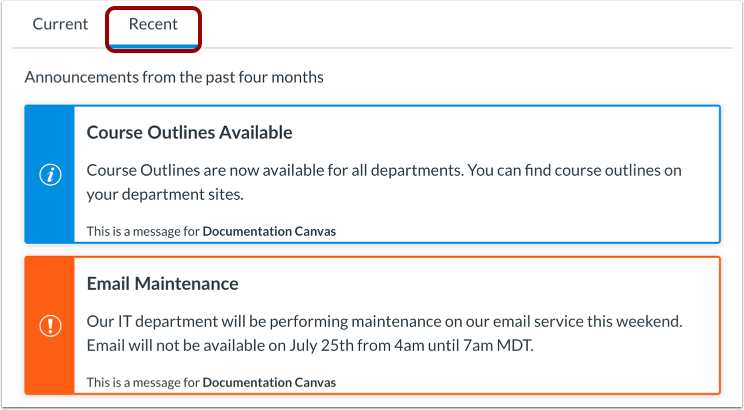
00:50: If you announcements in the past four months, click the recent tab.
00:55: When you dismiss a global announcement, canvas displays a message, notifying
00:59: you that you can view the announcement on the global announcements page to
01:03: view the announcement. Click the view button,
01:07: This guy covered had to view the global announcements page as a student.
Open Global Announcements
In the Global Navigation menu, click the Account link [1], then click the Global Announcements link [2].
View Current Announcements
To view currently active announcements, click the Current tab.
There are five announcement types for global announcements:
- A blue announcement with an i icon indicates an information announcement type.
- A red announcement with an exclamation icon indicates an error announcement type.
- An orange announcement with an exclamation icon indicates a warning announcement type.
- A blue announcement with a question icon indicates a question announcement type.
- A blue announcement with a calendar icon indicates a calendar announcement type.
View Recent Announcements
To view announcements from the past four months, click the Recent tab.
View Dismissed Announcement
When you dismiss a global announcement, Canvas displays a message notifying you that you can view the announcement on the Global Announcements page. To view the announcement, click the View button.