You can delete your ePortfolios in Canvas if you need to remove them.
View the video transcript
00:07: How do I delete my e-portfolio?
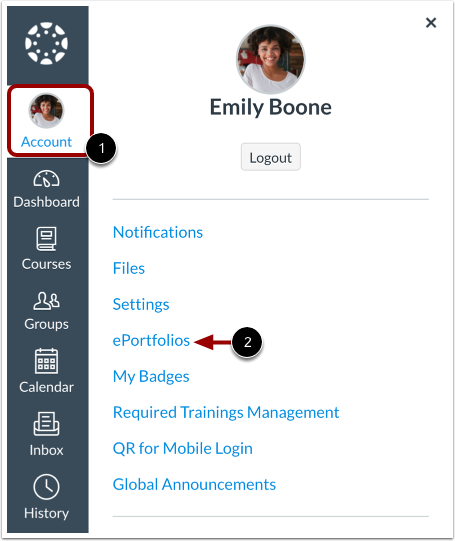
00:10: In global navigation, click the account link, then click the e-portfolios
00:14: link.
00:16: Click the title of the e-portfolio.
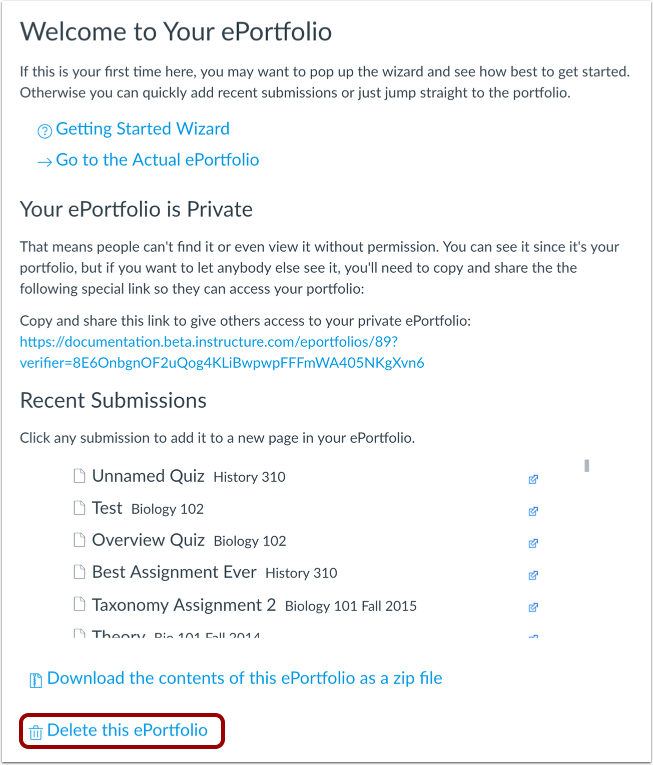
00:19: Click the delete, this e-portfolio link.
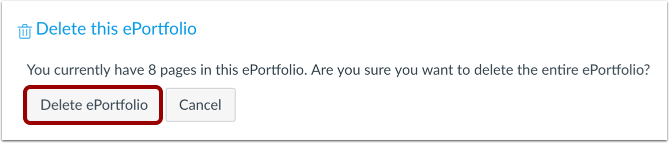
00:22: Click the delete e-portfolio button.
00:25: The guide covered how to delete my e-portfolio.
Open ePortfolios
In Global Navigation, click the Account link [1], then click the ePortfolios (Legacy) link [2].
Open ePortfolio
Click the title of the ePortfolio.
Delete ePortfolio
Click the Delete this ePortfolio link.
Confirm Deletion
Click the Delete ePortfolio button.