Earned badges can be printed on paper.
Note: For best results, it is recommended printing in landscape mode.
Sign into Parchment Digital Badges
Sign into your Parchment Digital Badges account.
Open Personal Account
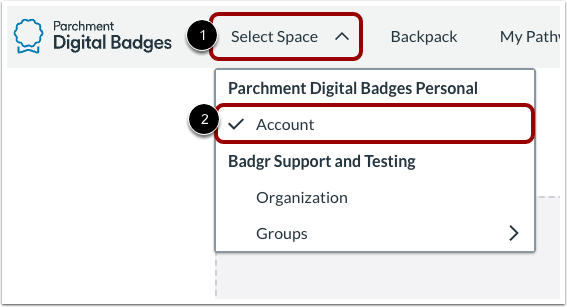
Click the Select Space drop-down menu [1] and then click the Account link [2].
Open Badge
In the Badges tab [1], click the Badge link [2].
Print Certificate
Select the more options icon [1], then click the Print Certificate link [2].
Choose Template
Select a template to print your certificate.
Print Certificate
To print your certificate, click the Print button. You can also press Cmd+P (Mac keyboard) or Ctrl+P (PC Keyboard).
Note: Badges uses your browser's print dialog window to print the certificate. You can select a different printer, and choose other printing options, such as layout, pages, and color printing options.