Issuers and administrators can archive badges. Once archived, you can view archived badges or reactivate badges.
Notes:
- Archiving a badge removes it from active circulation while retaining its associated metadata for future reference.
- You can also delete the badge.
Open Badges
To view badges, click the Badges tab.
Select Badge
Click the name of the badge you would like to archive.
Archive Badge
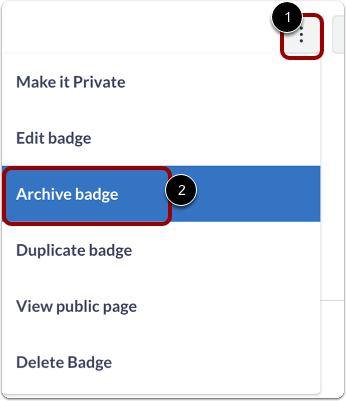
To archive the badge, click the Options menu [1], then click then Archive badge link[2].
Confirm Archive
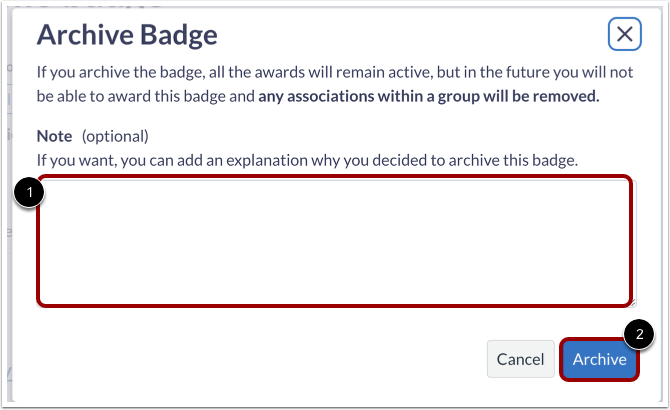
You can leave a note in the Note field [1] about the badge. When you are finished, click the Archive button [2].
Manage Archived Badges
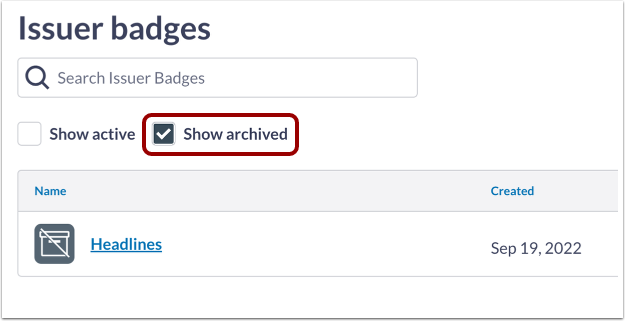
To view archived badges, click the Show archived checkbox.
To reactivate the badge, open the badge and click the Reactivate badge button.