The Calendar iCal feed is located in the sidebar of your Calendar. You can import the iCal feed URL into any calendar app that accepts the iCal format, such as Google Calendar, Apple Calendar, Outlook, and Yahoo Calendar. You can also download the calendar feed as an ICS file and import it into an external calendar. The calendar feed contains events and assignments from all of your Canvas calendars.
Notes:
- Future events up to 366 days in the future, and past events within 30 days, are included when exporting a Canvas calendar to another calendar program. The calendar feed includes up to 1,000 items.
- To Do items are not included in the Calendar iCal feed.
- After you import your calendar feed and are enrolled in a new course, you must re-import your calendar feed to include the new course calendar.
View the video transcript
00:07: How do I view the calendar I Kelsey to subscribe to an external calendar
00:11: as a student.
00:13: In global navigation click the calendar link
00:17: Click the calendar feed link
00:20: To copy the link copy the text in the URL field.
00:24: To download the feed as an ICS file.
00:27: Click the click to view calendar feed link.
00:30: To subscribe to an external calendar paste the URL or
00:34: import the ICS file.
00:38: This guy covered how to view the calendar I Kelsey to subscribe to an external
00:42: calendar as a student.
Open Calendar
In Global Navigation, click the Calendar link.
Open Calendar Feed
Click the Calendar Feed link.
Copy Calendar Feed
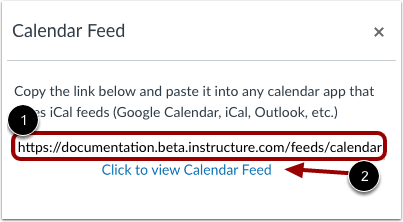
To copy the link, copy the text in the URL field [1].
To download the feed as an ICS file, click the Click to view Calendar Feed link [2].
To subscribe to an external calendar, paste the URL.