You can view all portfolios on your Portfolios page. Portfolios include learner-driven Showcase Portfolios and instructor-guided Evaluation Portfolios.
Note: If the Portfolio feature does not display in your account, it has not been enabled by your institution.
00:05: How do I view Portfolios as a student?
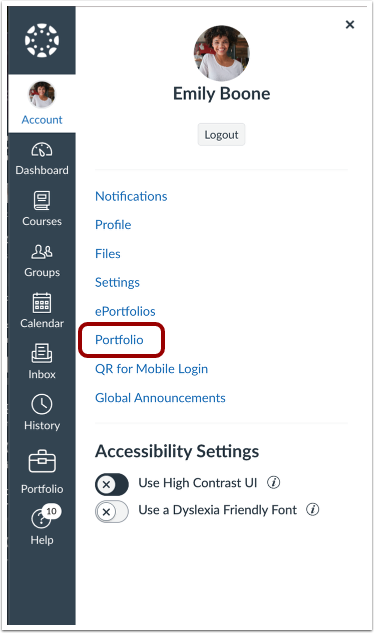
00:08: Click the Portfolio link in the User Navigation menu.
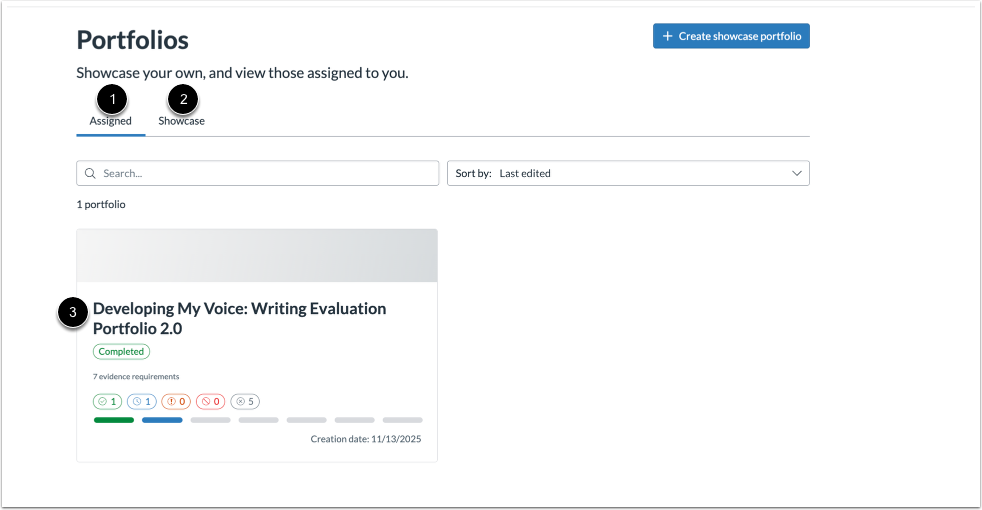
00:12: On the Portfolios page, click the Assigned tab to view instructor-assigned Portfolios and the Showcase tab to view your own Showcase Portfolios. Click the portfolio you want to view to see its content.
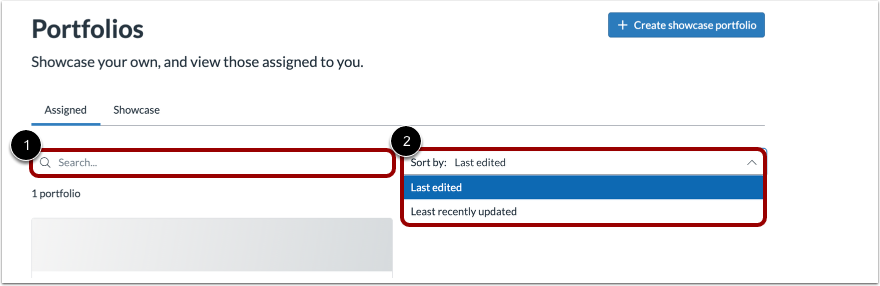
00:25: On the Portfolio page, you can search and sort to display desired portfolios
00:31: This guide covered how to view portfolio as a student.
Open Portfolio
Click the Portfolio link [1] in the User Navigation menu.
View Portfolios
On the Portfolios page, click the Assigned tab to view instructor-assigned Portfolios [1] and the Showcase tab to view your own Showcase Portfolios [2]. Click the portfolio you want to view to see its content [3].
Manage and Find Portfolios
On the Portfolio page, you can search [1] and sort [2] to display desired portfolios