The Evidence tab in the EdCo Partner Portal, organizational product library, and personal product library serves as a central repository for research completed by districts, edtech providers, and third-party researchers. You can use the Evidence tab to view efficacy information organized by product, or apply the search and filter tools to find specific studies.
Product details help administrators make informed vetting and purchasing decisions. For many districts, evidence information plays a key role in the vetting process and often determines which funding sources can cover the cost of a tool.
To learn more about how the Every Student Succeeds Act (ESSA) relates to funding, visit our Education Policy Atlas.
EdCo Partner Portal Evidence Tab
If you are a vendor, in the Evidence tab of the EdCo Partner Portal [1], you can add evidence [2] and maintain its accuracy to reflect current studies regarding the use and impact of your products.
You can populate the Evidence tab using two sections:
- ESSA Aligned Evidence [3]: This section summarizes studies conducted in alignment with ESSA levels of evidence. These studies showcase product impact, highlight efficacy, and support title funding eligibility. A third-party review can validate and badge these studies to confirm they meet all necessary criteria for a specific level of evidence.
- Supporting Research [4]: Add studies or additional research that do not align with ESSA tiers in this section.
To view details of individual studies, click the links in the Report Title column [5].
To begin conducting ESSA-aligned research from the partner portal, contact the LearnPlatform Research Team by clicking the Contact Evidence Team button [6].
Product Library Evidence Validation Filter
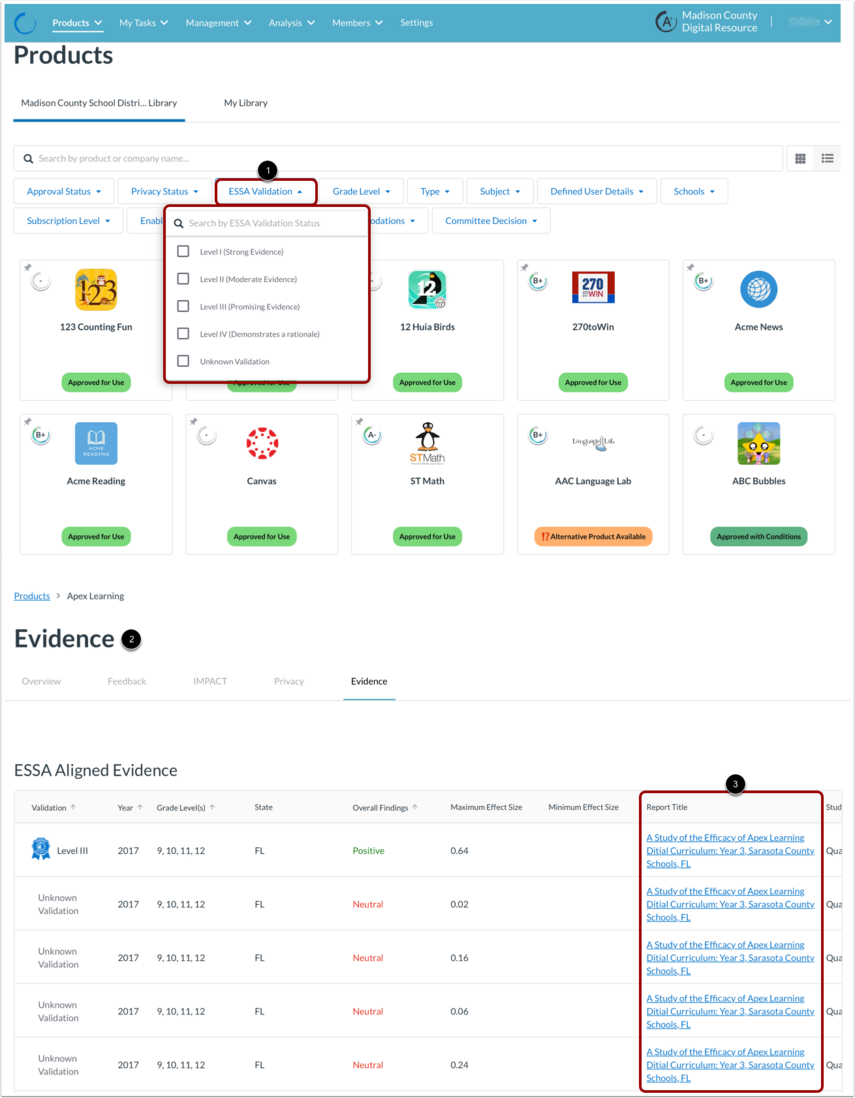
If your district is interested in using research evidence to vet products, you can start by using the ESSA Validation filter in the product library [1]. To open the Evidence tab [2], view the product details.
To view details of individual studies, click the links in the Report Title column [3]. Exploring these results helps determine if a study involved a district or student population similar to your own.
While only a few products currently hold Level I evidence (which requires a randomized-control trial), more tools are building foundational evidence to meet ESSA levels III or IV. The 2024-25 EdTech Top 40 Report found that 45% of tools now feature some level of published ESSA research.
ESSA Filter Settings
Tools that offer high-quality evidence and demonstrate positive student outcomes serve as a strong indicator of overall product quality. Tools with high levels of evidence are also more likely to benefit similar students in other districts.
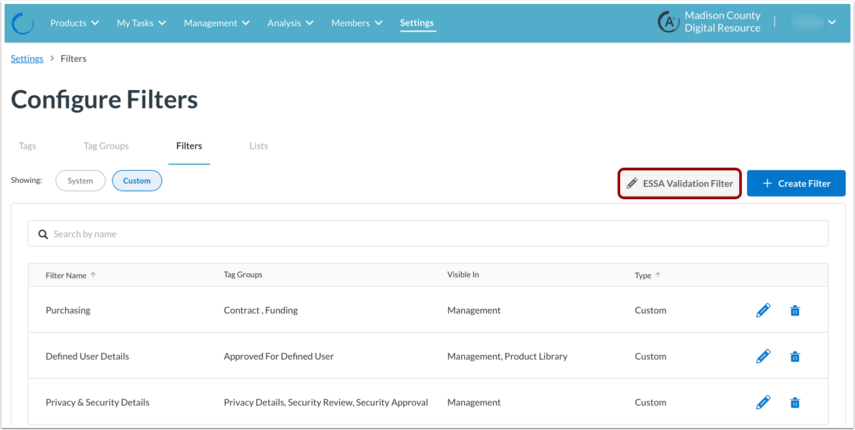
If you are a LearnPlatform admin, you can manage the ESSA Validation filter settings under Settings > Tags, Filters & Lists > Filters. In the Configure Filters page, click the ESSA Validation Filter button.
Selecting the ESSA Validation Filter button displays options to set the visibility of the ESSA filter on different pages. You can choose to show or hide the ESSA Filter in the Management or Product Library pages [1]. To update the LearnPlatform configuration, click the Save button [2].