After submitting a product request, you can check the status of your requests on the Requested tab in your product library.
Note: Request turnaround time depends on your organization's processes. Please contact your administrative team for additional information.
LearnPlatform is not responsible for a product's status within your organization. If you would like to find out more information about why a specific decision was made regarding your request, please reach out to your organization's edtech administrators. The LearnPlatform Team does not have access to this information.
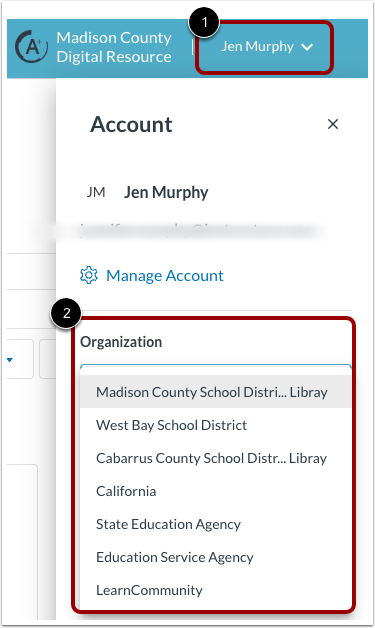
Select Organization
If you are a member of multiple organizations, select an organization from your user Account sidebar. Click the User Name drop-down menu [1]. Then click the Organization drop-down menu and select an organization [2].
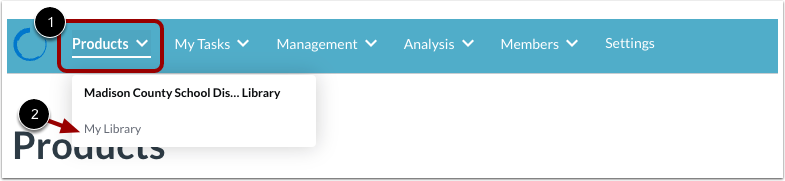
Open Organization Product Library
Click the Products drop-down menu [1], then click the My Library link [2].
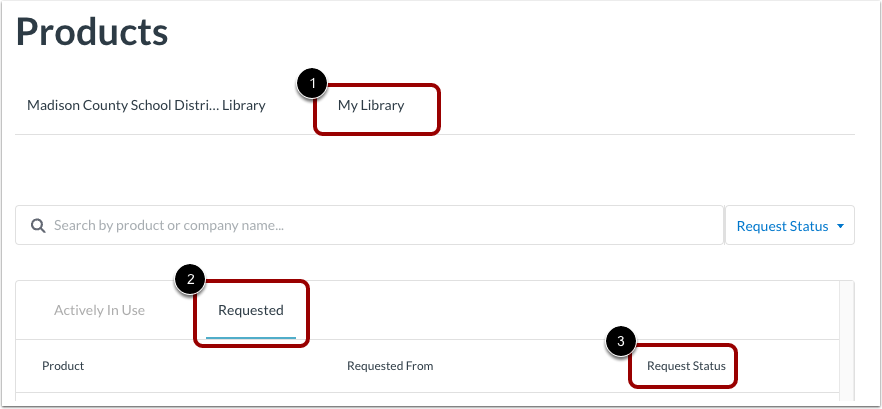
Track Product Request
On the My Library tab [1], click the Requested tab [2].
View the Request Status of the product [3].
You will also receive updates via email as the request is reviewed and when a decision is made.
Additionally, you can look for the product status in your organization's library.