As a provider logged into the EdCo Partner Portal, you can receive and manage leads from the EdTech Collective Marketplace in the Opportunities page. Requests for more information are created when a user in the EdTech Collective Marketplace clicks the Learn More button for one of your company's products. The request is listed in the Opportunities page and administrators receive an email notification about the lead.
You can manage requests by marking them as new, complete, or archived. You can also export requests.
Open Opportunities
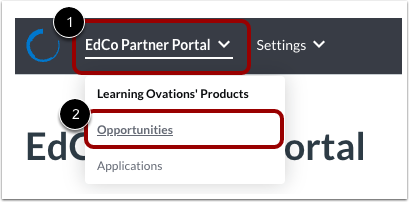
Click the EdCo Partner Portal drop-down menu [1]. Then click the Opportunities link [2].
View Opportunities
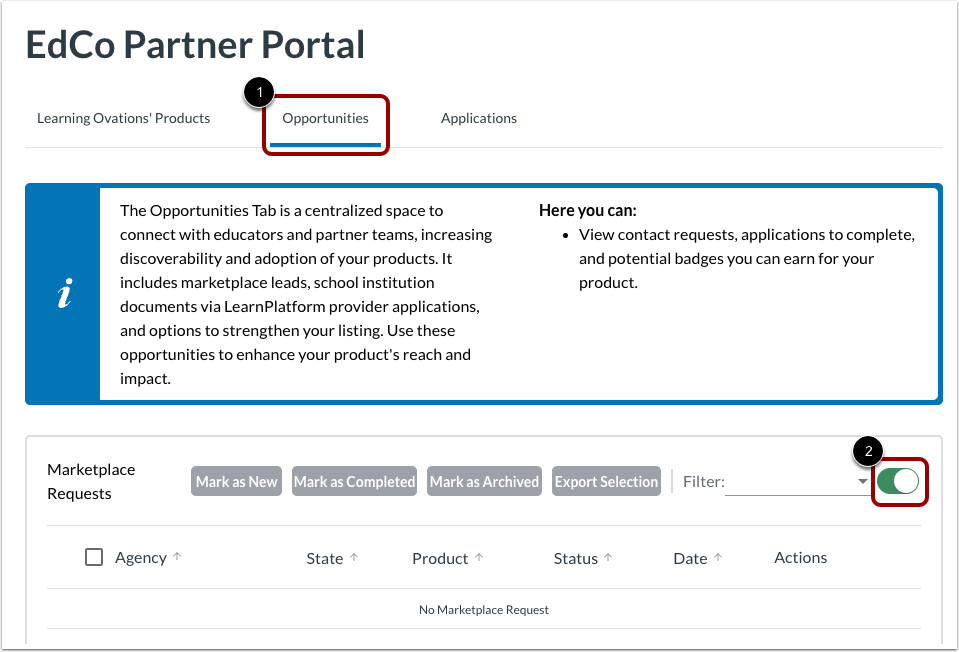
On the Opportunities tab [1], you can view requests for more information coming from the EdTech Collective Marketplace.
To receive requests, click the Marketplace Requests toggle button on [2].
View Request Details
For every user request, you can view the organization it came from in the Agency column [1]. You can also view the user's state [2], the product of interest to them [3], the request status [4], the date of the request [5], and actions you can take [6].
Filter by Status
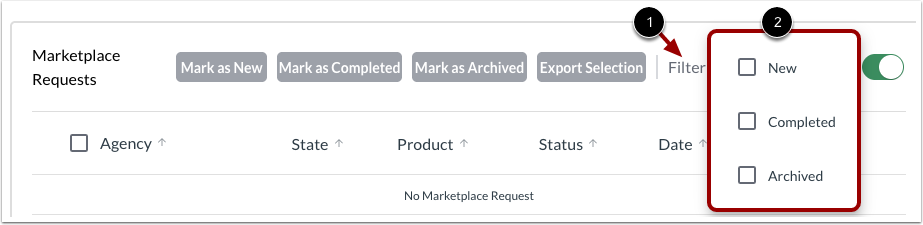
To filter the request list by status, click the Filter menu [1]. Then click the New, Completed, or Archived checkboxes [2].
Manage Requests
To change the status of one or more requests, click the request's checkbox [1]. Then click one of the following buttons:
- Mark as New [2]
- Mark as Completed [3]
- Mark as Archived [4]
Export Requests
To export one or more requests to a CSV file, click the request's checkbox [1]. Then click the Export Selection button [2].