The shopping cart is enabled by default for Catalog and sub-catalogs and cannot be disabled by admins.
Notes:
- If disabling the shopping cart is only possible through internal configuration or under specific conditions, please include guidance on the proper escalation path.
- For more information or assistance, please contact Support or your Customer Success Manager. Be sure to outline any known limitations, prerequisites, or scenarios where this option may not be available.
Open Admin
Click the usernamedrop-down menu [1]. Then, click the Admin link [2].
Open Catalogs
Click the Catalogs tab.
Select Catalog
Click the root catalog name link.
View Catalog Info
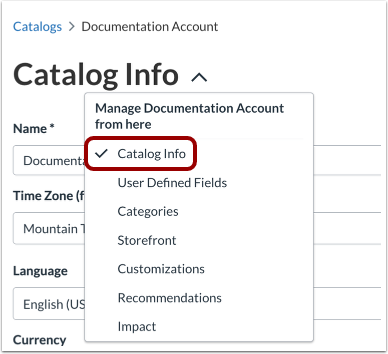
In the Catalog settings drop-down menu, the Catalog Info tab displays by default.
By default, the shopping cart is enabled for the catalog and sub-catalogs.
Save Catalog Info
Click the Save button.