If you are a Canvas admin and know how to use application program interface (API) commands, you can access the Canvas Catalog API to view information about your Catalog account.
The Canvas Catalog API documentation is contained on a single page, which you can print or scroll through. You can also auto-scroll to a section of documentation by clicking the links in the Table of Contents.
You can manage Subcatalog Admins directly within the product, including assigning or removing administrative access to specific subcatalogs. For automated or system-driven operations, the API allows developers to list account admins, associate an admin with an account, remove that association, or remove the admin entirely.
For more information, visit Catalog API documentation.
Notes:
- The User Registration API endpoint reaches its end-of-life as all registration capabilities merge into the primary Users endpoint. This transition centralizes user management into a single interface. The update streamlines the API architecture by removing redundant endpoints.
- The Consolidate System Integrations reduces integration complexity by providing a unified schema for user-related actions. It simplifies long-term maintenance for developers through a streamlined API structure and improves efficiency by centralizing user management functions.
Open Admin
Click the usernamedrop-down menu [1]. Then, click the Admin link [2].
Open API
Click the API tab.
View API Key Page
To use the API page, open and sort the table by selecting any column header.
Review the API Keys table, which displays the API key description, access type, creator, creation date, expiration date and last used information.
Open New API Key
Click the New API Key button.
Create New API Keys
To create a new API key, enter an API key description [1]. To grant read-only permissions, select the Read-only access checkbox [2].
Select an expiration date using the Expiration Date date picker [3]. The expiration date is required and cannot exceed one year from the key's creation date.
Click the Submit button to create the key [4].
Note: Existing API keys automatically receive an expiration date set to one year. Key creators receive reminder emails 30 days and 7 days before expiration. Once expired, keys cannot be reactivated, and requests made with an expired key return a 401 Unauthorized response, requiring a replacement key to be created.
View API Documentation
To view API Documentation, click on View API Documentation link.
View API Documentation Page
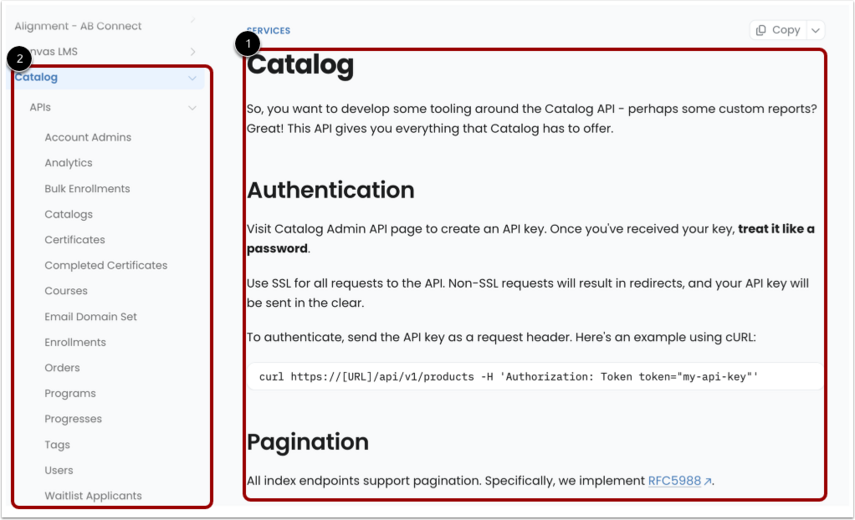
View the Catalog API documentation page [1] and the interactive table of contents [2].
To view content, scroll down the page.
Note: Canvas Catalog supports editing User Defined Fields (UDFs) through the API after learner registration is complete. This capability enables updates to information such as addresses, phone numbers, and license numbers that become available later in the learner lifecycle.
Manage Auto-Scroll to Content
To auto-scroll to a section in the documentation page and view subsections, click a section name link in the table of contents.
Search Certificates API Course
Identify the target Canvas Course ID. Include the course_id parameter in the Certificates API GET request. Execute the call to retrieve all certificate records associated with that specific course.