As a Catalog admin, if the Storefront Theme Editor has been enabled for your account, you can create custom email branding for your catalog and subcatalogs using HTML.
If custom email branding is not created for a subcatalog, it inherits the parent catalog email branding.
Note: When the parent catalog has the Modern Storefront enabled, all subcatalogs automatically inherit this setting and its branding elements such as logos, colors, and favicons, which cannot be customized at the subcatalog level. However, if the parent catalog uses the Legacy Storefront, subcatalogs can enable the modern Storefront independently and manage their own branding settings.
Open Admin
Click the username drop-down menu [1]. Then, click the Admin link [2].
Open Catalogs
Click the Catalogs tab.
Open Catalog
Click the catalog name link.
Open Customizations
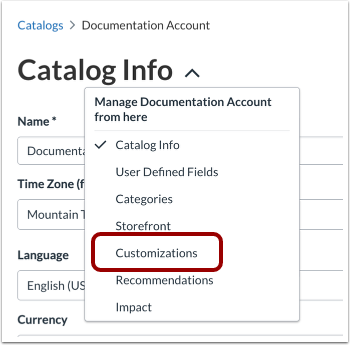
In the Catalog settings drop-down menu, the Catalog Info page displays by default. Click the Customizations link.
Customize Email Branding
Click the Email Branding link [1].
You can edit the text fields for the From name (display name) [2] and the Reply-to email address [3].
To help you to write correct HTML and avoid formatting errors, the email Header [4] or Footer [5] editing experience includes syntax highlighting and validation.
When finished, you can save the changes to apply the updated branding to all institutional emails. Click the Save button [6].