As an admin, The CRM/HRIS integration allows you to connect your external database to Canvas Career. You can add and manage users by mapping the data fields to automate the synchronization of user, enrollment, and grade records.
Open CRM/HRIS Integration
In Global Navigation, click the Admin drop-down menu [1]. Then, click the CRM/HRIS Integration link [2].
Open CRM
In the CRM Integration page, your organization's Customer Relationship Management (CRM) or Human Resources Information System (HRIS) system displays [1]. Click the Settings icon [2].
Map User Fields
Click the Mapping tab [1]. Users are mapped to the Contact table [2].
- User ID is mapped to the external Id field [3]. This field used as the primary identifier for matching and syncing individual user accounts.
- Login ID is mapped to the external Email field [4]. This is used as the user's login identifier, typically their email address.
- The Status field [5] specifies the user's current status, whether active or inactive.
- The Hashed Password (SSHA) field [6] is used for synchronizing a securely hashed password.
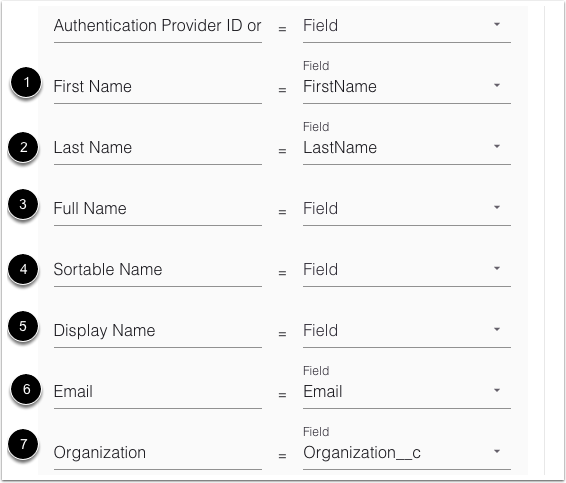
- First Name is mapped to the FirstName field. [1] This specifies the user's first or given name.
- Last Name is mapped to the LastName field. [2] This specifies the user's last or family name.
- Full Name is mapped to the Field field. [3] This specifies the user's complete name (can be used for display).
- Sortable Name is mapped to the Field field. [4] This specifies the name format optimized for sorting lists.
- Display Name is mapped to the Field field. [5] This specifies the name presented to other users in the platform.
- Email is mapped to the Email field. [6] This specifies the user's primary contact email address.
- Organization is mapped to the Organization__c field. [7] This specifies the larger company or entity the user belongs to.
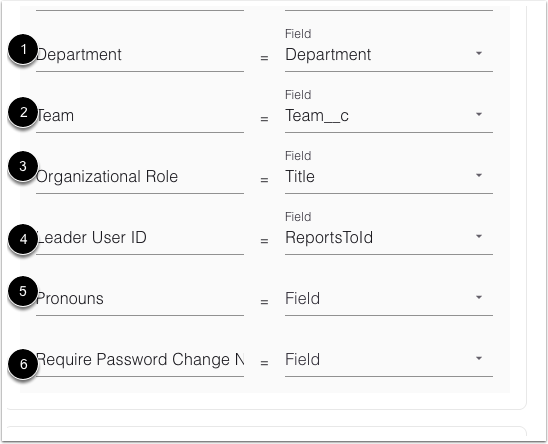
- Department is mapped to the Department field. [1] This specifies the user's primary division or functional area within the organization.
- Team is mapped to the Team__c field. [2] This specifies the smaller working group within the department.
- Organizational Role is mapped to the Title field. [3] This specifies the user's formal job title or function.
- Leader User ID is mapped to the ReportsToId field. [4] This specifies the ID of the user's direct manager or supervisor.
- Pronouns is mapped to the Field field. [5] This specifies the user's preferred personal pronouns.
- Require Password Change N is mapped to the Field field. [6] This specifies a setting to enforce a password change upon the user's next login.
Enrollments are mapped to the Enrollment__c table [1].
- User ID is mapped to the Contact__c field. [2] This is the required identifier for the user whose grade is being recorded.
- Course ID is mapped to the Field field. [3] This is the required identifier for the course the grade is associated with.
- Current Score is mapped to the Field field. [4] This specifies the user's score in the course as of the current date.
- Final Score is mapped to the Final_Score__c field. [5] This specifies the user's calculated final numeric score for the course.
- Current Grade is mapped to the Field field. [6] This specifies the user's current letter or pass/fail grade.
- Final Grade is mapped to the Field field. [7] This specifies the user's final letter or pass/fail grade for the course.
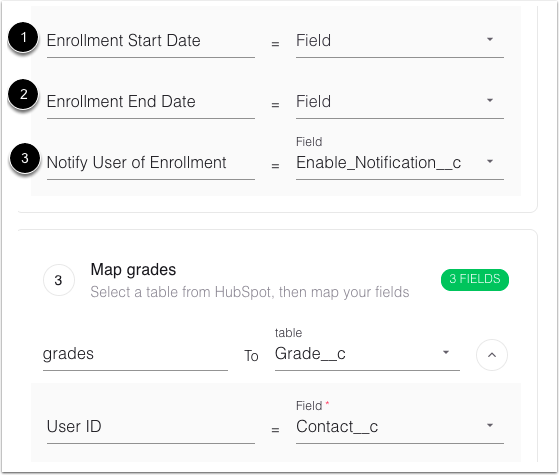
- Enrollment Start Date is mapped to the Field field. [1] This specifies the date the user's enrollment officially begins.
- Enrollment End Date is mapped to the Field field. [2] This specifies the date the user's enrollment officially ends.
- Notify User of Enrollment is mapped to the Enable_Notification__c field. [3] This is a toggle option to control whether an email notification is sent to the user upon enrollment.
Grades are mapped to the Grade__c table [1].
- User ID is mapped to the Contact__c field. [2] This is the required identifier for the user whose grade is being recorded.
- Course ID is mapped to the Field field. [3] This is the required identifier for the course the grade is associated with.
- Current Score is mapped to the Field field. [4] This specifies the user's score in the course as of the current date.
- Final Score is mapped to the Final_Score__c field. [5] This specifies the user's calculated final numeric score for the course.
- Current Grade is mapped to the Field field. [6] This specifies the user's current letter or pass/fail grade.
- Final Grade is mapped to the Field field. [7] This specifies the user's final letter or pass/fail grade for the course.
Save Changes
Click the Save button.


