In the Instructure Community, badges are designed to recognize members for the ways they participate in and contribute to the Community. They allow other members to identify you based on your interests and recognize your credibility as a member of the Community.
Badges are earned automatically as you reach milestones in your participation in the Community, and they display in your Community profile.
Participation Badges
In the Community, badges are earned automatically for the following participation milestones:
- Answer [1]: Receive this badge series by answering questions and having your answer accepted.
- Awesome [2]: Post great content and receive Awesome reactions to earn this badge series.
- Insightful [3]: Post great content and receive Insightful reactions to earn this badge series.
- Like [4]: Post great content and receive Like reactions to earn this badge series.
- Comment [5]: Receive this badge series by commenting anywhere and everywhere in the community.
Anniversary Badge
Each year, on the anniversary of the date that you joined the Community, you receive an Anniversary badge [1].
Depending on how many years you've been a community member, a number will be displayed on your anniversary badge [2].
A star on your on your anniversary badge [3] indicates that you've been a community member for more than 10 years.
Special Edition Badges
Limited-release badges are periodically offered for attending Instructure events or for completing specific tasks.
To view details about a badge, click the Badge icon.
View Badges
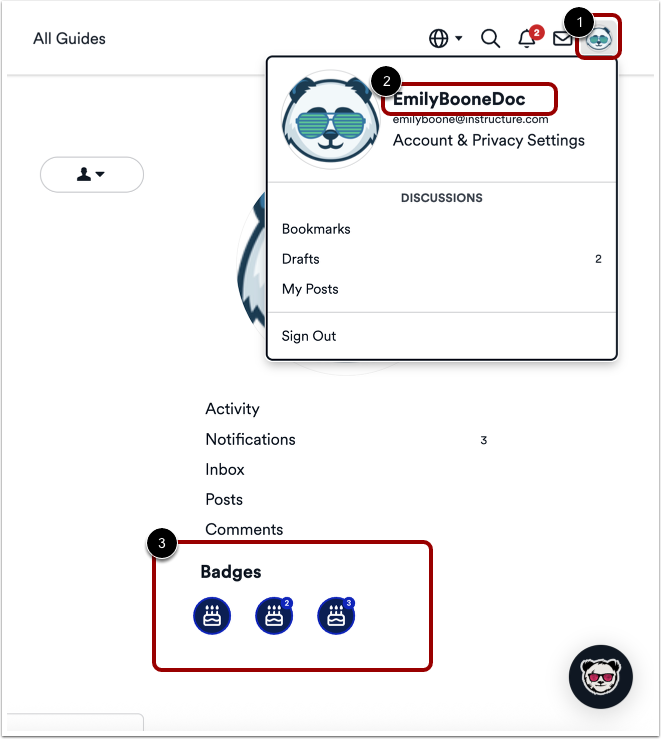
To view your badges, click on the Profile Menu icon [1]. Then click on you Profile Name [2] to open your profile page and view your Badges [3].