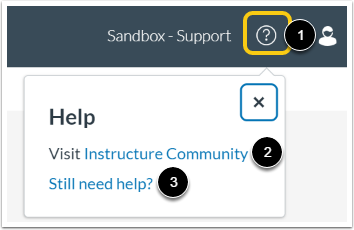
You can get help with the Standards Alignment App in the Help menu. The Help menu includes links to view the Standards Alignment user guides or submit a ticket to the Elevate Standards Alignment Support team.
To view available Help options, click the Help icon [1].
To view the Standards Alignment Guides, click the Instructure Community link [2].
To submit a ticket to the Standards Alignment App Support team, click the Still need help? link [3].
Submit Support Ticket
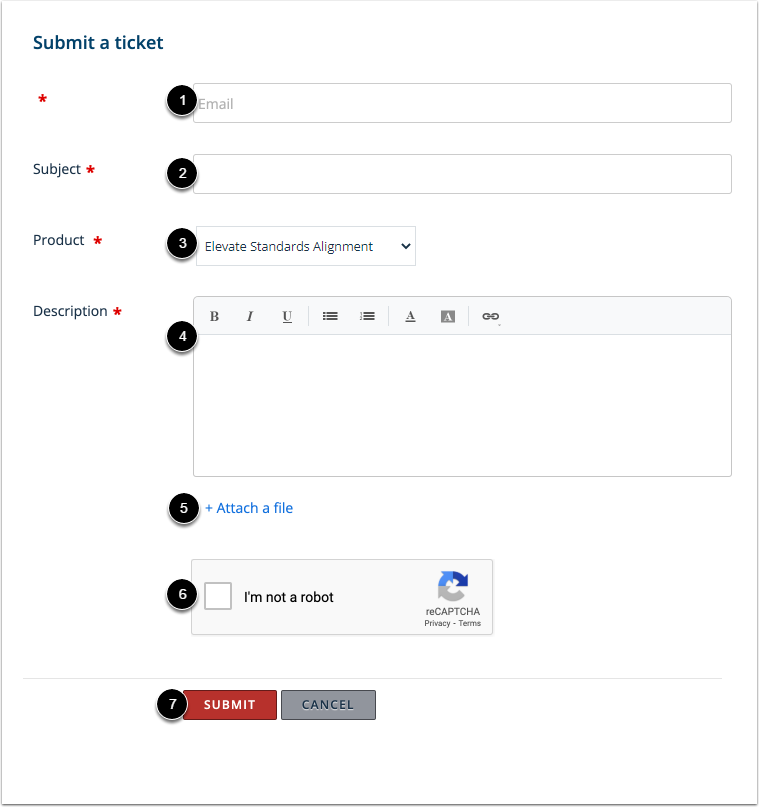
In the Email field [1], enter an email address at which Support can contact you regarding your ticket.
In the Subject field [2], create a subject for your ticket.
Click the Product drop-down menu [3], and select the Elevate Standards Alignment option.
In the Description field [4], describe the issue you are experiencing. Please be as detailed as possible to help troubleshoot the problem.
To include a file with the ticket, click the Attach a file link [5].
Confirm that you are not a robot by completing the Captcha form [6].
When you have finalized all the ticket details, click the Submit button [7].