Release notes outline upcoming customer-impacting changes that are expected to display in beta and/or production environments. Please note that features considered for future development are not included in the notes.
Unless otherwise stated, all features in this release are available in the Beta environment on 2026-02-16 and the Production environment on 2026-03-21.
Upcoming Canvas Changes
2026-03-25
- Deprecation: Removal of Unauthenticated File Access
2026-04-18
- Breaking Change: Improving Canvas Infrastructure with a Content Delivery Network (CDN)
For more information, please see Instructure Enforcements, Deprecations, and Breaking Changes.
New Features
Course
IgniteAI Image Alt Text Generation in Course Accessibility Checker
Affected User Roles: Instructor
Beta Environment Availability | 2026-03-12 Note: This date falls outside the regular beta release cadence. |
|---|
Feature Option to Enable | - IgniteAI Accessibility Remediation for Courses
- Accessibility Checker
See the Canvas Feature Option Summary to learn more about Feature Options. |
Enable Feature Option Location & Default Status | IgniteAI Accessibility Remediation for Courses - Account (Disabled/Locked)
Accessibility Checker - Account (Disabled/Unlocked)
|
Subaccount Configuration | No |
Account/Course Setting to Enable | None |
Permissions | Inherent to user role |
Affects User Interface | Yes |
Affected Areas | Course Accessibility Checker |
Summary
AI-powered remediations in the Accessibility Checker support fixing missing image alt text when the IgniteAI Accessibility Remediation for Courses feature option is enabled at the root account level.
Change Benefit
This feature reduces the time spent on accessibility remediation by using AI to generate alt text for hosted images in bulk from a central location.
Feature Workflow
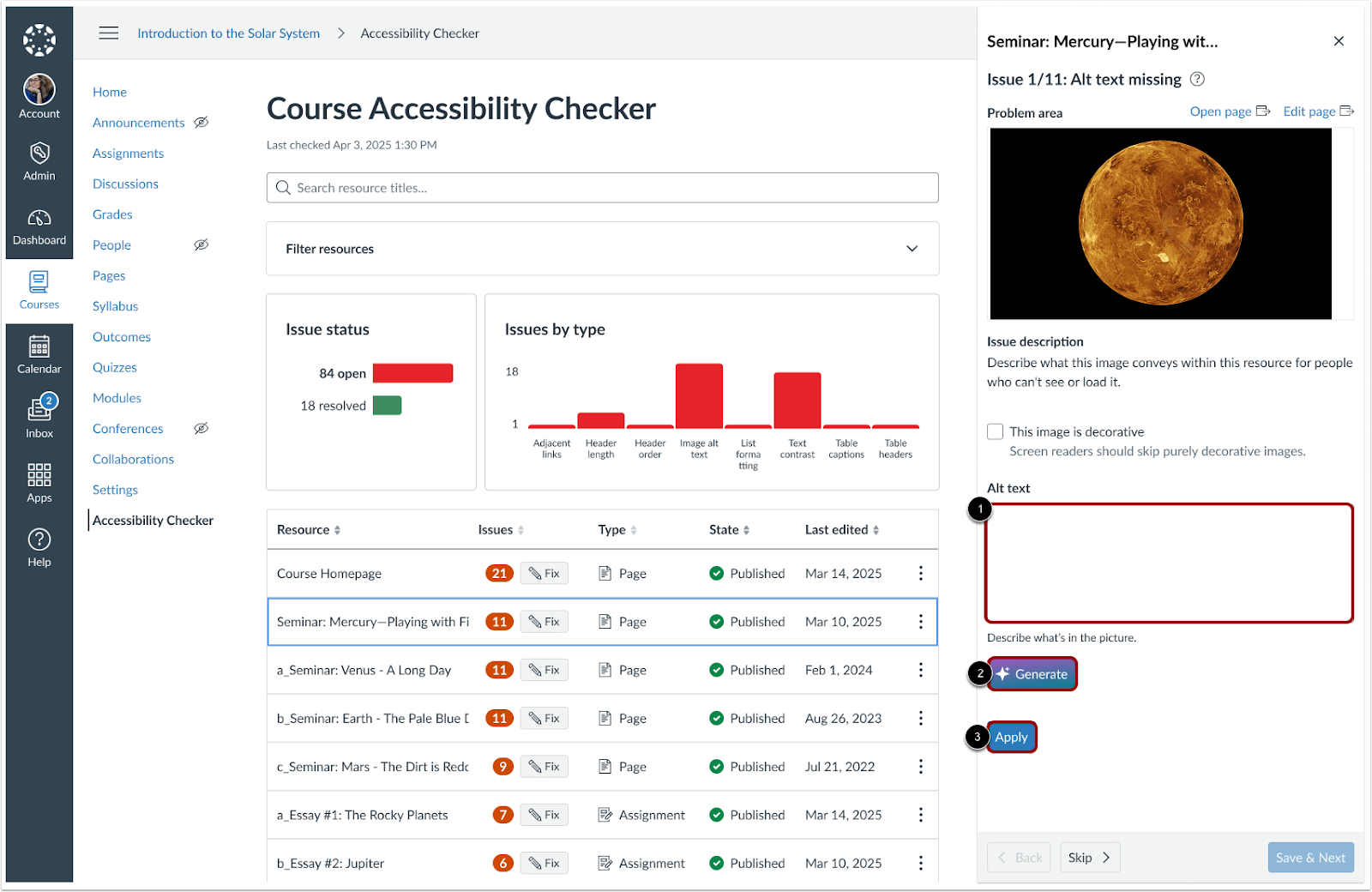
In the Issue tray, when alt text is missing, instructors can manually enter a description [1] or generate one using AI [2]. Once satisfied, click the Apply button [3].
Feature Video: Not Available
Grades
IgniteAI Grading Assistance for SpeedGrader [Delayed as of 2026-02-23]
This feature is currently delayed in production and beta environments and will be included in a future release.
Affected User Roles: Instructor
Feature Option to Enable | - Performance and Usability Upgrades for SpeedGrader
- Enhanced Rubrics
- Grading Assistance
See the Canvas Feature Option Summary to learn more about Feature Options. |
|---|
Enable Feature Option Location & Default Status | Performance and Usability Upgrades for SpeedGrader - Account (Enabled/Locked)
- Course (Enabled)
Enhanced Rubrics - Account (Enabled/Unlocked)
- Course (Enabled)
Grading Assistance - Account (Disabled/Locked)
- Course (Disabled)
|
Subaccount Configuration | Yes |
Account/Course Setting to Enable | None |
Permissions | Inherent to user role |
Affects User Interface | Yes |
Affected Areas | SpeedGrader |
Related Resources | IgniteAI Grading Assistance for SpeedGrader | Product Overview |
Summary
The Grading Assistance feature option lets instructors use an AI-assisted grading tool to generate scores and feedback suggestions for written assignments based on the associated rubric. To use this feature fully, the Enhanced Rubrics and Performance and Usability Upgrades for SpeedGrader feature options must also be enabled.
Note: This feature is designed to support teachers, not replace professional judgment. All AI-generated scores, feedback, and comments should be reviewed and approved by a teacher before being used or submitted.
Feature Limitations
- Grading Assistance does not detect or flag inappropriate, harmful, or sensitive content.
- The system has limited defenses against attempts to manipulate or bypass grading instructions.
- It does not verify the accuracy of factual claims.
- The legitimacy or credibility of cited sources is not evaluated.
- Formatting requirements (e.g., word count, structure, citation style) are not checked.
- Grades and feedback are based only on criteria explicitly stated in the rubric.
- Grading Assistance is not well-suited for objective, single-correct-answer assignments.
Using Grading Assistance
- Use clear, detailed rubrics.
- Apply Grading Assistance primarily to text-based, essay-style assignments.
- Avoid using it for quantitative or objective assignments.
Change Benefit
This feature helps instructors save time and streamline the grading process by providing AI-generated scores and feedback suggestions for written assignments. By using the associated rubric, the feature ensures feedback is aligned with assignment criteria, allowing teachers to focus on reviewing and refining feedback rather than starting from scratch.
Feature Workflow

In SpeedGrader, click the Auto-Evaluate button.

Once the evaluation is complete, criteria selections are applied [1] and comments are generated [2]. Click the Reset button to begin a new evaluation [3].
Note: The Reset button will replace all existing ratings and comments and cannot be undone.

Once the criteria selections and comments have been reviewed, click the Submit Assessment button.
Feature Video: Not Available
New Quizzes
Survey Results Visibility [Added on 2026-02-20]
Affected User Roles: Instructor
Feature Option to Enable | New Quizzes See the Canvas Feature Option Summary to learn more about Feature Options. |
|---|
Enable Feature Option Location & Default Status | Account (Disabled/Unlocked) |
Subaccount Configuration | Yes |
Account/Course Setting to Enable | None |
Permissions | Manage Assignments and Quizzes- add/edit |
Affects User Interface | Yes |
Affected Areas | New Quizzes Survey Results page |
Summary
In New Quizzes Survey Reports, instructors can click the response count to view a list of students who selected a specific answer. For anonymous surveys, student identities are masked as Student 1, Student 2, and so on to ensure privacy.
Change Benefit
This update enhances visibility into student engagement and feedback patterns, improving clarity when reviewing survey results and supporting fair assessment practices.
Feature Workflow

In the Reports tab, instructors can click the response link to view individual student responses.

In anonymous surveys, participant names display as Student followed by a number.
Feature Video: Not Available
New Quizzes
Export Survey Responses [Added on 2026-02-20]
Affected User Roles: Instructor
Feature Option to Enable | New Quizzes See the Canvas Feature Option Summary to learn more about Feature Options. |
|---|
Enable Feature Option Location & Default Status | Account (Disabled/Unlocked) |
Subaccount Configuration | Yes |
Account/Course Setting to Enable | None |
Permissions | Manage Assignments and Quizzes- add/edit |
Affects User Interface | Yes |
Affected Areas | New Quizzes Survey Results page |
Related Resource | New Quizzes Surveys in Canvas | Product Overview |
Summary
Instructors can export survey responses to a CSV file.
Included Data: The file includes respondent name for non-anonymous surveys, submission timestamp, question text, and all answers for every question type.
Anonymity Handling: For anonymous surveys, student name and ID are excluded or marked as Anonymous to protect privacy.
Change Benefit
This update makes it easier for instructors to analyze survey results, maintain records, and securely share information while respecting student anonymity.
Feature Workflow

To download a CSV file of a survey’s results, click the Generate CSV link [1], then click the Export button [2].
Feature Video: Not Available
Other Updates
Announcements/Discussions/Inbox
IgniteAI translations for Discussions, Announcements and Inbox Feature Preview Concluded
Affected User Roles: All Users
Summary
The IgniteAI translations for Discussions, Announcements and Inbox feature is no longer in feature preview and remains disabled by default for all institutions. There are no interface or functional changes related to this update.
Note: The IgniteAI Translations for Inbox, Discussions and Announcements user group will close for participation on March 6, 2026.
Change Benefit
This feature improves accessibility and communication by allowing users to easily read and participate in course content and messages in their preferred language.
Feature Workflow

When the feature option is enabled, users can select from available language options to translate discussions and announcements.

When enabled, users can select from the available language options to translate inbox messages.
Developer Keys
Legacy LTI Keys Replaced by Unified Key for Canvas Portfolio
Affected User Roles: Admin
Beta and Production Environment Availability | 2026-02-16 Note: This date falls outside the regular production release cadence. |
|---|
Feature Option to Enable | N/A |
Enable Feature Option Location & Default Status | N/A |
Subaccount Configuration | N/A |
Account/Course Setting to Enable | None |
Permissions | Developer Keys-manage |
Affects User Interface | No |
Affected Areas | Developer Keys |
Summary
Legacy region-specific LTI developer keys for Canvas Portfolio are deprecated on March 21, 2026 and replaced with a unified inherited developer key (170000000001986). Institutions that have not yet migrated should switch to the unified key to maintain functionality and reduce errors and the risk of configuration or authentication issues.
Change Benefit
This update standardizes LTI developer keys, reducing authentication issues, simplifying support and maintenance, and minimizing configuration errors caused by region-specific keys.
Feature Workflow

In the Inherited Developer Keys tab, enable the Portfolio LTI Client using the ID 170000000001986.
Discussions
IgniteAI Insights for Discussions Feature Preview Concluded
Affected User Roles: Instructors
Summary
The IgniteAI Insights for Discussions feature is no longer in feature preview and remains disabled by default for all institutions. There are no interface or functional changes related to this update.
Note: The IgniteAI Insights for Discussions user group will close for participation on March 6, 2026.
Change Benefit
This feature helps educators save time and make more informed decisions by providing quick, AI-powered evaluations of student replies. Instructors can efficiently assess relevance and quality without manually reviewing every post, allowing them to focus on meaningful feedback and supporting student learning.
Feature Workflow

After Insights are generated, instructors can search for specific students and filter results by relevance.
Discussions
IgniteAI Summaries for Discussions Feature Preview Concluded
Affected User Roles: Instructors
Feature Option to Enable | IgniteAI Summaries for Discussions
See the Canvas Feature Option Summary to learn more about Feature Options. |
|---|
Enable Feature Option Location & Default Status | Account (Disabled/Locked) Course (Disabled) |
Subaccount Configuration | No |
Account/Course Setting to Enable | None |
Permissions | Inherent to user role |
Related APIs | Name of API(s) w/ link(s), if the feature can be managed via API |
Affects User Interface | No |
Affected Areas | Discussions |
Related Resources | IgniteAI Summaries for Discussions | Product Overview |
Summary
The IgniteAI Summaries for Discussions feature is no longer in feature preview and remains disabled by default for all institutions. There are no interface or functional changes related to this update.
Note: The IgniteAI Summaries for Discussions user group will close for participation on April 17, 2026.
Change Benefit
This feature helps instructors quickly understand key themes and questions in discussion threads, saving time while making it easier to identify important ideas and guide follow-up conversations.
Feature Workflow

When enabled, instructors can generate summaries of the main points, questions, and ideas in a discussion thread.
New Quizzes
Native Canvas Integration Production Environment Availability [Delayed as of 2026-03-23]
This feature is currently delayed in the production environment until 2026-03-26.
Affected User Roles: All Users
Feature Availability | Released to the beta environment on December 15, 2025. |
|---|
Feature Option to Enable | - New Quizzes
- New Quizzes Native Canvas Integration
See the Canvas Feature Option Summary to learn more about Feature Options. |
Enable Feature Option Location & Default Status | New Quizzes - Account (Disabled/Unlocked)
- Course (Disabled)
New Quizzes Native Canvas Integration - Account (Disabled/Unlocked)
- Course (Disabled)
|
Subaccount Configuration | Yes |
Account/Course Setting to Enable | None |
Permissions | Inherent to user role |
Affects User Interface | No |
Affected Areas | New Quizzes |
Previous Release Mention | Canvas Release Notes 2026-01-17- Beta environment availability announcement. Canvas Release Notes (2026-02-21)- Original Production environment availability announcement |
Enforcement Date | 2026-07-01 |
Summary
When the New Quizzes Native Canvas Integration feature option is enabled the the New Quizzes experience is moved out of its isolation layer (iframe) to run natively within the main Canvas page in production environments.
Notes:
- The architectural block (iframe) is removed, but some third-party tools may not work immediately.
- While this feature is behind a feature option, third-party and proctoring tools must support both the existing (iframe) and new (iframeless) New Quizzes architectures to ensure compatibility before the enforcement date.
- New Quizzes remains a secure external LTI tool.
- The change only affects the presentation in the browser (iframe removed). There are no other interface changes.
- LTI protocol continues to handle secure communication, grade passback, and authentication. Existing LTI limitations still apply.
Change Benefit
This feature option allows institutions to adopt the update on their own timeline during the grace period. The architectural change improves accessibility, enhances compatibility with assistive technologies, and provides a foundation for expanded functionality in New Quizzes.
Platform/Integration
User-Agent Header Enforcement [Delayed as of 2026-03-13]
This feature is currently delayed in the production environment and will be included in a future release.
Affected User Roles: Admin
Summary
To strengthen API security and governance, all HTTP requests must include a User-Agent header. Requests without this header are rejected in Beta as of October 1, 2025, and in Production on March 21, 2026.
Change Benefit
This change improves API security, governance, and platform stability through better identification and management of integration traffic.
Rubrics
IgniteAI Generator for Rubrics Feature Preview Concluded
Affected User Roles: Instructor
Feature Option to Enable | - Enhanced Rubrics
- IgniteAI Generator for Rubrics
See the Canvas Feature Option Summary to learn more about Feature Options. |
|---|
Enable Feature Option Location & Default Status | Enhanced Rubrics - Account (Enabled/Unlocked)
- Course (Enabled)
IgniteAI Generator for Rubrics - Account (Disabled/Locked)
- Course (Disabled)
|
Subaccount Configuration | Yes |
Account/Course Setting to Enable | None |
Permissions | Inherent to user role |
Affects User Interface | No |
Affected Areas | Rubrics |
Related Resources | IgniteAI Generator for Rubrics | Product Overview |
Original Release | Canvas Release Notes (2025-11-15) |
Summary
The IgniteAI Generator for Rubrics feature is no longer in feature preview and remains disabled by default for all institutions. There are no interface or functional changes related to this update.
Note: The IgniteAI Generator for Rubrics user group will close for participation on March 6, 2026.
Change Benefit
This feature allows instructors to quickly generate editable rubrics with AI-suggested criteria, point values, and performance levels, saving time and improving consistency.
Feature Workflow

When the Enhanced Rubrics and IgniteAI Generator for Rubrics feature options are enabled, instructors can generate rubric criteria using the AI tool.
Rubrics
Enhanced Rubrics Feature Preview Concluded and Default Status Update
Affected User Roles: Instructor
Feature Option to Enable | - Enhanced Rubrics
- IgniteAI Generator for Rubrics
See the Canvas Feature Option Summary to learn more about Feature Options. |
|---|
Enable Feature Option Location & Default Status | Enhanced Rubrics - Account (Enabled/Unlocked)
- Course (Enabled)
IgniteAI Generator for Rubrics - Account (Disabled/Locked)
- Course (Disabled)
|
Subaccount Configuration | Yes |
Account/Course Setting to Enable | None |
Permissions | Inherent to user role |
Affects User Interface | Yes |
Affected Areas | Rubrics |
Related Resources | Enhanced Rubrics | Product Overview |
Original Release | Canvas Release Notes (2024-07-20) |
Summary
The Enhanced Rubrics feature preview is concluded. The feature option is enabled by default for all institutions but can still be disabled if needed.
Notes:
- The Enhanced Rubrics user group will close for participation on April 17, 2026.
- Instructors must enable the Student Assignment Enhancements feature option to access the Student Self-Assessment feature.
- Institutions can opt-out of the enabled-by-default setting by completing the Enhanced Rubrics GA Opt-Out form.
Change Benefit
This feature makes grading faster, more reliable, and easier to manage. Instructors can retain settings, control feedback timing, and give students clearer insight into scores and outcomes.
Feature Workflow

The Enhanced Rubric feature provides visual and functional enhancements to rubrics.
Change Log
Date | Description |
|---|
2026-06-12 | Updated - Rubrics
Enhanced Rubrics Feature Preview Concluded and Default Status- removed- attach multiple rubrics
|
2026-03-23 | Updated New Quizzes: Native Canvas Integration Production Environment Availability |
2026-03-19 | Updated Added New Quizzes Native Canvas Integration Course (Disabled) |
2026-03-13 | Delayed |
2026-03-03 | Update New Quizzes: Native Canvas Integration Production Environment Availability - Added Feature Option and Default Status for New Quizzes Native Canvas Integration
- Added Enforcement Date
- Updated Summary Note with While this feature is behind a feature option, third-party and proctoring tools must support both the existing (iframe) and new (iframeless) New Quizzes architectures to ensure compatibility before the enforcement date.
- New Quizzes remains a secure external LTI tool.
- Updated Change benefit
|
2026-02-23 | Delayed - Grades: IgniteAI Grading Assistance for SpeedGrader
|
2026-02-20 | Update Course: IgniteAI Image Alt Text Generation in Course Accessibility Checker - Changed Accessibility Checker Feature Option Default Status to Disabled
Added - New Quizzes: Survey Results Visibility- Instructor
- New Quizzes: Export Survey Responses- Instructor
|
2026-02-18 | Added Upcoming Changes Grades: IgniteAI Grading Assistance for SpeedGrader
Removed: -Note: Institutions can opt-out of the unlocked-by-default setting by completing the AI Grading Assistance GA Opt-Out form.
Updated: Grading Assistance Feature option default status is changed from Unlocked to Locked. |
