Upcoming Canvas Changes
2026-03-25
- Deprecation: Removal of Unauthenticated File Access
For more information, please see Instructure Enforcements, Deprecations, and Breaking Changes.
Release notes outline upcoming customer-impacting changes that are expected to display in beta and/or production environments. Please note that features considered for future development are not included in the notes.
Unless otherwise stated, all features in this release are available in the Beta environment on 2025-12-15 and the Production environment on 2026-01-17.
All Resources | Features in this release may be included in product blogs and other content areas.
Institutions are responsible for conducting thorough evaluations of their custom CSS/JS with each release and deploy to assess potential impacts.
Subscribe to the Canvas release notes to be notified of updates.
New Features
Canvas Apps
Availability and Exceptions [This feature is currently delayed in the production environment and will be available in the next production release.]
Affected User Roles: Admin
Feature Option to Enable | N/A |
|---|
Enable Feature Option Location & Default Status | N/A |
Subaccount Configuration | Yes |
Account/Course Setting to Enable | None |
Permissions | Account level settings-manage LTI registrations-manage |
Affects User Interface | Yes |
Affected Areas | Apps |
Summary
Root account admins can manage LTI 1.3 tool availability from a single location within the root account. This management includes the ability to grant access to specific sub-accounts or contexts, or conversely, to make the tool available everywhere except for specific contexts.
Note: To ensure proper permissions, availability exceptions set by the root administrator at the course level are excluded during the course copy process.
Change Benefit
This feature provides a clearer, more efficient way to manage LTI 1.3 tool availability within Canvas.
Feature Workflow
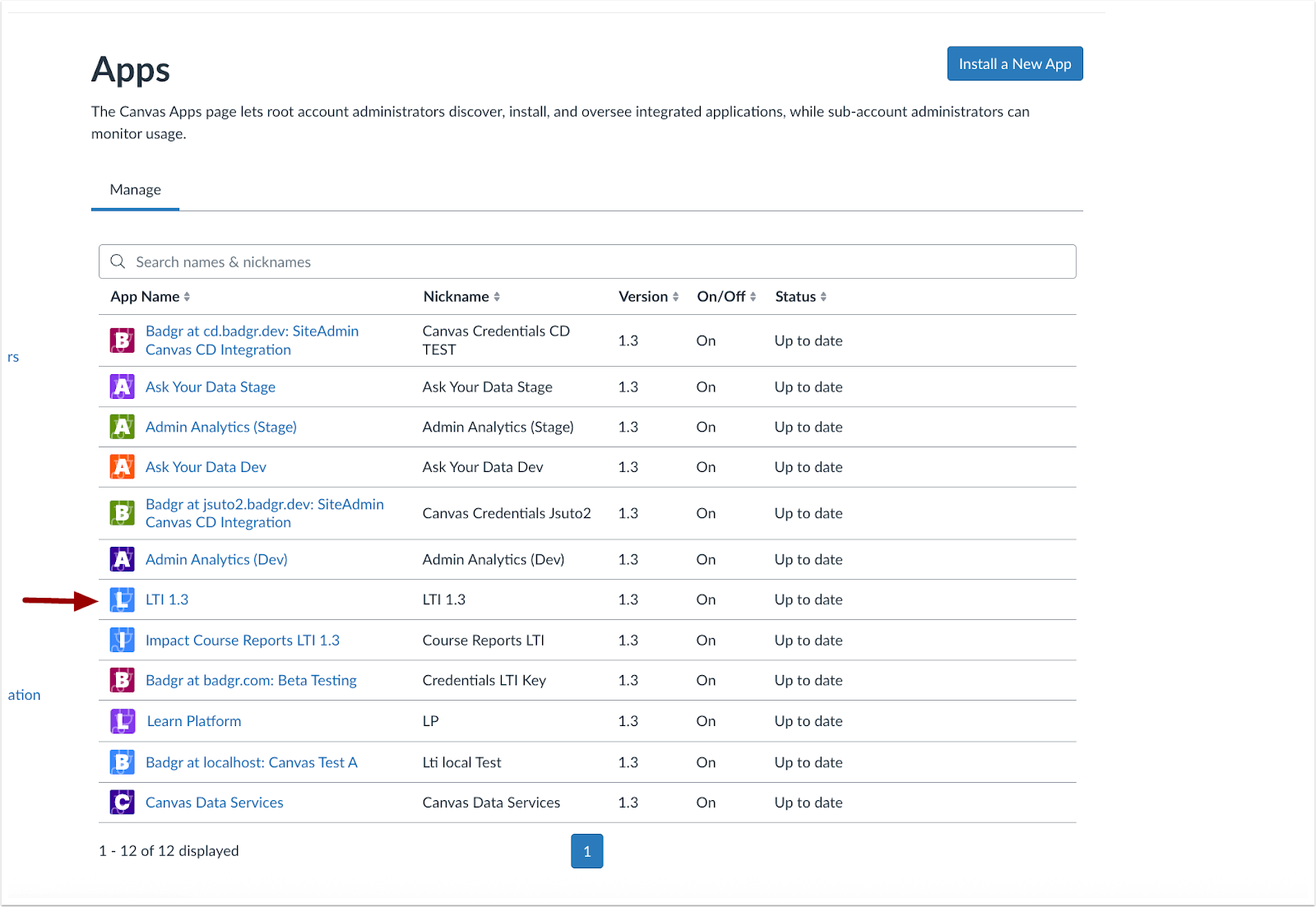
In the Apps page, click the desired App link.

In the Availability and Exceptions tab, click the Create Deployment button.

Click the Add Exception button.

In the Add Availability and Exception modal, select the desired subaccount or course [1]. Then, select availability [2] and click the Save button [3].
Note: Courses can also be searched by course code.
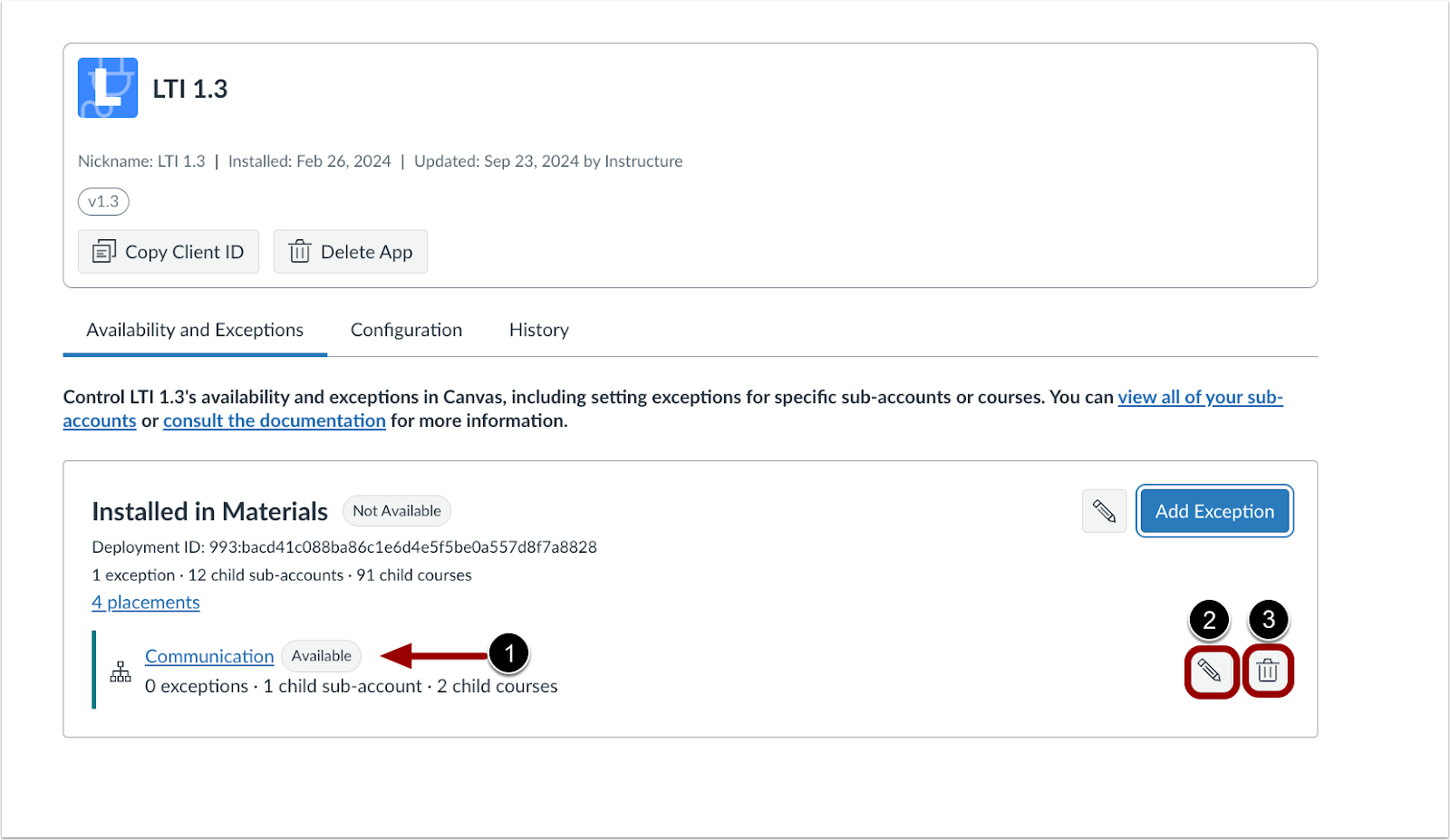
In the Availability and Exceptions tab, admins can view LTI availability of a course or sub-account [1]. Click the Edit button [2] to make changes or the Delete button [2] to remove the exception.
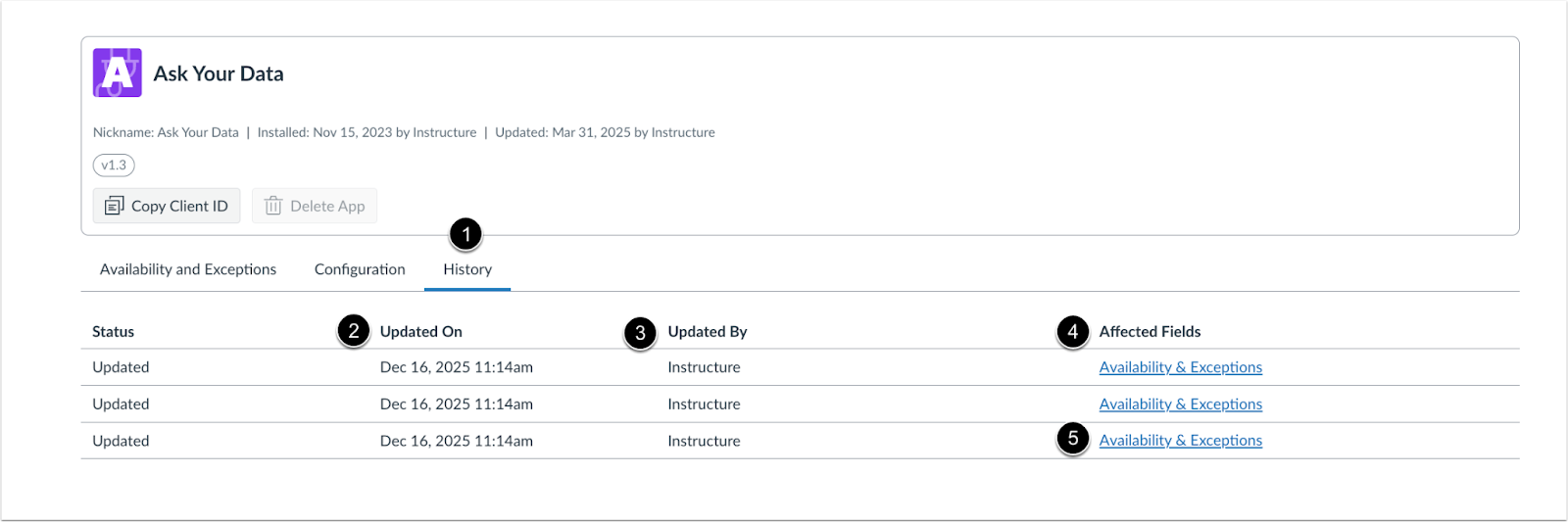
Click the History tab [1] to view when an update occurred [2], who updated it [3] and which fields were affected [4]. To view more details related to the change, click the Affected Fields link [5].
Feature Video
Embed Code:
<iframe width="560px" height="320px" allowfullscreen="true" allow="autoplay *" title="Release Screencast: 2026-01-17 Canvas Apps: Availability and Exceptions" src="https://community.instructuremedia.com/embed/111c1f15-fc4e-4164-bd04-03792230991e" frameborder="0"></iframe>
New Quizzes
Native Canvas Integration available in the Beta Environment
Affected User Roles: All Users
Feature Availability | Beta availability environment only on 2025-12-15. Production environment availability will be announced in a future release. |
|---|
Feature Option to Enable | New Quizzes See the Canvas Feature Option Summary to learn more about Feature Options. |
Enable Feature Option Location & Default Status | Account (Disabled/Unlocked) |
Subaccount Configuration | Yes |
Account/Course Setting to Enable | None |
Permissions | Inherent to user role |
Affects User Interface | No |
Affected Areas | New Quizzes |
Summary
The New Quizzes experience is moved out of its isolation layer (iframe) to run natively within the main Canvas page.
Notes:
- The architectural block (iframe) is removed, but some third-party tools may not work immediately.
- Providers may need to update their tools to interact with the new New Quizzes structure.
- Proctoring solutions may require updates to work seamlessly with the new architecture.
- New Quizzes remains a secure external LTI tool.
- The change only affects the presentation in the browser (iframe removed). There are no other interface changes.
- LTI protocol continues to handle secure communication, grade passback, and authentication. Existing LTI limitations still apply.
This update is planned to be made available in the production environment in February to allow partners additional time for testing and adoption, and will be announced in a future release.
Change Benefit
This architectural change improves accessibility, enhances compatibility with assistive technologies, and lays the foundation for additional feature support in New Quizzes.
SpeedGrader
Performance and Usability Upgrades for SpeedGrader Feature Preview is Concluded
Affected User Roles: Instructors
Feature Option Name to Enable | Performance and Usability Upgrades for SpeedGrader
See the Canvas Feature Option Summary to learn more about Feature Options. |
|---|
Feature Preview User Group | Performance and Usability Upgrades for SpeedGrader |
Enable Feature Option Location & Default Status | Account (Enabled/Unlocked) Course (Enabled) |
Subaccount Configuration | Yes |
Permissions | Inherent to user role |
Affects User Interface | Yes |
Affected Areas | SpeedGrader |
Mobile App Support | Not available |
Free-for-Teacher Availability | Available |
Summary
The Performance and Usability Upgrades for SpeedGrader feature is no longer in feature preview, and the feature option is enabled by default for all institutions, but can still be disabled if needed.
This feature provides foundational improvements to SpeedGrader's backend, delivering faster load times and enhanced stability. Additional updates include:
- A streamlined interface for the Section drop-down menu.
- A clearer, more prominent No Submission alert.
- An improved interface for courses without content.
- Submission Status updated to a drop-down menu.
- Rubrics automatically display in the traditional view.
- Media attachments and submission comments are repositioned, and the delete icon has been updated.
- A Comment Library filter.
- Support for moderated grading
- The Assignment Comment Editor supports images, math, and course links.
- A Multi-Select Sections filter.
Note: The Performance and Usability Upgrades for SpeedGrader user group will close for participation on April 17, 2026. After this date, current members can continue to view information in the group in a read-only format.
Change Benefit
This feature enhances performance for a faster, smoother experience for users handling larger courses or complex assignments. Upgrading the backend technology improves SpeedGrader's ability to manage high-demand tasks more efficiently and reliably.
Feature Workflow

The Sections drop-down menu is redesigned for a more streamlined and user-friendly interface.

The No submission alert is enhanced for better visibility and clarity.

Courses without content display a streamlined interface.

Instructors can edit the submission status using the updated Status drop-down menu.

Rubrics automatically display in the traditional view.
Note: When the Enhanced Rubric feature option is enabled, instructors can choose additional rubric views.
Feature Video
Not Available
Other Updates
Conferences
BigBlueButton Raise Hand Placement and Reporting Updated
Affected User Roles: Admin
Summary
The Raise Hand button is relocated for improved access. For educator accounts, the list of active hand-raises is integrated directly into the User List. See the BigBlueButton guides for more information.
Note: BigBlueButton functions as a third-party integration. Development cycles and feature releases for BigBlueButton are independent of the Canvas LMS release schedule and may not align with specific Canvas update dates.
Developer Keys
Canvas Apps Link [This feature is currently delayed in the production environment and will be available in the next production release.]
Affected User Roles: Admin
Account/Course Setting to Enable | None |
|---|
Permissions | Name of Permission relevant to feature area |
Affects User Interface | Yes |
Affected Areas | Developer Keys |
Related Ideas | None |
Summary
In Developer Keys, the Show Key button is removed for LTI Keys and replaced with a View in Canvas Apps link. The Show Key button remains available for API keys.
Change Benefit
This change streamlines the Developer Keys page by replacing an unused option with a direct link to Canvas Apps, making it easier for admins to manage integrations in the appropriate location.
Feature Workflow
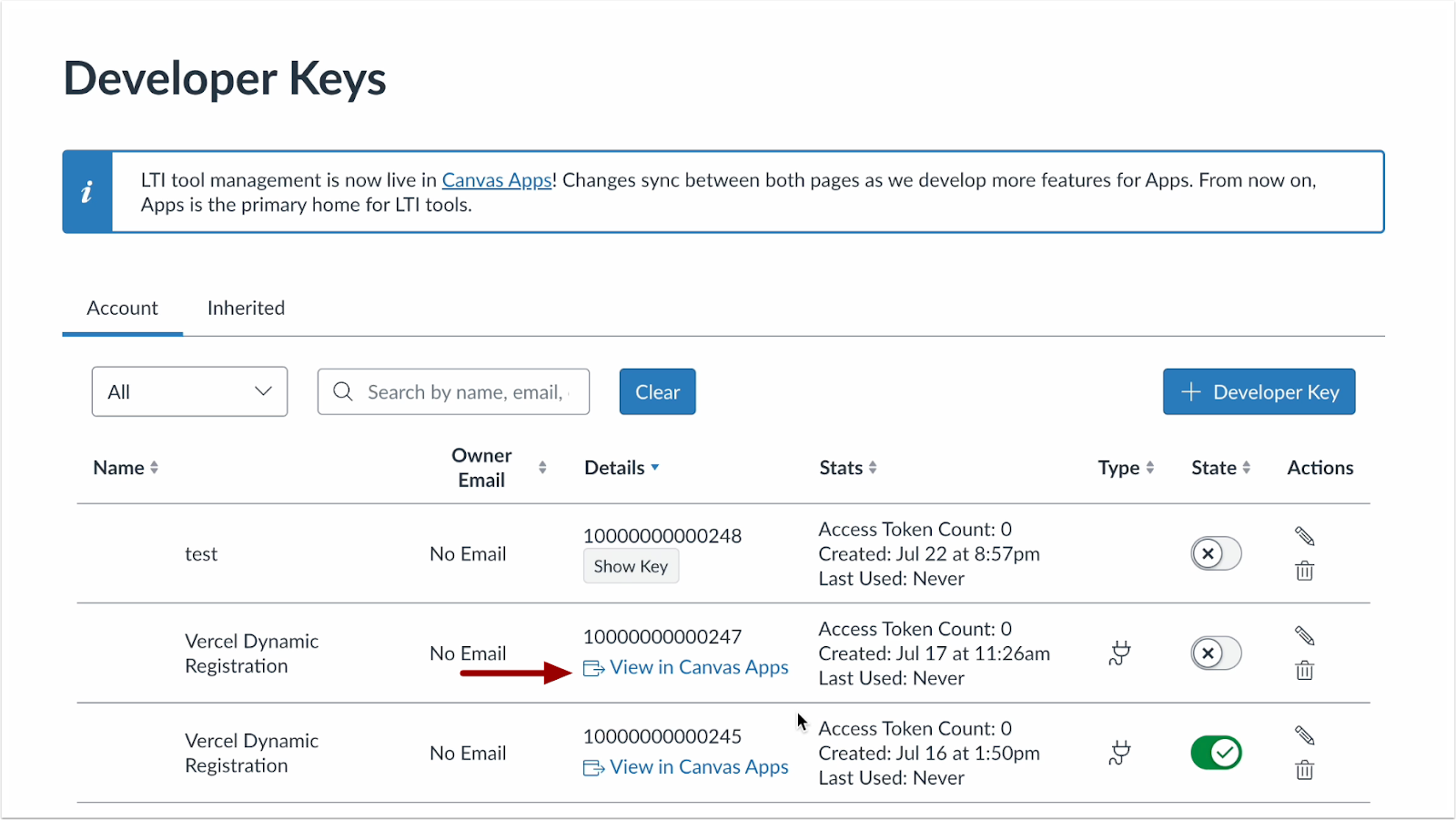
To open the Canvas Apps page, click the View in Canvas Apps link.
Feature Video
Not Available
Deprecation of Limit Argument
Affected User Roles: Admin
Summary
The limit argument is deprecated and removed from user.comment_bank_items_connection. Please use the standard GraphQL connection argument first instead, which provides the same functionality and ensures a consistent experience across all connection fields.
Change Benefit
This change increases stability and predictability across Canvas integrations by adhering to GraphQL best practices.
Deprecation of user.comment_bank_items_count Field
Affected User Roles: Admin
Summary
The user.comment_bank_items_count field is removed. This field previously returned the number of available comment bank items for a user.
A more flexible method is available for retrieving these values using user.comment_bank_items_connection.page_info.total_count. This approach provides a consistent structure for counting items across supported connections, including comment bank items.
Change Benefit
This change improves API consistency and flexibility through standardized counting, simplifying development efforts for applications retrieving user data.
Infrastructure/Platform [Added 2026-01-05]
Content Delivery Network (CDN)
Affected Users: All users
Summary
Most Canvas instances are fronted by the AWS CloudFront CDN. This change does not impact Canvas appearance, domains, or functionality.
A small number of instances receive API GET requests with a body instead of query parameters, which CloudFront does not support. These instances have until April 18, 2026 to update request behavior.
All other instances are included in a gradual rollout during the first two weeks of January and are expected to transition seamlessly.
Instances excluded from the January rollout display a notice on the Developer Keys page.
Change Benefit
Serving Canvas assets through a CDN improves page load performance, network resiliency, and security.
User-Agent Header Enforcement [Production Delayed as of 2026-01-09]
Affected User Roles: Admin
Summary
To strengthen API security and governance, all HTTP requests must include a User-Agent header. Requests without this header are rejected in Beta as of October 1, 2025, and in Production on January 17, 2026.
Change Benefit
This change improves API security, governance, and platform stability through better identification and management of integration traffic.
Change Log
2026-01-23 | Updated SpeedGrader user Group link |
2026-01-20 | Production Delay Canvas Apps: Availability and Exceptions AND Developer Keys
Canvas Apps Link |
2026-01-09 | Delayed User-Agent Header Enforcement
See the Canvas Platform Breaking Changes for more information. |
2026-01-08 | Added This update is not currently available in the production environment. to New Quizzes: Native Canvas Integration |
2026-01-05 | Added Infrastructure/Platform: Content Delivery Network (CDN) |
2025-12-22 | Added Video for Availability and Exceptions |
2025-12-18 | updated User-Agent Header Enforcement production date. Added Upcoming Changes |
2025-12-17 | Added Conferences BigBlueButton Raise Hand Placement and Reporting after initial publish of release. |
|---|
