I'm struggling with how to to handle audio file embeds and would love to advice from the Community. My use case is I my students make their own audio recordings and I want to embed those within the RCE. These are .mp3 files and I don't want to use anything other than Canvas, Studio, or Google Drive.
The problem with audio-only files in Studio and the RCE media player is how much vertical space they take (screenshot embedded):
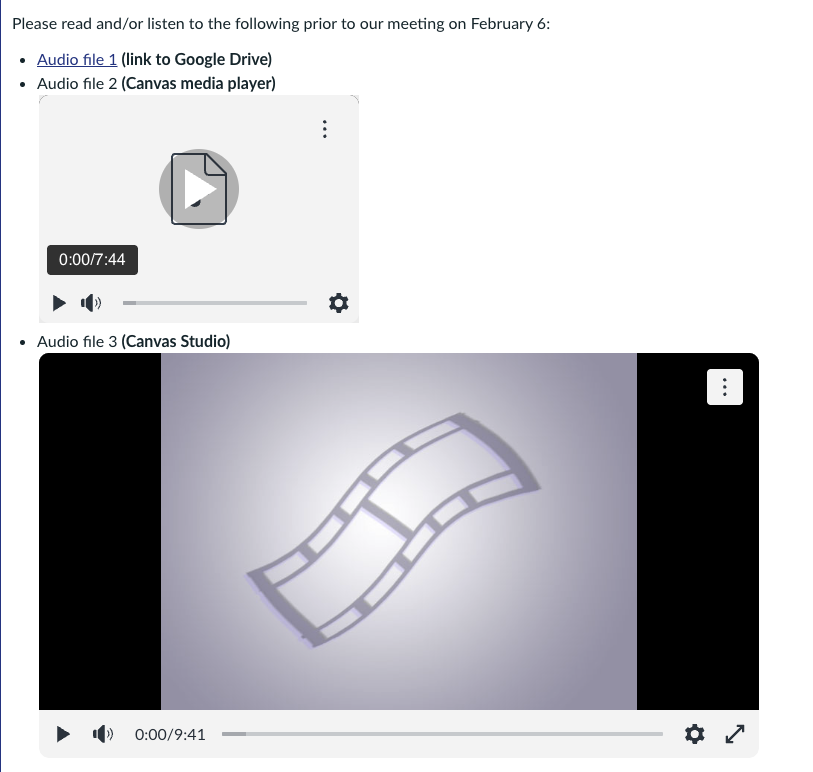
- Audio file 1 is a link to a file in Google Drive can be linked, but that opens in a new browser window
- Audio file 2 uses the RCE's media player. That's embedded (good) but the height of the player takes up too much space.
- This is even worse with Canvas Studio, which I used for Audio file 3. I could add a thumbnail but that won't fix the space that's taken up when the file is playing.
With the two embedded options, changing the height of the player does not fix the issue because it hides the controls.
The best embed option I could find so far is to embed the Google Drive audio file, using some code I found via searching online (I replaced file-ID with the file identifier from Google Drive):
<iframe src="https://drive.google.com/file/d/file-ID/preview" width="400" height="30" loading="lazy"></iframe>

I like how short this is (only 30 pixels in this embedded screenshot for Audio file 4), though the button to view in a new tab is partially hidden.
Instructure has not yet developed a streamlined audio player per a February 27, 2025 Product Blog announcement. Pending that development, how are you providing access to audio files in Canvas?