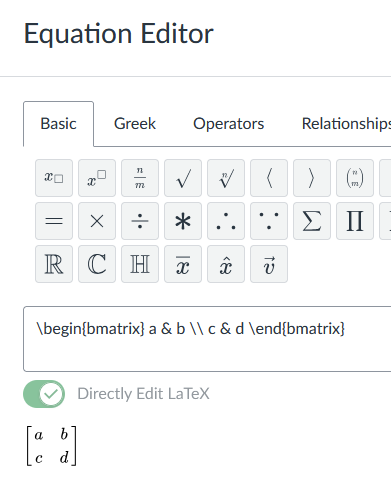
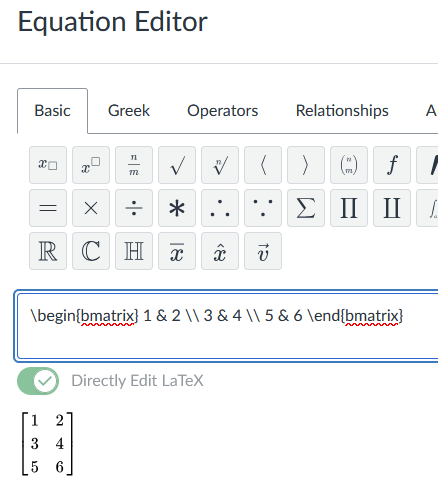
As an instructor, I want to create a matrix of number in a Linear Algebra quiz question.
What are the tools for that?
You can use the Equation Editor in the Rich Content Editor.
While it doesn't seem to have a point and click option to matrices that I can find, you can select to directly edit LaTeX and it will accept the code:
--Editing to add that you can also add random numbers to the matrix with formula questions.
Why was this moved to New Quizzes discussion?
This works on Classic Quizzes (and was where I created the images above).
Is having students read the textbook considered an assignment or an activity if there is no grade but a required date?
Hoping someone can explain for me. We're using pacing to avoid manually dating regular assignments each quarter, but the dates I see are based on when the course was instantiated, while students see dates based on when they were added to the course by [backend software I don't know anything about, presumably]. If I set…
Has anyone else had issues with an influx of duplicate users in Canvas? Ours is currently in the form of an email that already exists, becoming a new user - and not automatically merging with the user ID with the same email that also is linked to our SIS ID correctly as well. For example, user 1 is xyz@gmail.com without a…
Canvas Portfolios provide a powerful platform for students to document their learning journey, reflect on their progress, and showcase competencies. However, in programs where multiple educators are involved in assessment—such as team teaching, moderation, or competency-based evaluation—there are important questions about…
I have a student that was in a tag called "ac" and recently moved him to a different tag, "AC." I did ensure the old tag was removed; however on a canvas PAGE he sees both pages the "ac" and "AC" Canvas Pages. I removed the assigned tags to the page and the one tag to the student thinking maybe if I remove and reassign…