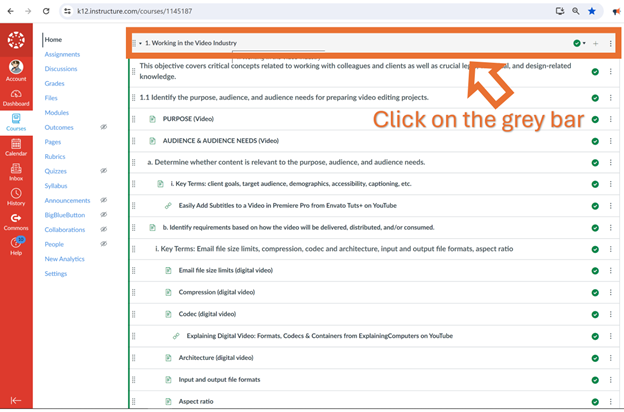
How do I collapse a section so it does not show once the unit is finished?
As a student, in the Modules of a Canvas course, you can click on the grey bar at the top of a module and the module will collapse. That does not make it disappear completely, it just collapses the module so everything below the grey bar is hidden.
Hi @JaniceRose ,If you're talking about Module sections, I think @RecycledElectro covered it all (thank you RecycledElectro!).Please understand that only that course's teacher, TA, instructional designer, or any roles that have teacher permissions can unpublish the modules completely. I recommend reaching out to your teacher about unpublishing it if you guys as student's no longer need access to it, and if it's cluttering your modules page.
I know several teachers purposely leave modules published so students can go back and access resources from previous units in case they need to, however they will move the modules to the bottom instead of leaving it at the top. You can also ask your teacher to do that, too if they don't want to fully unpublish the module.
If you're talking about Assignments or Quizzes in its respective course navigation category, similar rules can apply but it's not the same. Teachers can have their courses set up all differently, so it's best to reach out to your teacher(s) instead.
Feel free to reach out with any additional questions, however I hope this helps!Noah B.
How does one view/sort submissions of specific sections within a Google Assignment, if grading is done through Google vs Speedgrader?
One of the teachers has registered for Google Services in her Canvas account. However, she is unable to link the Google Assignment LTI as an external tool for assignment submissions. The error message is "account not linked" after clicking continue at this step: When I try to go into this teacher's course as an admin and…
Hello Canvas Community, Our institution is planning a migration from Banner to Workday Student and is beginning to evaluate the best approach to integrating Workday with Canvas. Our current integration is: Banner → Ethos API → ILP → Canvas We would like to learn from other institutions that have already migrated to Workday…
The line between "skills" and "competencies" gets blurry fast, and "learning how to learn" means different things depending on who you ask. We're putting together an Educast 3000 podcast episode on all of it, and your questions will shape the conversation. Curious how to teach students to learn independently, what the…
When in Speed Grader, under the "Grade by question" option, the Next Student and Previous Student buttons no longer work.