Instructors invite observers to join their courses. By default, when you are added to a course, you will be able to view the course without having to accept a course invitation.
Note: If you do not receive an invitation to join the course, please contact the instructor.
00:07: How do I accept an invitation to join a course as an observer?
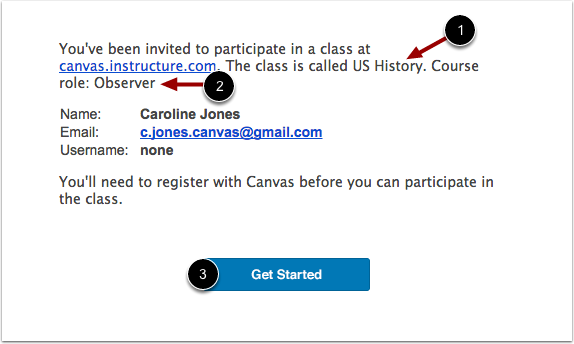
00:11: You will receive the course invitation via email.
00:14: The invitation will include the course name and your user role in the course.
00:18: To complete registration. Click the get started button.
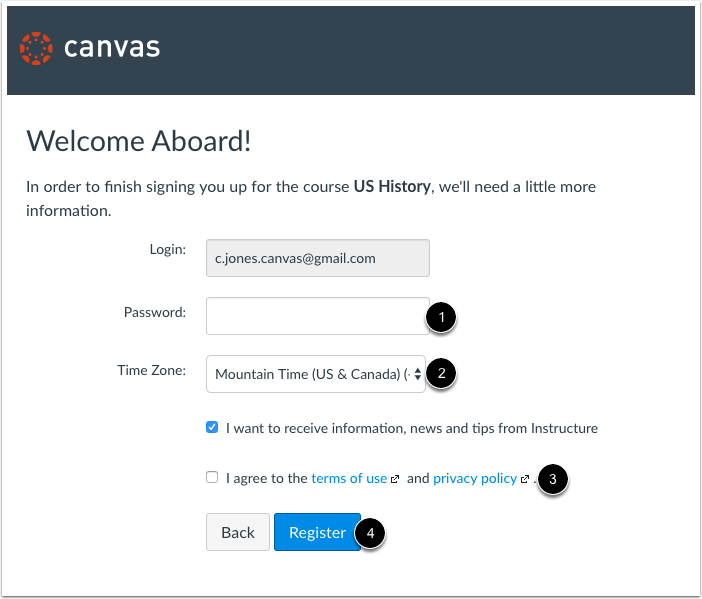
00:23: If you need to set up an account, you will need to create a password.
00:26: Enter your time zone and view the privacy policy.
00:30: Then click the register button.
00:33: This guide covered how to accept an invitation to join a course as an observer.
Receive Email Invitation
You will receive the course invitation via email. The invitation will include the course name [1] and your user role in the course [2]. To complete registration, click the Get Started button [3].
Note: You will have to sign in to Canvas to accept the course invitation. If you don't have a Canvas account you'll be able to create one as part of the course invitation.
Complete Registration
If you need to set up an account, you will need to create a password [1], enter your time zone [2], and view the privacy policy [3]. Then click the Register button [4].