View the video transcript
00:07: How do I log into canvas as an observer?
00:10: In a browser window. Enter your school's canvas URL EG
00:14: School named Dot instructure.com.
00:18: You can access canvas through an institution specific canvas URL.
00:23: Canvas URLs use one of the following structures, your students institutions
00:27: named instructure.com or canvas, your students institutions
00:32: named dot EDU. Some institutions may also allow
00:36: access to Canvas via an institution-specific authentication system
00:40: which redirects to Canvas such as a school Portal or website.
00:45: After locating, your students institutions canvas URL, you can log
00:49: into your canvas account. To log in enter your credentials
00:53: or login information, which may display as your email address, username
00:58: or login ID and password. Then click the login
01:02: link.
01:04: Alternatively, you can navigate to your students, institutions, canvas instance,
01:08: and log into the canvas parent app by scanning, your canvas profile, QR
01:12: code from canvas web.
01:15: This guide covered how to log into canvas as an observer.
Open Canvas
You can access Canvas through an institution-specific Canvas URL. Canvas URLs use one of the following structures: [your student's institution's name].instructure.com or canvas.[your student's institution's name].edu.
You can also locate your student's institution's Canvas URL using the Canvas Parent iOS app or Canvas Parent Android app.
Some institutions may also allow access to Canvas via an institution-specific authentication system which redirects to Canvas, such as a school portal or website.
Note: Canvas Network and Free-For-Teacher accounts do not follow an institution-specific URL structure. Canvas Network accounts can be accessed at learn.canvas.net. Free-For-Teachers accounts can be accessed at canvas.instructure.com.
Log in to Canvas
After locating your student's institution's Canvas URL, you can log in to your Canvas account.
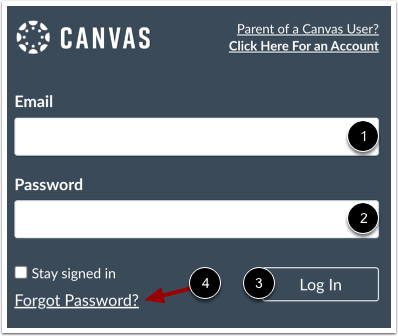
To log in, enter your credentials (or login information) which may display as your email address, username, or login ID [1] and password [2]. Then click the Login link [3].
If needed and depending on your student's institution settings, you may be able to reset your password by clicking the Forgot Password link [4].
Note: The Login page may display differently depending on your student's instititution or if you are logging in via the Canvas Parent app.
Log in to Canvas via QR Code
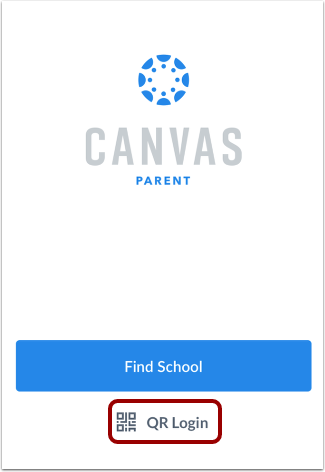
Alternatively, you can navigate to your student's institution's Canvas instance and log in to the Canvas Parent app by scanning your Canvas profile QR code from Canvas web.
View QR log in steps for the Canvas Parent app using an Android or iOS device.