It sure would be nice to have the Submit Assessment button located on the left of the screen directly under the rubric. As it is, we have to scroll over to hit it, which disrupts flow. Is it just me?
Hi there, @dking2 ...
You could submit this as a new idea so that it could be voted on later on. Here are a few resources for you:
Also, please keep in mind that the idea process is going through some changes at the moment. You can read more about that here:
I know this isn't probably a direct answer to your question, but I hope these links will help in some way.
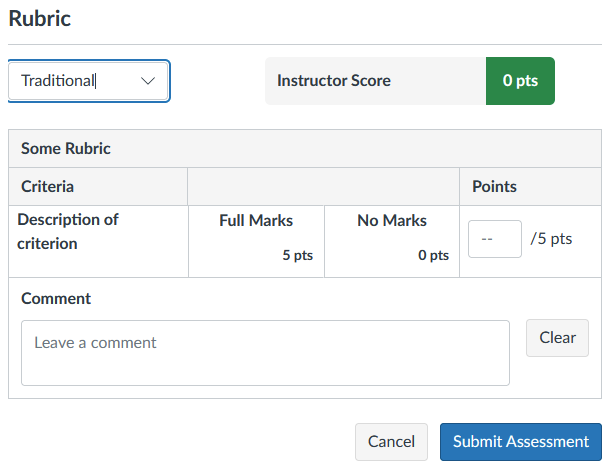
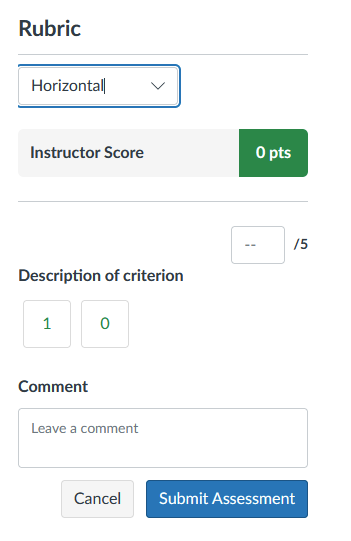
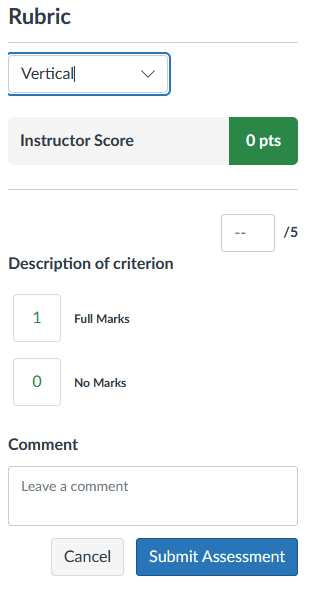
It seems like Canvas may already be looking into options to change how rubrics look like. I can see a dropdown with these 3 options in my testing and beta interfaces, the later two of which move the buttons closer together:
Traditional (same as what I currently see in production):
Horizontal:
And vertical:
So maybe these would show up soon in production?
We are transitioning to Canvas from Moodle, and I'm struggling trying to adapt how I was previously using my rubrics. I'm pretty sure after reading this old archived post that it is still impossible to have assignments "scale" a rubric score to match different point totals for different assignments, but I'm curious whether…
Multiple Rubrics: attach more than one rubric per assessment (Coming in early 2026). Currently mid 2026 and we still do not have this critical feature. Any update on this ?
Hello, I have initiated the MFA authorization on my account. When I try to login into my iPhone or iPad on a browser, I am not able to login I either get a complicated code or I am brought back to generating another new code (a QR code shows up) Can anyone help me sort this please? Thank you
I am currently grading video presentations posted through Studio in a Discussion Board post. Students are required to reply to two presentations as part of the assignment. I use Speed Grader to grade the presentations and comments. Most students turn off the ability to comment on their videos directly, but not all. While…
I am looking into agentic teaching assistants to alleviate some of the workload of my teachers as well as from myself. I discovered the Canvas MCP Server on Github through a colleague of mine. Integrated using Claude Code, it can deploy a number of features into your Canvas courses. This could be such a timesaver. I am…