Canvas deploys contain code changes that are intended to fix bugs, improve performance, and prepare for new features. These deploys take place every two weeks and can be tested in the beta environment before the production deploy date indicated in the title of this document.
Unless otherwise stated, all features in this deploy are available in the Beta environment on 2026-03-12 and the Production environment on 2026-03-25.
Updated Features
Analytics
Course Analytics Performance in Large Courses
Affected User Roles: Instructors
Feature Option Name to Enable | Course and User Analytics See the Canvas Feature Option Summary to learn more about Feature Options. |
|---|
Enable Feature Option Location & Default Status | Account (Enabled/Unlocked) Course (Enabled) |
Subaccount Configuration | Yes |
Account/Course Setting to Enable | None |
Permissions | Analytics-view pages |
Affects User Interface | No |
Affected Areas | Course Analytics |
Summary
Course Analytics supports very large courses, including those with up to approximately 100,000 enrollments.
- In large courses, loading times may be slower than in smaller courses.
- Data visualizations and data tables are available across all analytics tabs for all courses.
- For courses with more than 100,000 enrollments, some browsers may display a message indicating that the page script is taking a long time to respond.
- If this message displays, selecting Wait allows the analytics page to continue loading.
- The maximum course size that may affect loading performance has not yet been fully determined.
Note:
When a Message Students Who message includes more than 2,000 recipients, the recipient list does not expand.
- The total recipient count displays in place of the expanded list.
- Messages can still be sent to all recipients.
- Individual recipients cannot be viewed or removed from the list when the recipient count exceeds 2,000.
Change Benefit
- Improved Course Analytics Access: Allows analytics data, visualizations, and tables to load for courses with very high enrollment counts.
Courses
IgniteAI Table Caption Generation
Affected User Roles: Admin, Instructors
Feature Option to Enable | - IgniteAI Accessibility Remediation for Courses
- Accessibility Checker
See the Canvas Feature Option Summary to learn more about Feature Options. |
Enable Feature Option Location & Default Status | IgniteAI Accessibility Remediation for Courses - Account (Disabled/Locked)
Accessibility Checker - Account (Disabled/Unlocked)
|
Subaccount Configuration | No |
Account/Course Setting to Enable | None |
Permissions | Inherent to user role |
Affects User Interface | Yes |
Affected Areas | Course Accessibility Checker |
Summary
AI-powered remediations in the Accessibility Checker support fixing table captions when the IgniteAI Accessibility Remediation for Courses feature option is enabled at the root account level.
Change Benefit
- Faster Table Captioning: Writing captions for every table manually can be time-consuming.
- AI-Generated Captions: AI can generate table captions automatically, helping resolve accessibility issues faster.
Feature Workflow

Follow these steps to generate and apply a table caption:
- Click the Generate button to create a table caption [1].
- Review the suggested caption [2].
- Click the Add caption button to apply it [3].
Developer Keys
Availability and Exceptions API Scoped Endpoints Available
Affected User Roles: Admin
Feature Option Name to Enable | N/A |
|---|
Enable Feature Option Location & Default Status | N/A |
Subaccount Configuration | N/A |
Account/Course Setting to Enable | None |
Permissions | Developer Keys-Manage |
Affects User Interface | Yes |
Affected Areas | Developer Keys API Key Settings |
Summary
In the Developer Keys API Key Settings, the following scoped endpoints are available for Availability and Exceptions APIs:
- url:GET|/api/v1/accounts/:account_id/lti_registrations/:id/controls
- url:POST|/api/v1/accounts/:account_id/lti_registrations/:id/controls
- url:DELETE|/api/v1/accounts/:account_id/lti_registrations/:id/controls/:id
Change Benefit
- Improved security: Supports API scope enforcement for Availability and Exceptions endpoints, helping institutions better control access.
- Better developer experience: Published API documentation makes it easier to understand and implement Availability and Exceptions integrations.
- Expanded integration support: Enables developers to more easily manage LTI registration controls through secure APIs.
Feature Workflow
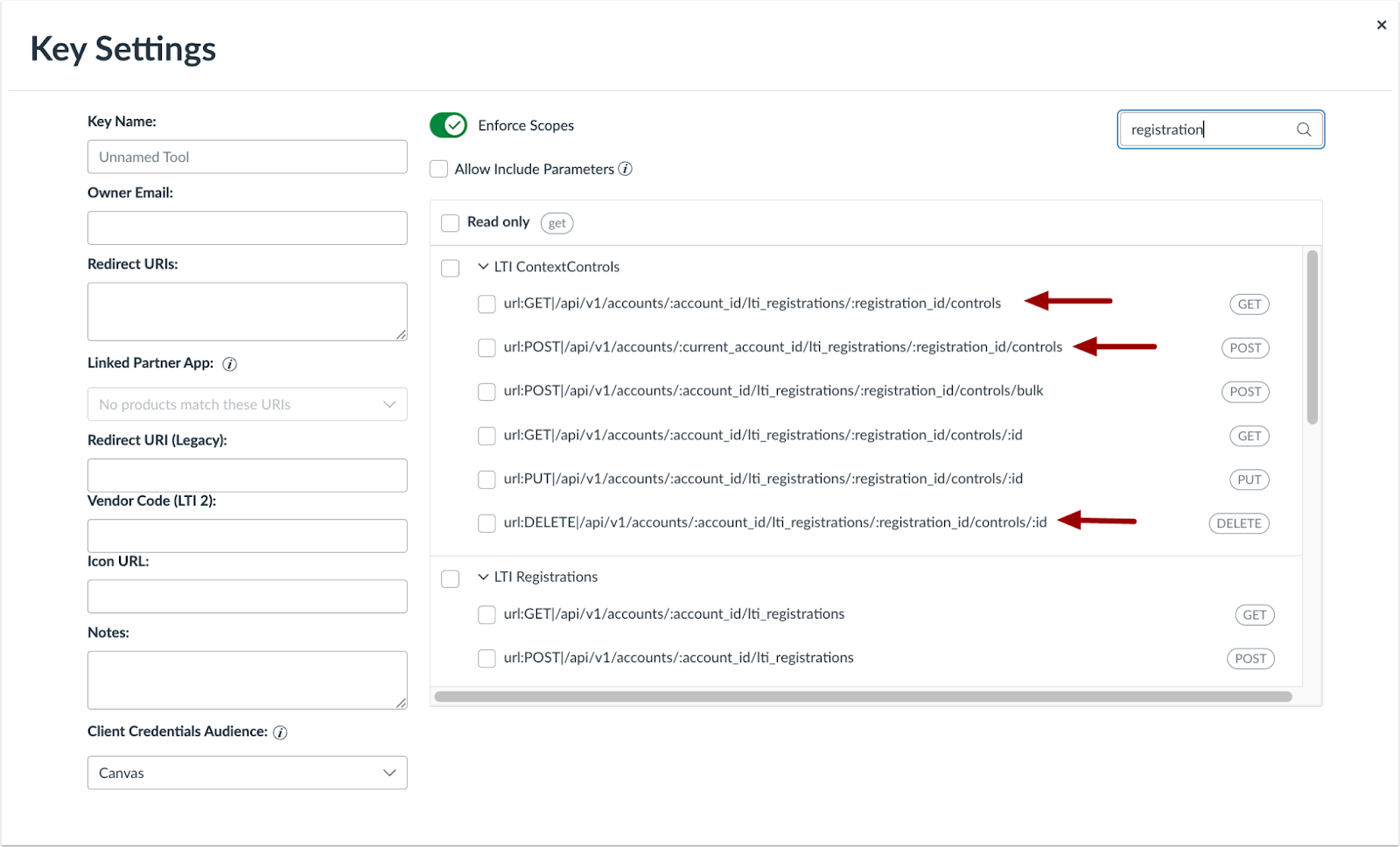
In the Developer Keys API Key Settings, additional scoped permissions are available for Availability and Exceptions APIs.
Other Updates
Canvas Apps
App Detail Breadcrumb
Affected Users: Admin
Affects User Interface | Yes |
|---|
Affected Feature Areas | Canvas Apps Monitor |
Summary
A breadcrumb link is added in Canvas Apps, allowing admins to return to the Monitor tab.
Change Benefit
- App Navigation Improvement: Simplifies navigation by letting users quickly return from app details to the main page.
Feature Workflow
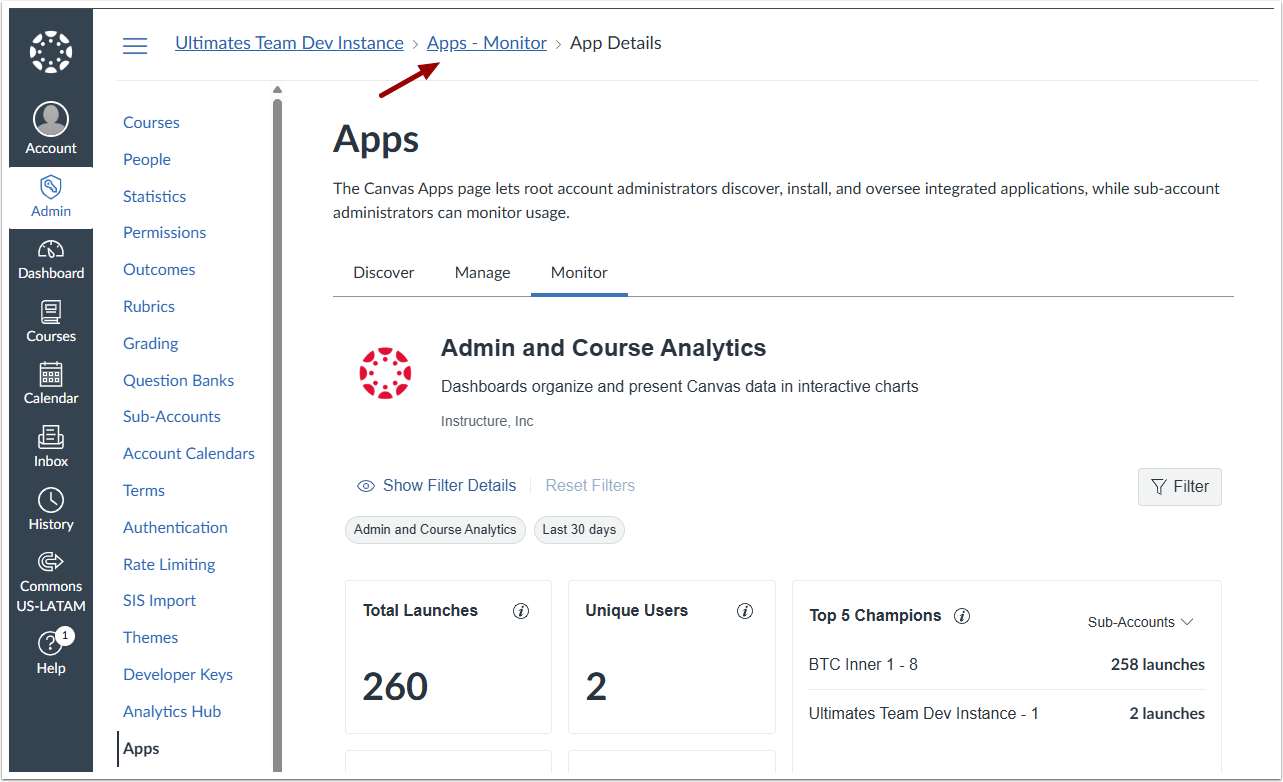
Click the Apps-Monitor breadcrumb to navigate back to the monitor tab from the Apps Details page.
Gradebook
Learning Mastery Gradebook Performance Update
Affected Users: Instructors
Affects User Interface | No |
|---|
Affected Feature Areas | Learning Mastery Gradebook |
Summary
In the Learning Mastery Gradebook (LMGB), outcome rollups are calculated and cached differently to improve scalability and performance.
Note: There is no impact on user interface or workflow. This update affects backend processes only.
Change Benefit
- Improved reliability: LMGB loads consistently, even in courses with many students, assignments, and outcomes.
- Faster performance: Outcome rollups are calculated and cached more efficiently, reducing load times.
- Supports large courses: Instructors can use LMGB in medium-to-large courses without timeouts or failures.
- Better adoption: More instructors can rely on LMGB for tracking mastery without performance issues.
SIS Imports
Upload Progress in Real Time
Affected Users: Admin
Affects User Interface | Yes |
|---|
Affected Feature Areas | SIS Import Page |
Summary
When uploading a file for a SIS import on the SIS Imports page, an upload progress bar will display. Previously, SIS Import file uploads that took more than 1 minute to upload would cause the SIS Import to fail without user feedback.
Change Benefit
- Fixes a type of SIS Import failure: Prevents SIS Import failures errors when files take longer than 1 minute to upload.
- Quickly See Upload Progress: Monitor your file upload in real time with a visible progress bar.
