Canvas deploys contain code changes that are intended to fix bugs, improve performance, and prepare for new features. These deploys take place every two weeks and can be tested in the beta environment before the production deploy date indicated in the title of this document.
Unless otherwise stated, all features in this deploy are available in the Beta environment on 2026-01-15 and the Production environment on 2026-01-28.
Updated Features
Canvas Apps
Tool Icon Customization for Admins
Affected User Roles: Admin
Feature Option Name to Enable | N/A |
|---|
Enable Feature Option Location & Default Status | N/A |
Subaccount Configuration | N/A |
Account/Course Setting to Enable | None |
Permissions | - Account level settings-manage
- LTI registrations-manage
|
Affects User Interface | Yes |
Affected Areas | Install App modals and edit pages |
Summary
Admins can update the icon for tools installed using manual, paste JSON, or JSON URL methods from both the Discover and Manage pages in the Apps page.
Change Benefit
This update allows admins to replace broken tool icons on the Apps page, ensuring all tools display correctly without contacting the tool provider.
Feature Workflow

When installing or editing a tool, admins can use the Tool Icon URL field to update the tool’s icon.
Courses
Concluded Courses and Blueprint Associations
Affected User Roles: Admin, Instructors
Account/Course Setting to Enable | None |
|---|
Permissions | Blueprint courses-add/edit/associate/delete |
Affects User Interface | Yes |
Affected Areas | Blueprint Course Associations |
Summary
Courses that are associated with a Blueprint display a Concluded status pill.
Change Benefit
This update improves transparency for Blueprint associations by clearly identifying concluded courses.
Feature Workflow
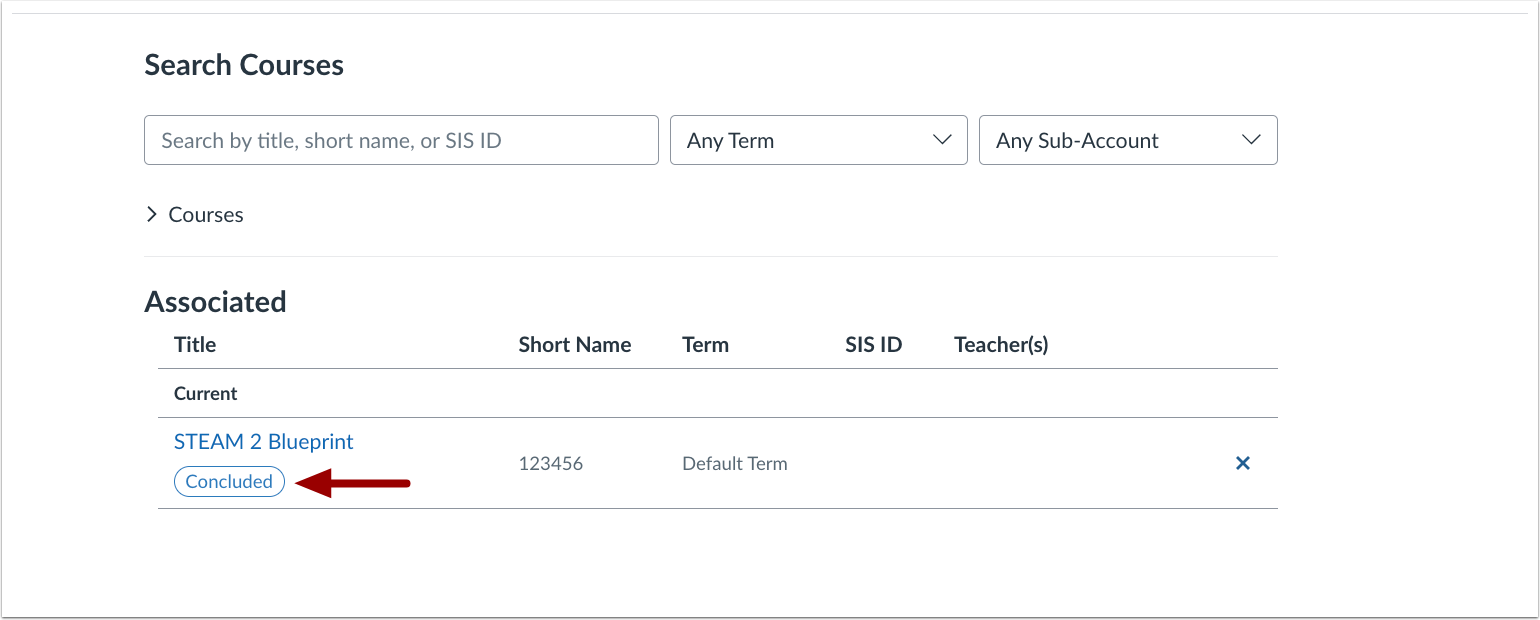
A Concluded status pill displays when a concluded course is associated with a Blueprint course.
Gradebook
Gradebook Status Icons for Accessibility
Affected User Roles: Instructor
Feature Option Name to Enable | N/A |
|---|
Enable Feature Option Location & Default Status | N/A |
Subaccount Configuration | No |
Account/Course Setting to Enable | None |
Permissions | Inherent to user role |
Affects User Interface | Yes |
Affected Areas | Gradebook and Gradebook Settings |
Summary
A View status for colorblindness option is added to Gradebook Settings. When enabled, a symbol displays next to each status in the Gradebook to provide an additional visual indicator.
Change Benefit
This update improves accessibility by adding icon indicators to view status colors, making statuses easier to distinguish without relying on color alone.
Feature Workflow

In the Gradebook settings, click the View status for colorblindness checkbox.

The gradebook status icons display in the gradebook.
Reports
User Access Token Report Options Updated
Affected User Roles: Admin
Feature Option Name to Enable | N/A |
|---|
Enable Feature Option Location & Default Status | N/A |
Subaccount Configuration | N/A |
Account/Course Setting to Enable | None |
Permissions | Reports-manage |
Affects User Interface | Yes |
Affected Areas | User Access Token Configure Report Modal |
Summary
The Configure Report modal for User Access Tokens is updated with options to exclude deleted and expired tokens and to include tokens from deleted users.
Change Benefit
This update clarifies previously unclear report behavior, giving admins more control over which User Access Tokens are included and ensuring accurate, intentional reporting.
Feature Workflow

When configuring a User Access Token report, admins can choose to exclude deleted and expired tokens and/or include tokens from deleted users.
Settings
Granular User Profile Editing Permissions
Affected User Roles: Admin
Feature Option Name to Enable | N/A |
|---|
Enable Feature Option Location & Default Status | N/A |
Subaccount Configuration | N/A |
Account Setting to Enable If only course or account, delete the other word | Users can edit their profile |
Permissions | Inherent to user role |
Affects User Interface | Yes |
Affected Areas | Account Level Personal Profile Settings |
Summary
In Account Settings, when the Users can edit their profile setting is enabled, admins can configure more granular permissions that allow users to edit their title, bio, and profile links.
Change Benefit
This update gives admins greater control over user profile information by allowing them to enable or restrict editing of titles, bios, and profile links independently.
Feature Workflow
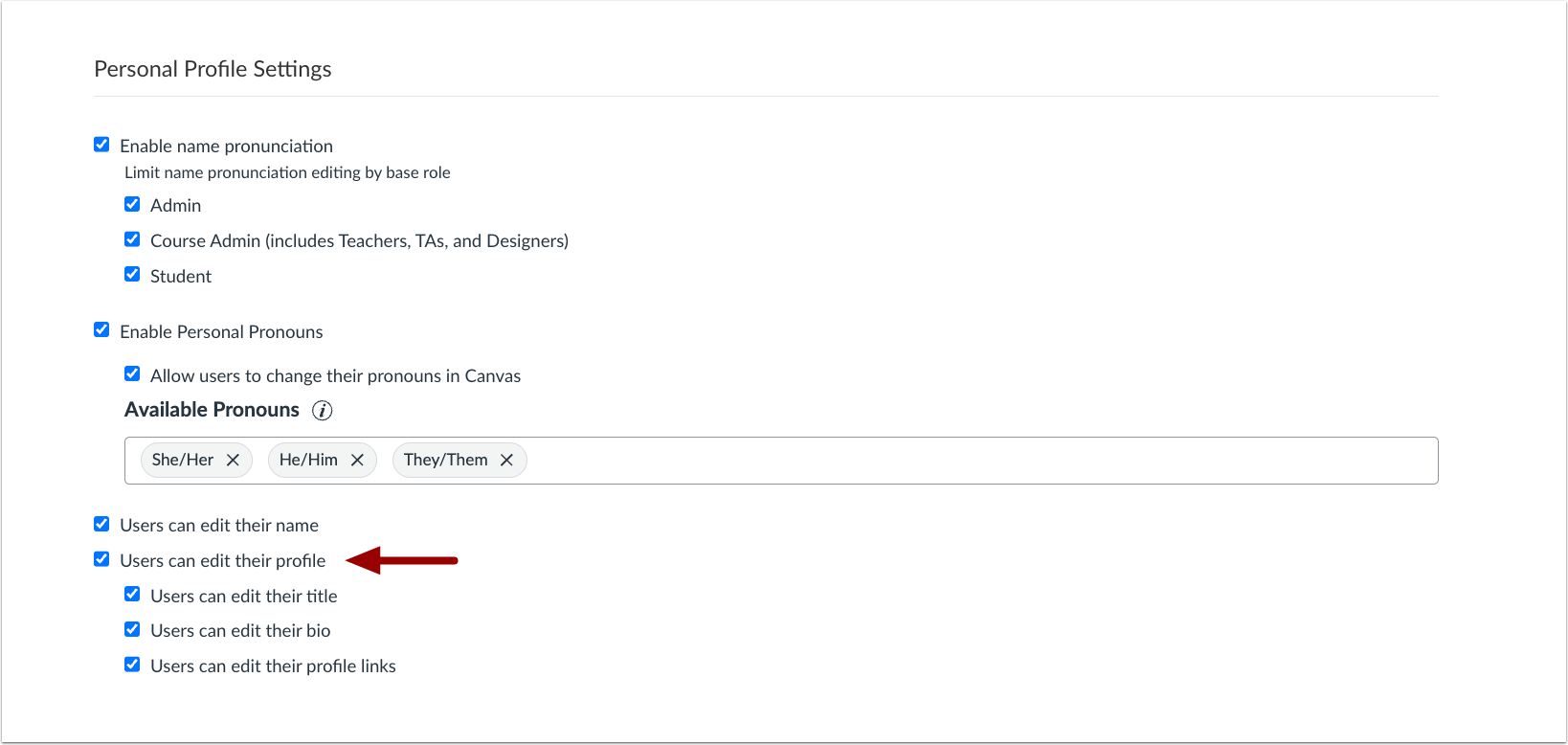
When the Users can edit their profile setting is enabled, admins can allow users to edit their title, bio, and/or profile links.
Other Updates
ePortfolios
Canvas Native ePortfolios Legacy Transition Updates
Affected Users: All users
Affects User Interface | Yes |
|---|
Affected Feature Areas | ePortfolios, User Navigation |
Related resources | |
Summary
To improve clarity around ePortfolio options and support the transition to newer solutions, legacy indicators, in-product banners,added to Canvas native ePortfolios.
Sunset Banner: Canvas native ePortfolios display an in-product banner indicating that the product is planned to sunset on June 30, 2026. Users can export their ePortfolio content by following the instructions in the linked guide.
Legacy Naming Indicator: Canvas native ePortfolios are labeled as (Legacy), with the designation appended to the product name in the User Navigation.
Change Benefit
This update helps users clearly understand which ePortfolio tools are legacy solutions, reduces confusion during the transition to newer offerings, and provides improved export options to support content retention and portability.
Feature Workflow

The User Navigation includes a Legacy label [1], and a banner displays on the ePortfolio page [2].
Feature Preview Change Log updates
A Feature Preview indicates a feature option in active development. Users who opt in to the feature and join the Community user group can help improve the feature through direct feedback.
IgniteAI Generator for Rubrics
Updated Rubric Point Distribution
Affected Users: Instructor
Feature Preview to Enable | - IgniteAI Generator for Rubrics
- Enhanced Rubrics
|
|---|
Feature Preview User Group | IgniteAI Generator for Rubrics |
Enable Feature Option Location & Default Status | - Account (Disabled/Locked)
- Course (Disabled)
See the Canvas Feature Option Summary to learn more about Feature Options. |
Subaccount Configuration | Yes |
Permissions | Inherent to user role |
Affects User Interface | Yes |
Affected Areas | Assignment Create Rubric Page |
Mobile App Support | Not available |
Free-for-Teacher Availability | Not available |
Summary
When the Enhanced Rubrics and AI Rubric Generator feature options are enabled, the Points per Criterion field is replaced with a Total Points field, and points are evenly distributed across all criteria. When creating a rubric, assignment points automatically sync to the Total Points field.
Change Benefit
This update simplifies rubric scoring by allowing instructors to set a single total point value for the rubric. Points are automatically and evenly distributed across all criteria, reducing manual calculations, ensuring consistent scoring, and making rubric setup faster and less error-prone.
Feature Workflow

When creating a rubric, the Points per Criterion field is changed to Total Points.

The total points are distributed evenly across criterion.
