You can export your entire portfolio as a ZIP file, including:
- All project descriptions
- Categories and skills
- Teammates and tags
- Links
- All uploaded files
Note: When your data is ready, you will receive an email notification. Data download files are only available for 14 days.
Open Settings
Log in to your account.
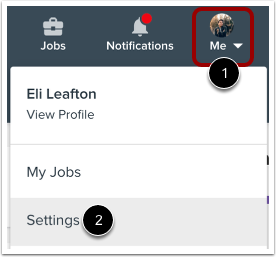
To open your user settings, click the Me icon in the toolbar [1], and then click the Settings link [2].
Open Privacy
In Account Navigation, click the Privacy link.
Download Your Data
In the Download Your Data section, you can request a download of your data to keep for your records or to use with another service. To start the download process, click the Submit a request link. When your data is ready, you will receive an email notification. Return to this page to download your data.
Note: Data download files are only available for 14 days.