Canvas deploys contain code changes that are intended to fix bugs, improve performance, and prepare for new features. These deploys take place every two weeks and can be tested in the beta environment before the production deploy date indicated in the title of this document. Institutions are responsible for conducting thorough evaluations of their custom CSS/JS with each release and deploy to assess potential impacts.
Fixed bugs are located in Known Issues.
Unless otherwise stated, all features in this deploy are available in the Beta environment on 2025-11-20 and the Production environment on 2025-12-03.
Subscribe to the release notes page to be notified of new release and deploy notes
For Canvas Platform Service changes (API, GraphQL, Canvas Data), please see the appropriate page in the Change Log
Updated Features
Developer Keys
Link Partner App Drop-Down Menu
Admin
Feature Option Name to Enable | N/A |
|---|
Enable Feature Option Location & Default Status | N/A |
Subaccount Configuration | N/A |
Account/Course Setting to Enable | None |
Permissions | Developer Keys-manage |
Affects User Interface | Yes |
Affected Areas | Developer Keys-API Keys |
Related Ideas | None |
Summary
In the API Key Settings, a Link Partner App drop-down menu is available. When an admin adds or updates a redirect URI:
- Canvas checks for matching partner apps.
- If no matches are found: The UTID field stays blank.
- If one match is found: The UTID is automatically filled in.
- If multiple matches are found: The admin can choose the correct partner app from the dropdown. Nothing is selected automatically.
Change Benefit
This update provides Instructure with visibility into API usage, supporting more informed decisions about where to focus future development work.
Feature Workflow

Key Settings Linked Partner App Drop-Down Menu
In the API Key Settings, a Linked Partner App drop-down menu is available.
Modules
Bulk Unpublish Supports Simple Published Files
Instructor
Feature Option Name to Enable | N/A |
|---|
Enable Feature Option Location & Default Status | N/A |
Subaccount Configuration | N/A |
Account/Course Setting to Enable | None |
Permissions | Inherent to user role |
Affects User Interface | No |
Affected Areas | Modules, Files |
Related Ideas | None |
Summary
Files are unpublished through the Unpublish Module and All Items feature when in a simple published state with no other restrictions. Other availability states, such as scheduled availability or link-only, remain published. Previously, all files remained published regardless of their state.
Change Benefit
This update allows faster management of published files in bulk while preserving complex availability settings, reducing manual effort for content adjustments.
Settings
Feature Options are Sortable
All Users
Feature Option Name to Enable | N/A |
|---|
Enable Feature Option Location & Default Status | N/A |
Subaccount Configuration | N/A |
Account/Course Setting to Enable | None |
Permissions | Inherent to user role |
Affects User Interface | Yes |
Affected Areas | Account Settings, Course Settings, User Settings |
Related Ideas | None |
Summary
Users can sort feature options by feature, status or state.
Change Benefit
This update makes it easier for users to quickly find and manage feature options by allowing them to sort by feature name, status, or state, improving efficiency and reducing time spent navigating long lists.
Feature Workflow

Feature Option Ascending and Descending Icons
Click the Ascending and Descending icons to filter by Feature [1], Status [2] or State [3].
Back to Table of Contents
Feature Preview Change Log Updates
A Feature Preview indicates a feature option in active development. Users who opt in to the feature and join the Community user group can help improve the feature through direct feedback.
Performance and Usability Upgrades for SpeedGrader
Moderated Grading Support
Instructor
Feature Preview to Enable | - Performance and Usability Upgrades for SpeedGrader
- Moderated Grading
|
|---|
Feature Preview User Group | Upgrades for SpeedGrader |
Enable Feature Option Location & Default Status | Performance and Usability Upgrades for SpeedGrader - Account (Disabled/Unlocked)
- Course (Disabled)
Moderated Grading - Account (Disabled/Unlocked)
- Course (Disabled)
See the Canvas Feature Option Summary to learn more about Feature Options. |
Subaccount Configuration | Yes |
Permissions | Inherent to user role |
Affects User Interface | Yes |
Affected Areas | SpeedGrader |
Mobile App Support | Not available |
Free-for-Teacher Availability | Available |
Related Ideas | None |
Summary
Moderators can access and use the upgraded SpeedGrader.
Change Benefit
This update allows Moderators to access the upgraded SpeedGrader, making the grading process faster and more streamlined.
Feature Workflow
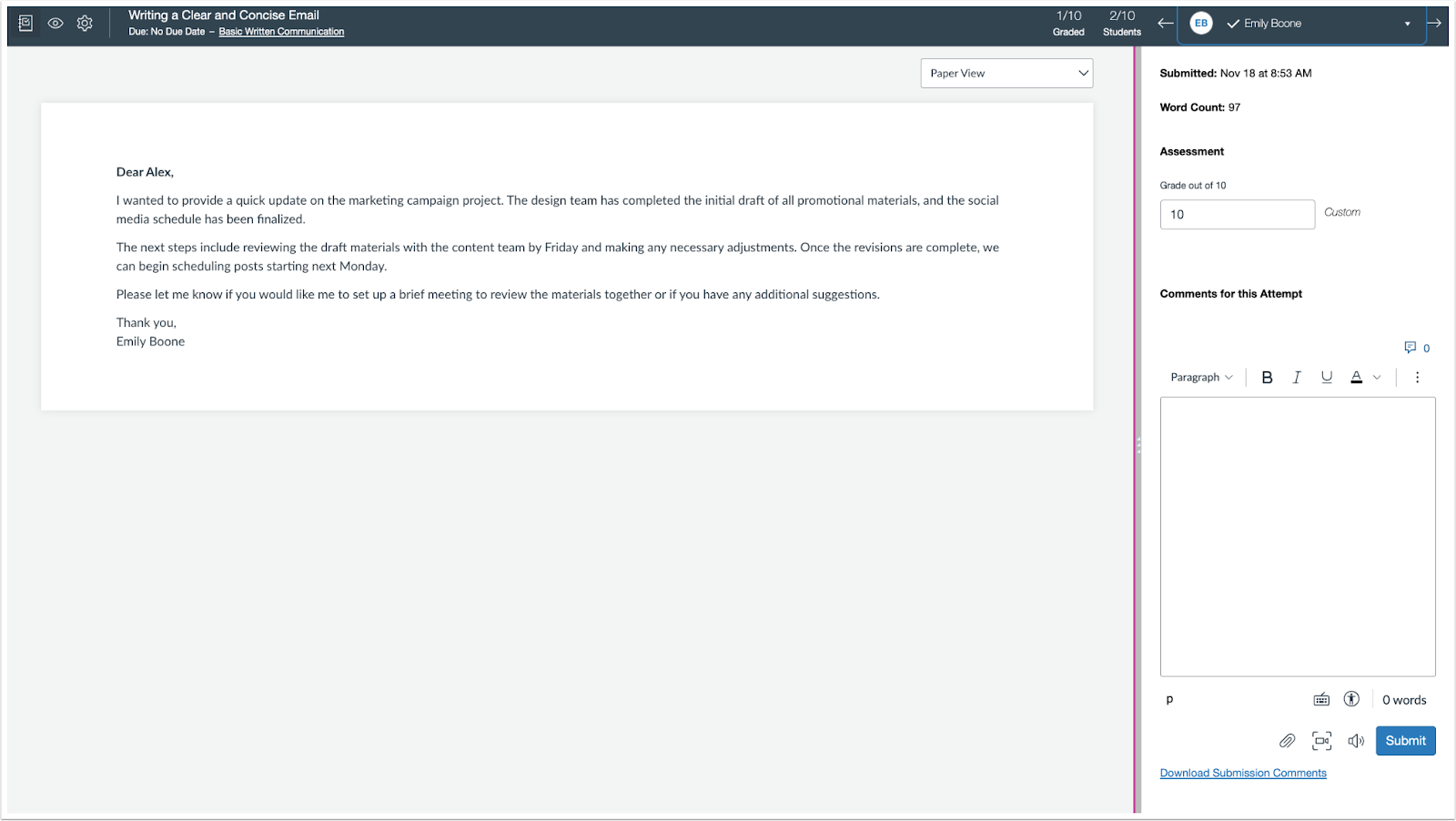
Moderator View of SpeedGrader
Moderators view the upgraded SpeedGrader.
Back to Table of Contents
