Canvas deploys contain code changes that are intended to fix bugs, improve performance, and prepare for new features. These deploys take place every two weeks and can be tested in the beta environment before the production deploy date indicated in the title of this document. Institutions are responsible for conducting thorough evaluations of their custom CSS/JS with each release and deploy to assess potential impacts.
Fixed bugs are located in Known Issues.
Unless otherwise stated, all features in this deploy are available in the Beta environment on 2025-10-09 and the Production environment on 2025-10-22.
Subscribe to the release notes page to be notified of new release and deploy notes
For Canvas Platform Service changes (API, GraphQL, Canvas Data), please see the appropriate page in the Change Log
Updated Features
SIS Imports
SIS Imports Retain Existing IDs
Admin
Feature Option Name to Enable | N/A |
|---|
Enable Feature Option Location & Default Status | N/A |
Subaccount Configuration | N/A |
Account/Course Setting to Enable If only course or account, delete the other word | None |
Permissions | Inherent to user role |
Affects User Interface | No |
Affected Areas | SIS Imports |
Related Ideas | None |
Summary
When importing section CSVs using the SIS importer, SIS imports consistently retain existing integration_id values when the integration_id column is not included in the import file. Previously, some import types (such as Sections) removed the integration_id while others (such as Users) kept it. To remove an integration_id, it must be explicitly unset using the change_sis_id.csv file.
Change Benefit
This update ensures consistent handling of integration_id across all SIS import types and prevents accidental data loss.
Back to Table of Contents
Other Updates
User Interface
Dialogs and Modals Updated to InstUI
All Users
Affects User Interface | No |
|---|
Affected Feature Areas | Dialog and Modals |
Related Ideas | None |
Summary
The dialog component is updated to use React and InstUI.
Change Benefit
This update improves stability and consistency across the interface.
Back to Table of Contents
Feature Preview Change Log Updates
A Feature Preview indicates a feature option in active development. Users who opt in to the feature and join the Community user group can help improve the feature through direct feedback.
Performance and Usability Upgrades for SpeedGrader
Assignment Comment Editor Supports Images, Math, and Course Links
Instructor
Feature Preview to Enable | Performance and Usability Upgrades for SpeedGrader |
|---|
Feature Preview User Group | Upgrades for SpeedGrader User Group |
Enable Feature Option Location & Default Status | Account (Disabled/Unlocked) Course (Disabled) See the Canvas Feature Option Summary to learn more about Feature Options. |
Subaccount Configuration | Yes |
Permissions | Inherent to user role |
Affects User Interface | Yes |
Affected Areas | SpeedGrader |
Mobile App Support | Not available |
Free-for-Teacher Availability | Available |
Related Ideas | None |
Summary
The Rich Content Editor in assignment comments now includes Image Upload, Math Editor, and Course Link options.
Change Benefit
This update allows instructors to provide richer, more detailed feedback in assignment comments by including images, mathematical notation, and direct links to course content, improving clarity and engagement for students.
Feature Workflow
Assignment Comment Rich Content Editor
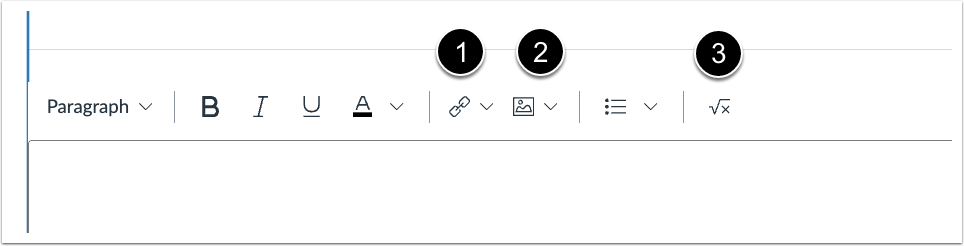
In the SpeedGrader assignment comments Rich Content Editor, instructors can add an external or course link [1], upload an image [2] or insert an equation [3].
Back to Table of Contents
