Canvas deploys contain code changes that are intended to fix bugs, improve performance, and prepare for new features. These deploys take place every two weeks and can be tested in the beta environment before the production deploy date indicated in the title of this document. Institutions are responsible for conducting thorough evaluations of their custom CSS/JS with each release and deploy to assess potential impacts.
Fixed bugs are located in Known Issues.
Unless otherwise stated, all features in this deploy are available in the Beta environment on 2025-08-14 and the Production environment on 2025-08-27.
Subscribe to the release notes page to be notified of new release and deploy notes
For Canvas Platform Service changes (API, GraphQL, Canvas Data), please see the appropriate page in the Change Log
Other Updates
Back to Table of Contents
Course Import
Warning for IMSCC Files with Turnitin Assignments
Admin Instructor
Affects User Interface | Yes |
|---|
Affected Feature Areas | Course Import |
Related Ideas | None |
Summary
When importing content, a warning displays for previously exported IMSCC files containing Turnitin-enabled assignments to indicate potential import issues.
Note: Turnitin configurations are now removed from assignments without the integration during export, preventing import errors.
Change Benefit
This change provides instructors with early visibility into potential import issues, helping them identify and address Turnitin-enabled assignments before attempting a course import.
Feature Workflow
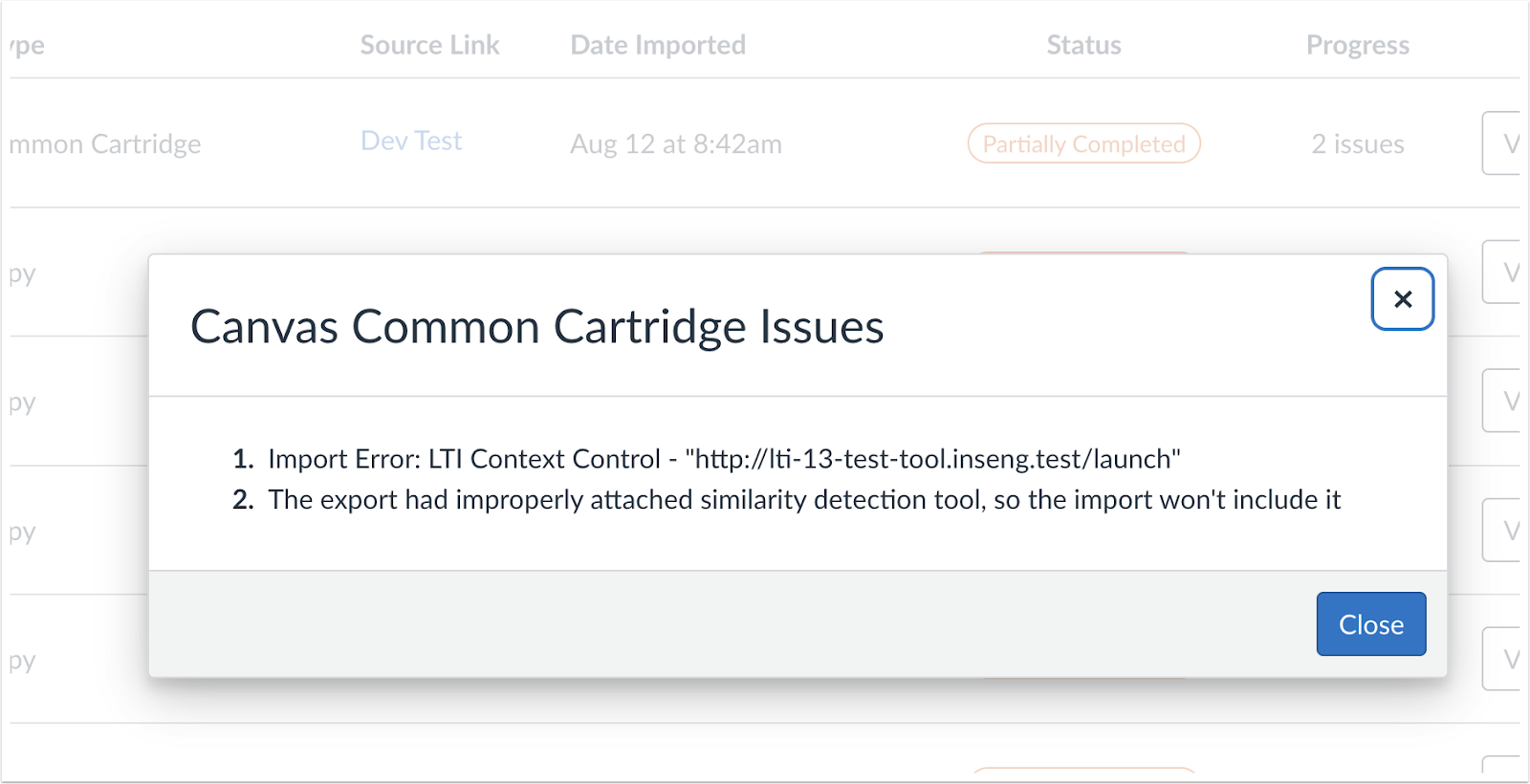
Canvas Common Cartridge Issues Modal
A warning is displayed for IMSCC files exported with Turnitin-enabled assignments to alert users of potential import problems.
Feature Preview Change Log Updates
Back to Table of Contents
Differentiation Tags
Tags Visible in Student Details Tray
Admin Instructor
Feature Preview to Enable | Differentiation Tags |
|---|
Account Setting to Enable | Differentiation Tags |
Feature Preview User Group | Differentiation Tags |
Enable Feature Option Location & Default Status | Account (Disabled/Unlocked) See the Canvas Feature Option Summary to learn more about Feature Options. |
Subaccount Configuration | Yes |
Permissions | Manage Differentiation Tags |
Affects User Interface | Yes |
Affected Areas | People |
Mobile App Support | Not available |
Free-for-Teacher Availability | Not available |
Related ideas | View Differentiation Tags on student profile page |
Summary
Differentiation Tags associated with a student display in the details tray.
Change Benefit
This enhancement streamlines access to important information, helping instructors make informed decisions without navigating away from their current view.
Feature Workflow
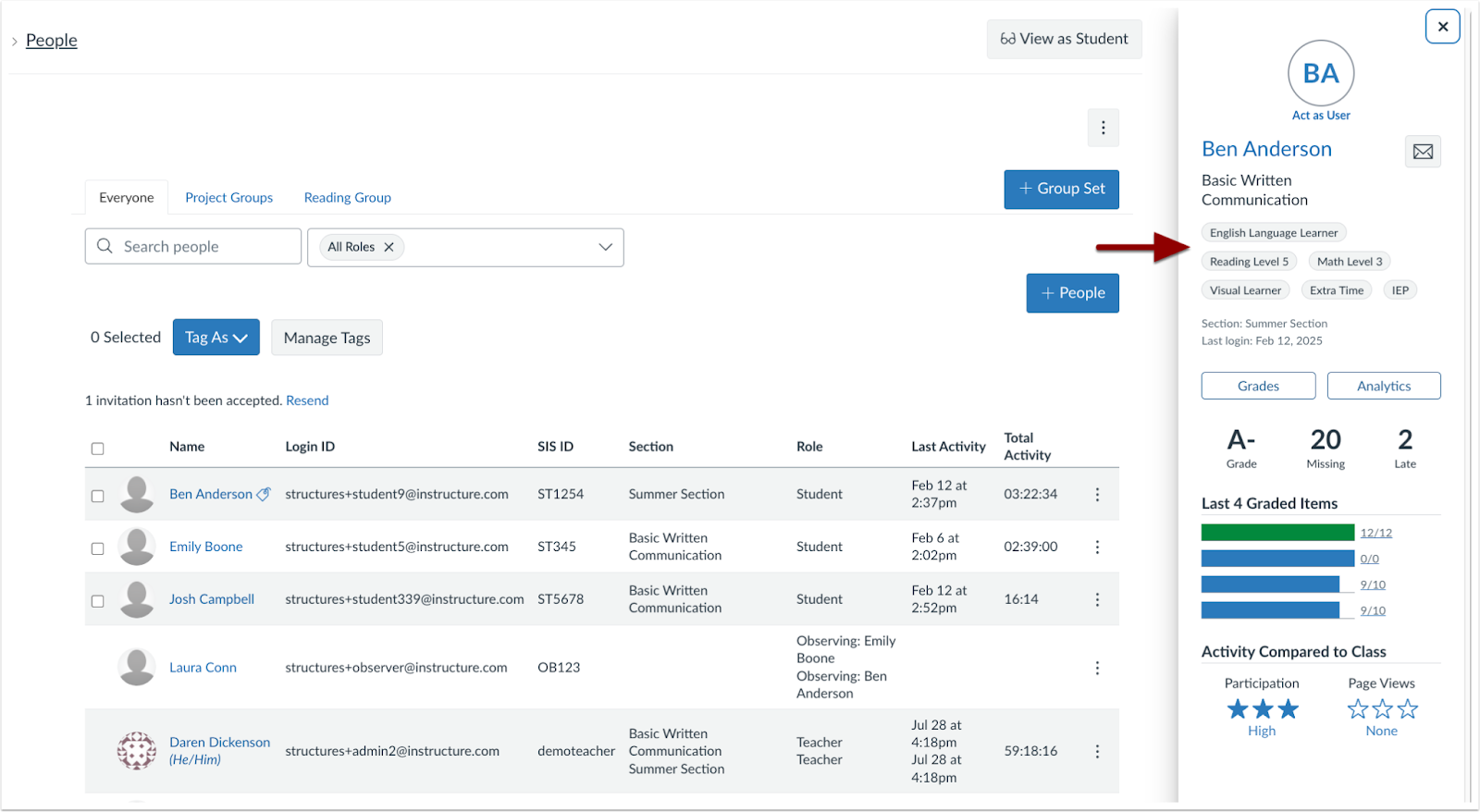
Student Details Tray
Instructors can view Differentiation Tags directly in the Student Details tray.
Gradebook Filter Available
Admin Instructor
Summary
In the Gradebook, instructors can filter by Differentiation Tags.
Change Benefit
This update improves clarity and allows instructors to quickly locate and filter by the desired Differentiation Tags.
Feature Workflow
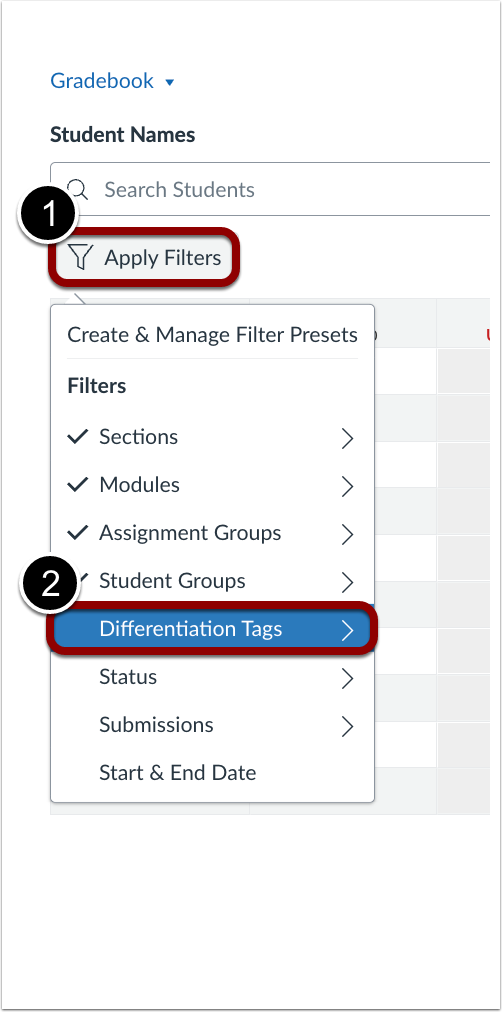
Enhanced Gradebook Filter
In the Gradebook, click the Apply Filters button [1]. Then, click the Differentiation Tags option [2].
Bulk Remove Tags
Admin Instructor
Feature Preview to Enable | Differentiation Tags |
|---|
Account Setting to Enable | Differentiation Tags |
Feature Preview User Group | Differentiation Tags |
Enable Feature Option Location & Default Status | Account (Disabled/Unlocked) See the Canvas Feature Option Summary to learn more about Feature Options. |
Subaccount Configuration | Yes |
Permissions | Manage Differentiation Tags |
Affects User Interface | Yes |
Affected Areas | People |
Mobile App Support | Not available |
Free-for-Teacher Availability | Not available |
Related ideas | Bulk remove Differentiation Tags |
Summary
In the People page, the Tag As dropdown menu supports bulk tag removal.
Note: Only one tag can be removed at a time.
Change Benefit
This update streamlines managing tags for multiple students by enabling quick, bulk removal of shared tags, improving efficiency and reducing the chance of errors.
Feature Workflow
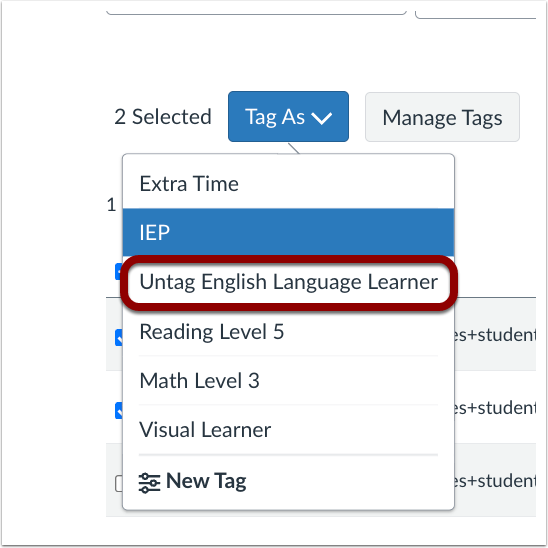
Tag As Menu Untag Options
When multiple students with shared tags are selected, the dropdown displays an Untag option for those tags.
Note: Only one tag can be removed at a time
