Canvas deploys contain code changes that are intended to fix bugs, improve performance, and prepare for new features. These deploys take place every two weeks and can be tested in the beta environment before the production deploy date indicated in the title of this document. Institutions are responsible for conducting thorough evaluations of their custom CSS/JS with each release and deploy to assess potential impacts.
Fixed bugs are located in Known Issues.
Unless otherwise stated, all features in this deploy are available in the Beta environment on 2025-07-31 and the Production environment on 2025-08-13.
Subscribe to the release notes page to be notified of new release and deploy notes
For Canvas Platform Service changes (API, GraphQL, Canvas Data), please see the appropriate page in the Change Log
Updated Features
Back to Table of Contents
Groups
Tooltip Added for Group Section Requirement Setting
Instructor
Feature Option Name to Enable | N/A |
|---|
Enable Feature Option Location & Default Status | N/A |
Subaccount Configuration | N/A |
Account/Course Setting to Enable | None |
Permissions | Manage Groups |
Affects User Interface | Yes |
Affected Areas | Groups |
Related Ideas | None |
Summary
In the Groups page, when the Require group members to be in the same section checkbox is selected a tooltip displays.
Change Benefit
This tooltip provides additional context to help users understand what the setting does.
Feature Workflow
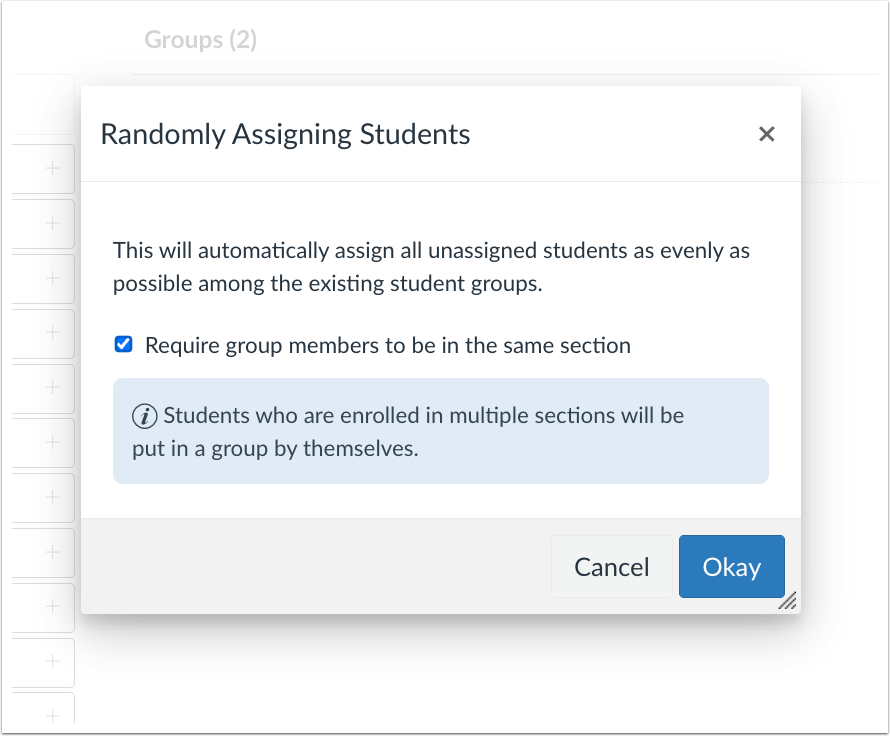
Randomly Assigning Students Checkbox Tooltip
When the Require group members to be in the same section checkbox is selected, a tooltip displays.
Notifications
Improved Visibility for Course Activity Definitions
All Users
Feature Option Name to Enable | N/A |
|---|
Enable Feature Option Location & Default Status | N/A |
Subaccount Configuration | N/A |
Account/Course Setting to Enable | None |
Permissions | Inherent to user role |
Affects User Interface | Yes |
Affected Areas | User Notifications |
Related Ideas | None |
Summary
The User Notifications page displays Course Activity definitions directly on the page, rather than as tooltips shown on hover.
Change Benefit
This change improves visibility and accessibility by allowing users to view Course Activity definitions without needing to hover over text, making the information easier to access across all devices.
Feature Workflow
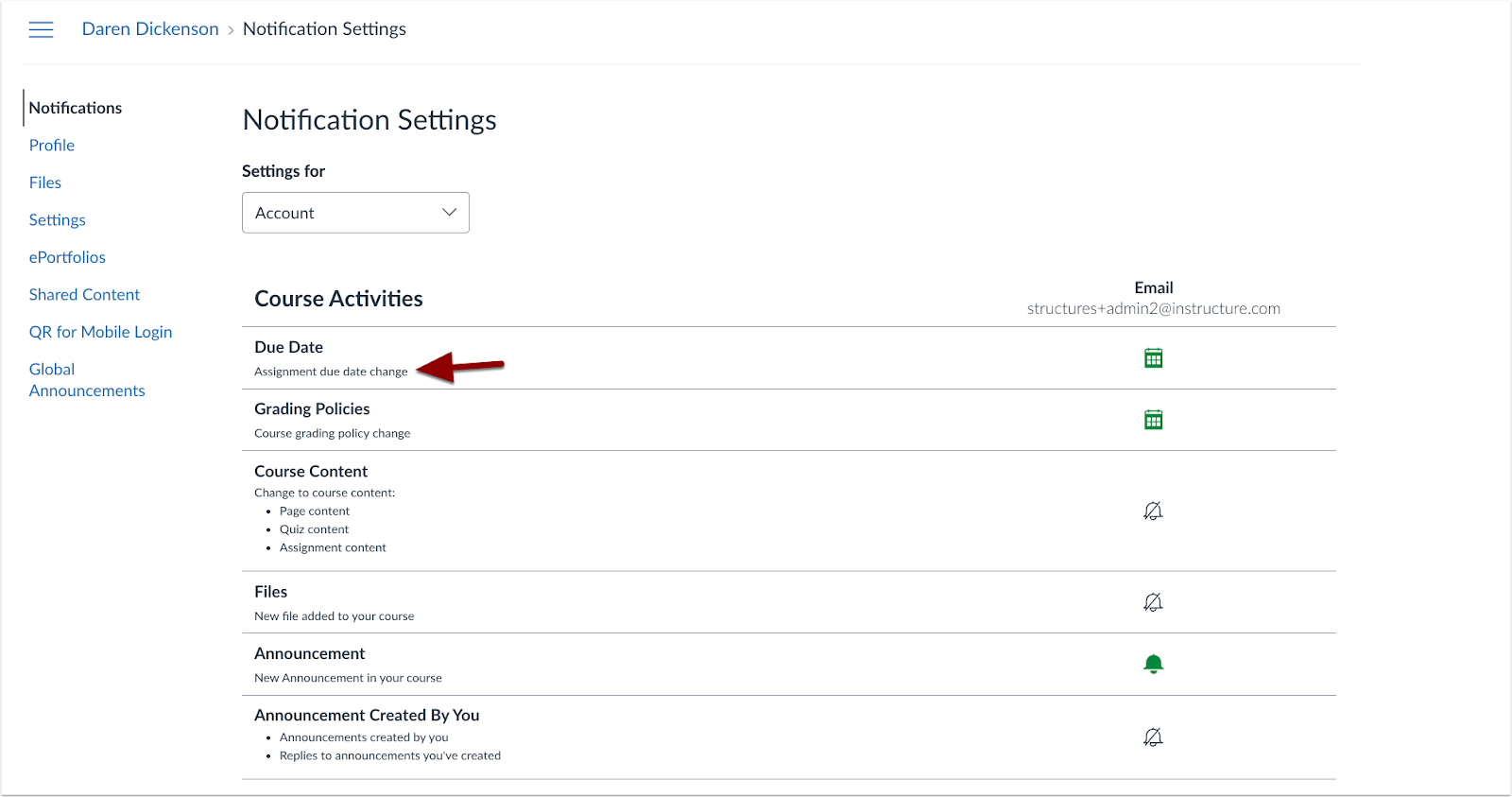
Notification Descriptions
Course Activity definitions display directly on the User Notifications page.
Feature Preview Change Log Updates
Back to Table of Contents
Differentiation Tags
CSV Import Support
Instructor
Feature Preview to Enable | Differentiation Tags |
|---|
Account Setting to Enable | Differentiation Tags |
Feature Preview User Group | Differentiation Tags |
Enable Feature Option Location & Default Status | Account (Disabled/Unlocked) See the Canvas Feature Option Summary to learn more about Feature Options. |
Subaccount Configuration | Yes |
Permissions | Manage Differentiation Tags |
Affects User Interface | Yes |
Affected Areas | People |
Mobile App Support | Not available |
Free-for-Teacher Availability | Not available |
Related Ideas | Support CSV Import for Tag Creation in Large Courses |
Summary
Instructors can create and assign Differentiation Tags via CSV import.
Note: To view the Upload CSV button, at least one tag must be added.
Change Benefit
This change streamlines the setup process, making it more efficient, particularly for courses with large enrollments or multiple sections.
Feature Workflow
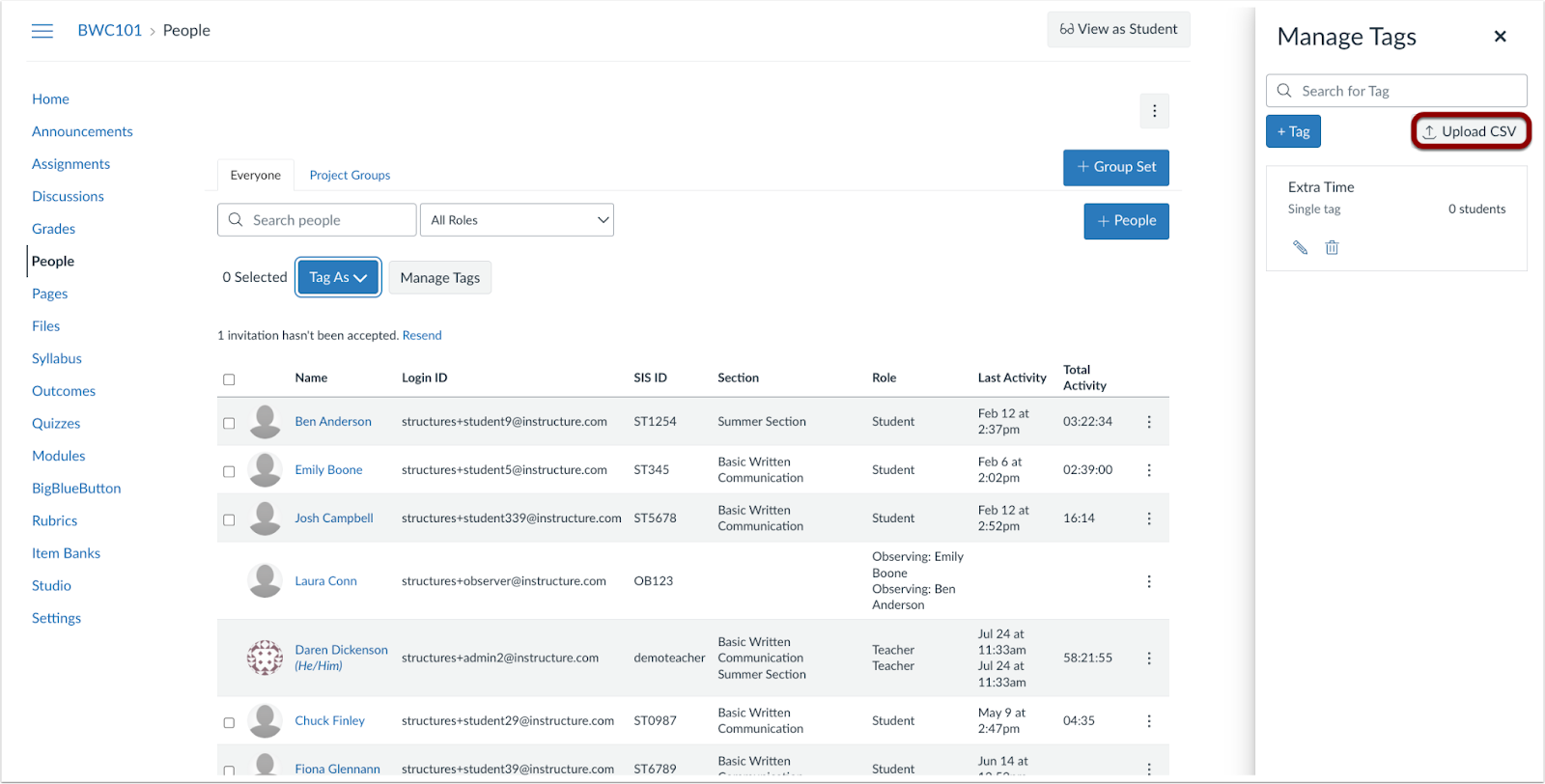
Manage Tags Tray Upload CSV Button
In the Manage Tags tray, click the Upload CSV button.
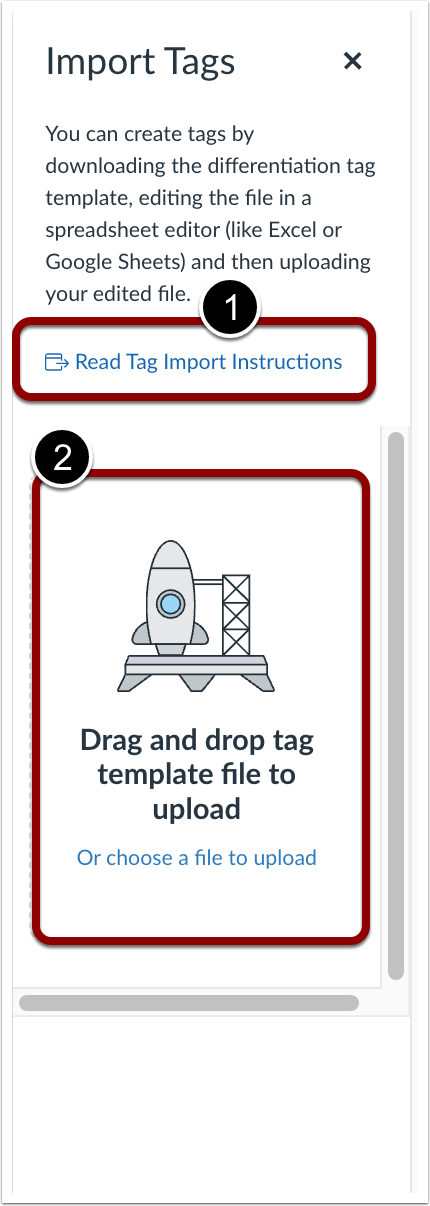
Import Tags Tray
To learn more about import instructions, click the Read Tag Import Instructions link [1]. To upload a CSV file, drag and drop the desired file or upload a file [2] in the tray.
Tag Display Updated in Differentiation Modal
Instructor
Feature Preview to Enable | Differentiation Tags |
|---|
Account Setting to Enable | Differentiation Tags |
Feature Preview User Group | Differentiation Tags |
Enable Feature Option Location & Default Status | Account (Disabled/Unlocked) See the Canvas Feature Option Summary to learn more about Feature Options. |
Subaccount Configuration | Yes |
Permissions | Manage Differentiation Tags |
Affects User Interface | Yes |
Affected Areas | People |
Mobile App Support | Not available |
Free-for-Teacher Availability | Not available |
Related Ideas | None |
Summary
The Differentiation Tag modal displays tags horizontally. When tags reach the modal’s maximum width, they wrap to the next line. If the modal’s height is exceeded, tags become scrollable.
Change Benefit
This change streamlines the setup process, making it more efficient, particularly for courses with large enrollments or multiple sections.
Feature Workflow
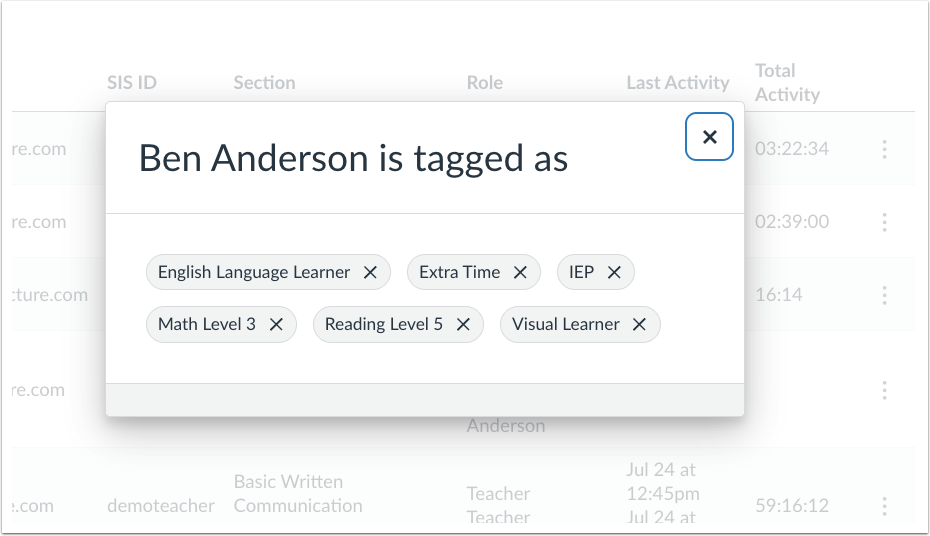
Student Tag Modal
In the Differentiation tag modal, tags display horizontally.
Assignment Details Tag Display Update
Instructor
Feature Preview to Enable | Differentiation Tags |
|---|
Account Setting to Enable | Differentiation Tags |
Feature Preview User Group | Differentiation Tags |
Enable Feature Option Location & Default Status | Account (Disabled/Unlocked) See the Canvas Feature Option Summary to learn more about Feature Options. |
Subaccount Configuration | Yes |
Permissions | Manage Differentiation Tags |
Affects User Interface | Yes |
Affected Areas | Assignments |
Mobile App Support | Not available |
Free-for-Teacher Availability | Not available |
Related Ideas | Update due date information to say Tags instead of Groups |
Summary
When viewing an assignment’s details with multiple due dates, the For column displays Tag(s) when a due date is assigned to specific tags. Previously, this column displayed the text as Groups when assigned to a tag.
Change Benefit
This change helps reduce confusion and ensures instructors can easily understand and manage who the assignment applies to.
Feature Workflow
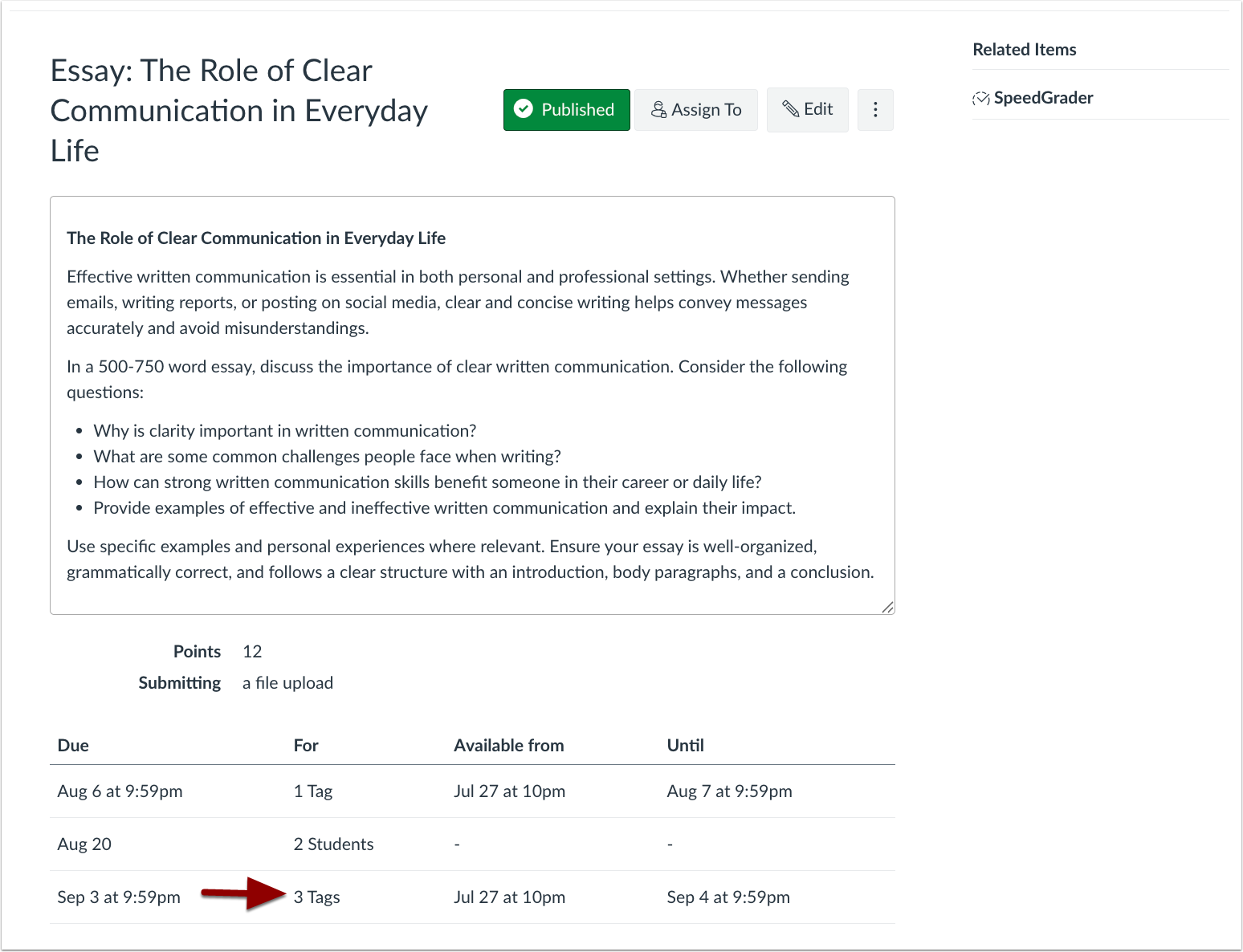
Assignment Details Page Tags Display
Assignments assigned to tags display as Tag(s) in the For column instead of Groups.
Role and Tag Filter Update
Instructor
Feature Preview to Enable | Differentiation Tags |
|---|
Account Setting to Enable | Differentiation Tags |
Feature Preview User Group | Differentiation Tags |
Enable Feature Option Location & Default Status | Account (Disabled/Unlocked) See the Canvas Feature Option Summary to learn more about Feature Options. |
Subaccount Configuration | Yes |
Permissions | Manage Differentiation Tags |
Affects User Interface | Yes |
Affected Areas | People |
Mobile App Support | Not available |
Free-for-Teacher Availability | Not available |
Related Ideas | Filter by Tag on the Course-Level People Page |
Summary
In the People page, the role filter is updated with the latest version of InstUI and supports filtering by tags. Instructors can also apply multiple filters.
Change Benefit
This update improves user management by allowing instructors to filter by tags and select multiple roles, making it easier to locate specific users.
Feature Workflow
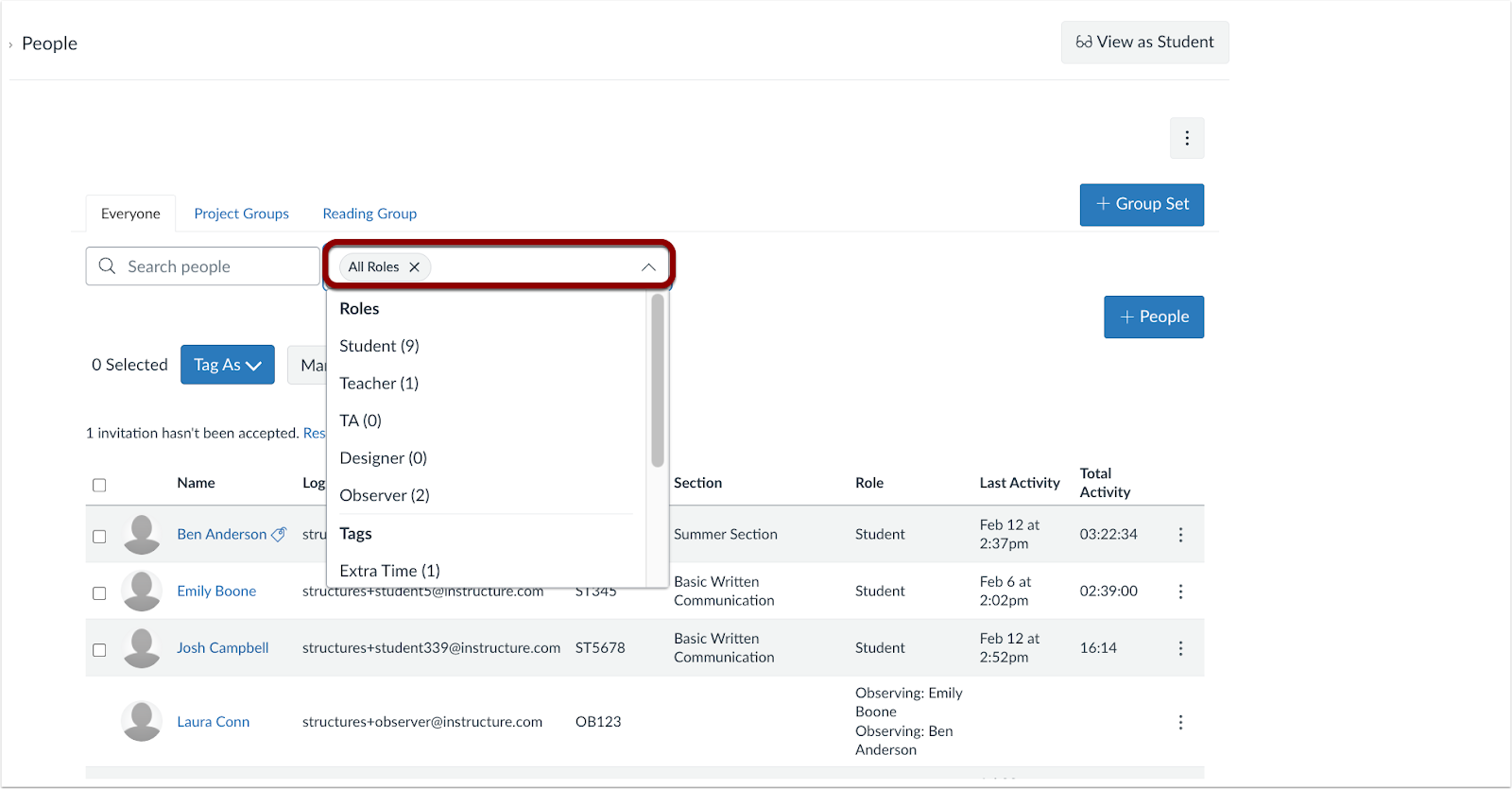
People Page Role and Tag Filter
Click the Role drop-down menu to filter by roles and differentiation tags.
SIS Import Support
Admin
Feature Preview to Enable | Differentiation Tags |
|---|
Account Setting to Enable | Differentiation Tags |
Feature Preview User Group | Differentiation Tags |
Enable Feature Option Location & Default Status | Account (Disabled/Unlocked) See the Canvas Feature Option Summary to learn more about Feature Options. |
Subaccount Configuration | Yes |
Permissions | SIS Data-import |
Affects User Interface | No |
Affected Areas | SIS Imports |
Mobile App Support | Not available |
Free-for-Teacher Availability | Not available |
Related Ideas | None |
Related Resource | SIS Import Format Documentation |
Summary
At the account level, differentiation tags are supported via SIS import.
Change Benefit
This update streamlines tag management by allowing admins to import differentiation tags in bulk, reducing the need for manual entry.
