Canvas deploys contain code changes that are intended to fix bugs, improve performance, and prepare for new features. These deploys take place every two weeks and can be tested in the beta environment before the production deploy date indicated in the title of this document. Institutions are responsible for conducting thorough evaluations of their custom CSS/JS with each release and deploy to assess potential impacts.
Fixed bugs are located in Known Issues.
Subscribe to the release notes page to be notified of new release and deploy notes
For Canvas Platform Service changes (API, GraphQL, Canvas Data), please see the appropriate page in the Change Log
Interface Updates
Back to Table of Contents
Announcements
Notification Option for Announcements in Blueprint Courses
Admin Instructor
Affected Feature Areas | Blueprint Courses, Announcements |
|---|
Account Setting to Enable | None |
Permissions | Inherent to user |
Related Ideas | None |
Summary
When creating a new announcement in a blueprint course, an Enable New Item Notifications checkbox is available, allowing users to receive notifications for the new announcement.
Note: This checkbox is disabled by default and students must have announcement notifications enabled.
Change Benefit
This update ensures that users are promptly notified of new announcements in a blueprint course. This helps improve communication and ensures important updates are not missed, enhancing overall course management and engagement.
Feature Workflow

Enable New Item Notifications Checkbox
When Syncing a blueprint course, select the Enable New Item Notifications checkbox to ensure users get notifications of a new announcement.
Account Settings
Settings
Limit Name Pronunciation Editing by User Role
Admin
Summary
In Account Settings, when the Enable Name Pronunciation setting is enabled, admins have the option to limit name pronunciation editing by base role.
Note: The role options are disabled by default.
Change Benefit
This update provides admins greater control over who can edit name pronunciations based on user roles.
Feature Workflow
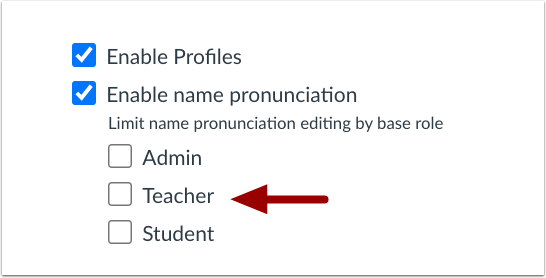
Enable Name Pronunciation User Role Checkboxes
When the Enable Name Pronunciation setting is enabled, admins can limit editing to Admin, Teacher and Student roles.
User Settings
Pronouns Removed When Setting is Disabled
All Users
Affects User Interface | No |
|---|
Affected Feature Areas | User Settings |
Related Ideas | None |
Summary
When the Enable Personal Pronouns account setting is disabled, pronouns are removed from user settings. Previously, pronouns remained visible even after the setting was disabled.
Change Benefit
This update ensures consistency and privacy. When the Enable Personal Pronouns setting is disabled, pronouns are fully removed, preventing confusion and aligning with user expectations.
Other Updates
Back to Table of Contents
Assignments
Preserve Group Category Name During Assignment Copy
Instructor
Summary
When copying a group assignment, group categories are created with the same name as the original when no match exists. Previously, group assignments were linked to a matching group category in the destination course if available, or defaulted to the Project Groups category.
Change Benefit
This update is beneficial because it maintains consistency and organization when copying group assignments between courses.
Discussions
Save Sorting Preferences
All Users
Summary
When sorting a discussion, the selected sorting preference is automatically saved for that specific discussion.
Change Benefit
This update enhances user convenience by automatically saving sorting preferences for specific discussions.
Rich Content Editor
SourceCodeEditor Update
All Users
Affects User Interface | Yes |
|---|
Affected Feature Areas | Rich Content Editor HTML Editor |
Related Ideas | None |
Summary
CodeEditor in Instui is updated to the SourceCodeEditor improving accessibility by allowing keyboard users to navigate out of the Pretty HTML Editor. This update also includes some minor color changes of the HTML text.
Change Benefit
The update improves accessibility by allowing keyboard users to easily navigate out of the Pretty HTML Editor, enhancing the overall user experience.
